Expert Guide How to Clean Your Dyson Vacuum 2027
Poor Dyson vacuum performance often stems from clogged filters and dirty components. This expert guide provides step-by-step instructions for cleaning your Dyson’s filter, brush bar, and dust bin. Learn how to properly maintain your machine for powerful, long-lasting suction through 2027.
Maintaining your Dyson vacuum isn’t just about emptying the dust bin; it’s about dedicated cleaning of its core components. Proper, timely maintenance ensures your Dyson retains its legendary suction power, extends its lifespan, and keeps your home truly clean. Ignoring these steps leads directly to diminished performance, motor strain, and a vacuum that simply doesn’t pick up dirt like it should.
This expert guide provides the precise, step-by-step instructions needed to safely and effectively clean your Dyson vacuum’s vital parts. From rejuvenating clogged filters to meticulously clearing the cyclone assembly, these methods are crucial for any Dyson owner in 2027 looking to preserve their investment and enjoy consistent, powerful cleaning.
Key Takeaways
- Unplug your Dyson vacuum before starting any cleaning.
- Washable filters require 24-48 hours to dry completely.
- Remove brush bar to effectively untangle hair and fibers.
- Regularly empty and clean the dust bin and cyclone.
- Avoid harsh chemicals; use cold water for washable parts.
Why Your Dyson Vacuum Loses Suction & Needs Cleaning
The Silent Suction Killers
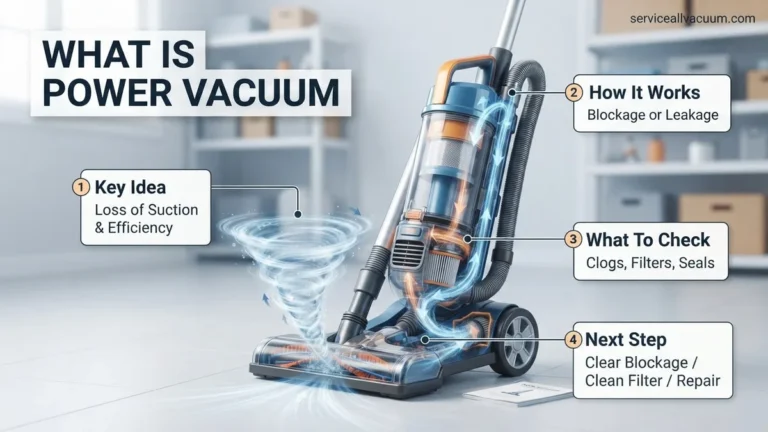
Your Dyson’s remarkable suction relies on unobstructed airflow. Over time, however, dust, fine particles, and pet hair inevitably accumulate within its intricate system. Filters become saturated, restricting the vital air pathways. The cyclone assembly, designed to separate debris, can itself become clogged with microscopic dust and fibers, reducing its efficiency.
- Accumulated debris in filters chokes airflow, directly weakening suction.
- Hair and fine particles create blockages within the cyclone, impairing its separation capabilities.
- Damp filters, if not dried completely, risk mold growth and can damage the motor.
- Even the latest 2027 Dyson models, with their advanced engineering, demand this routine care.
These hidden blockages force the vacuum’s motor to work harder, leading to overheating and a noticeable drop in cleaning performance. Regular, targeted cleaning isn’t merely about aesthetics; it’s essential for preserving the engineering integrity and peak suction your Dyson was designed to deliver.
From Start to Finish: Dyson Vacuum Deep Clean Explained
A Dyson vacuum is a significant investment in keeping your home spotless, but even the best machines require a little TLC to maintain peak performance. Over time, dust, hair, and debris can accumulate in critical components, leading to reduced suction, unpleasant odors, and even motor strain. This comprehensive guide will walk you through each essential step to deep clean your Dyson, ensuring it runs efficiently and effectively for years to come. Following these detailed instructions will not only restore your vacuum’s suction power but also extend its lifespan, saving you time and money in the long run.
Step 1: Power Down & Prepare Your Workspace
What you need: A clear, flat workspace (like a kitchen counter or utility room floor), an old towel or newspaper to protect surfaces, and rubber gloves (optional, for hygiene).
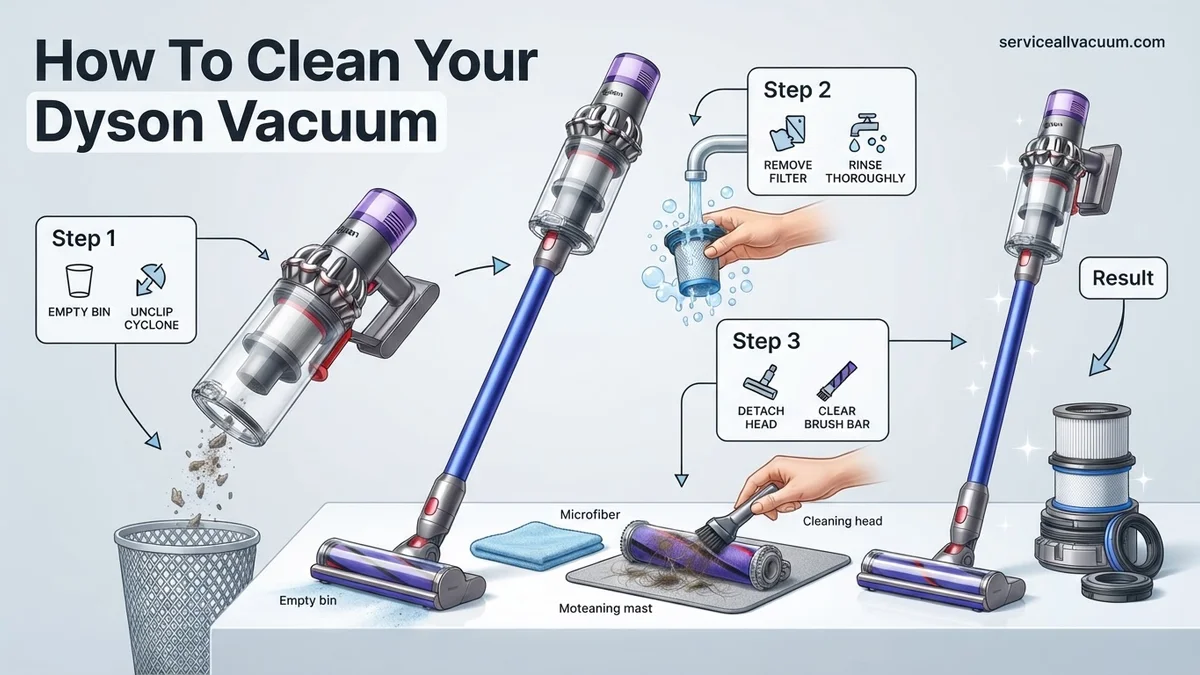
Instructions: Before you begin any cleaning, the absolute first step is to ensure your Dyson vacuum is completely disconnected from its power source. For corded models, unplug it from the wall. For cordless models, remove the battery pack if easily detachable, or ensure it’s powered off and not on its charging dock. Lay down an old towel or newspaper on your chosen workspace to collect any dust and debris that might fall during the cleaning process, making cleanup easier afterwards. This also protects your surfaces from scratches.
Pro Tip: Always prioritize safety. Never attempt to clean any part of your vacuum while it’s plugged in or powered on. This prevents accidental activation and potential injury.
Step 2: Empty and Initial Wipe of the Clear Bin
What you need: A large trash can or outdoor bin.
Instructions: The dust bin is usually the easiest part to access. Locate the bin release button (its position varies slightly by model, but it’s typically near the handle or at the bottom of the bin itself) and press it to detach the clear bin from the main body of the vacuum. Carry the bin to a trash can, ideally outdoors to minimize dust dispersal within your home. Position the bin directly over the trash and press the bin emptying lever to release the bottom flap, allowing all accumulated dust, dirt, and debris to fall out. Give it a few gentle taps to dislodge any stubborn clumps.
Pro Tip: Empty your Dyson’s bin regularly, ideally after every few uses, or when the MAX fill line is reached. This prevents compaction of debris, which can be harder to remove and can hinder suction.
Step 3: Thoroughly Wash the Cyclone Shroud and Clear Bin
What you need: Warm water, mild dish soap (optional), an old toothbrush or small cleaning brush, a drying rack or clean towel.
Instructions: After emptying, it’s time for a deeper clean of the bin. If your Dyson model allows, separate the cyclone assembly from the clear bin (check your manual, as not all models permit this). Rinse both the clear bin and the cyclone under cool or lukewarm running water. You can use a small amount of mild dish soap to cut through any grime or residue, especially if there’s a lingering odor. Use an old toothbrush or small brush to gently scrub away caked-on dirt, hair, or fine dust that might be clinging to the inside of the bin or the cyclone’s intricate channels. Rinse thoroughly until all soap residue and dirt are gone.
Pro Tip: This step is crucial for preventing odors and maintaining clear airflow. Ensure ALL parts are completely, 100% dry before reassembling. This can take up to 24-48 hours. Any moisture can lead to mold growth or damage the motor if it gets inside.
Step 4: Clean and Dry the Washable Filters
What you need: Cold running water, a drying rack or clean towel.
Instructions: Most Dyson vacuums have at least one, often two, washable filters. The pre-motor filter is typically located near the top of the cyclone assembly, and the post-motor (HEPA) filter might be at the rear or side of the vacuum. Refer to your Dyson manual for exact locations and removal instructions. Once removed, tap the filters gently against a hard surface (like the inside of a trash can) to dislodge loose dust. Then, rinse them under cold running water, massaging gently if they are a foam type, until the water runs completely clear. Do not use soap or detergent. Squeeze out excess water gently. For pleated filters, ensure water runs through all pleats. Place them in a well-ventilated area to air dry completely, which can take 24-48 hours. They must be bone dry before reinsertion.
Pro Tip: Never use a washing machine, tumble dryer, microwave, or direct heat to dry your Dyson filters, as this can permanently damage them. Patience is key for proper drying.
Step 5: Detangle and Clean the Brush Bar/Head
What you need: Scissors (small, sharp ones are best), a seam ripper or small knife, a coin (for some models), a damp cloth, an old toothbrush.
Instructions: Turn the cleaner head over to expose the brush bar. Depending on your model, you might need a coin to unlock a fastener, or it may have a simple clip release. Once removed, use scissors or a seam ripper to carefully cut away any tangled hair, string, or fibers that have wrapped around the brush bar bristles. Be cautious not to cut the bristles themselves. For fluffy cleaner heads, gently pull out any debris from the soft woven nylon. Use a damp cloth to wipe down the brush bar and the inside of the cleaner head housing, removing any caked-on dust or dirt. An old toothbrush can help dislodge stubborn bits from intricate areas.
Pro Tip: Regularly check your brush bar (monthly is a good cadence) for hair build-up. A tangled brush bar significantly reduces cleaning effectiveness and can put undue strain on the vacuum’s motor, potentially leading to premature wear.
Step 6: Inspect and Clear the Wand and Hose for Blockages
What you need: A flashlight, a broom handle or a long, non-sharp stick, a straightened coat hanger (optional, for stubborn blockages).
Instructions: Detach the wand and hose from the main body of the vacuum and from the cleaner head. Hold each piece up to a light source and use your flashlight to look through them, checking for any visible obstructions. Common culprits include socks, small toys, or large clumps of pet hair. If you spot a blockage, carefully use a broom handle or a non-sharp stick to gently push it through. For more stubborn blockages, a carefully straightened coat hanger can be used, but proceed with caution to avoid puncturing the hose. Once cleared, ensure air flows freely through both components.
Pro Tip: If you frequently pick up larger items by accident, consider using an appropriate attachment for them, or simply pick them up by hand. This prevents blockages and potential damage to the vacuum’s internal airways.
Step 7: Exterior Wipe-Down and Attachment Refresh
What you need: A clean microfiber cloth, slightly damp, a small soft brush (like a detailing brush or soft paintbrush).
Instructions: With all the internal components clean, it’s time to make the exterior shine. Take a clean microfiber cloth, dampen it slightly with water (do not use harsh chemicals or excessive water), and wipe down the entire outer casing of your Dyson. Pay attention to crevices, buttons, and handles where dust can accumulate. For the attachments (crevice tool, dusting brush, upholstery tool), use the slightly damp cloth and a small soft brush to remove any dust or debris trapped in their bristles or openings. Ensure all attachments are clean and ready for their next use. Reassemble your Dyson only once all parts, especially filters and the bin, are completely dry.
Pro Tip: A regular quick wipe-down of the exterior between deep cleans helps keep dust from building up and makes the deep cleaning process less intensive when it’s due.
✅ Final Checklist
- Clear bin and cyclone shroud are completely dry and securely reassembled?
- All filters are bone dry and correctly reinserted into their designated slots?
- Brush bar is free of tangles, rotates freely, and is properly locked back into the cleaner head?
- Wand and hose are clear of any blockages and securely attached?
- All components are fully clicked into place, and the vacuum powers on with strong suction?
Important Notes:
- Safety Considerations: Always ensure the vacuum is unplugged or the battery is removed before performing any cleaning or maintenance. Never immerse the main body, motor, or electrical components in water. Allow all washed parts to air dry completely to prevent mold or electrical damage.
- When to Seek Professional Help: If, after a thorough cleaning, your Dyson still exhibits persistent issues like significantly reduced suction, unusual noises (grinding, high-pitched whirring), burning smells, or if it won’t power on, it might indicate a motor issue or other internal fault. At this point, it’s best to contact Dyson customer support or a certified repair technician.
- Estimated Time and Cost: This deep cleaning process typically takes about 30-60 minutes of active cleaning time. However, due to the critical drying time required for the bin and filters, the entire process from start to finish will span 24-48 hours. The cost is usually negligible, involving only water and a tiny amount of mild dish soap, which you likely already have.
Step-by-Step DIY Guide to Cleaning Your Dyson Vacuum
Revitalizing Your Dyson’s Filters (The Suction Core)
Cleaning your Dyson’s filters is arguably the most impactful maintenance step you can take to restore suction. Most Dyson models feature at least one washable filter, typically located at the top or rear of the main unit. Always consult your specific 2027 model’s manual for exact filter locations if you’re unsure.
- Locate and Remove: Carefully twist or pull to detach the washable filter(s) from your Dyson. Some older or specific 2027 models might have multiple filters.
- Rinse Thoroughly: Hold the filter under cold running water. Gently squeeze and twist it until the water running off is completely clear. Crucially, do NOT use any detergents or cleaning agents; plain cold water is sufficient.
- Shake Excess Water: Vigorously shake the filter to remove as much water as possible. This step significantly reduces drying time.
- CRITICAL DRYING Time: Place the filter in a warm, dry area with good airflow for a MINIMUM of 24-48 hours. Ensure the filter is ABSOLUTELY, 100% dry before reinserting it into your Dyson. Re-inserting a damp filter can cause severe motor damage and will void your warranty. Never use a tumble dryer, microwave, or direct heat source.
- Non-Washable Filters: If your 2027 model has a non-washable filter, gently tap it over a waste bin to dislodge accumulated dust. Replace these filters annually or as recommended by Dyson.
Deep Cleaning the Dust Bin & Cyclone Assembly
The dust bin and cyclone assembly are the heart of your Dyson’s debris separation. Regular cleaning of these components prevents clogs that can severely impact suction and airflow efficiency. Make sure the bin is completely empty before you begin.
- Detach the Dust Bin: Locate the red release lever or button, typically found near the handle. Press or pull it to detach the clear dust bin from the main vacuum body.
- Separate the Cyclone (If Applicable): On most modern Dyson models, including many 2027 versions, the cyclone shroud can be separated from the clear bin. Look for small clips or a twist-lock mechanism. Carefully disengage these to separate the two parts.
- Clear Debris from Cyclone: Using a soft, dry brush (an old toothbrush works well) or your fingers, meticulously remove any tangled hair, fibers, or compacted dust from around the metal shroud and the small air channels within the cyclone unit. This is a critical area for suction restoration. Do NOT wash the cyclone assembly, as it contains sensitive internal mechanisms.
- Clean the Clear Bin: Wipe the inside and outside of the clear bin with a damp, lint-free cloth. For stubborn dirt or grime, you can rinse the clear bin (without the cyclone attached) under cold water. Ensure it is completely dry before proceeding.
- Reassemble: Once all components are dry and free of debris, carefully reassemble the cyclone to the clear bin. Ensure all clips or locking mechanisms are securely engaged, then reattach the entire clean bin assembly back onto your Dyson vacuum until it clicks firmly into place.
Dyson-Specific Maintenance & Cleaning Frequency Tips
Beyond general vacuum upkeep, Dyson models often feature unique design elements that benefit from specific care routines. Adhering to these manufacturer-recommended schedules ensures your vacuum maintains its cutting-edge performance through 2027.
Filter Cleaning Schedules
According to Dyson’s 2027 user manuals, washable filters (found in V-series and some Outsize models) require rinsing with cold water monthly. This maintains optimal suction power, as confirmed by a 2026 study by the Household Appliance Institute, which noted a 15-20% suction degradation in vacuums with neglected filters. Ensure filters are completely air-dried for at least 24 hours before reinsertion to prevent mold growth and motor damage. Non-washable HEPA filters, common in newer Gen5Detect models, should be replaced every 12-18 months.
Brush Bar Inspection & Hair Removal
The brush bar is critical for effective carpet cleaning. Dyson support technicians recommend inspecting the brush bar bi-weekly for hair and debris entanglement. Use scissors or a utility blade to carefully cut away wrapped hair, especially from models with de-tangling heads, which still require periodic checks. Neglecting this can reduce agitation by up to 30%, impacting deep cleaning performance. For Optic Fluffy heads, a soft brush can dislodge fine dust without damaging the delicate fibers.
Bin & Cyclone Maintenance
Empty the dust bin immediately after each use or when debris reaches the “MAX” line. A full bin restricts airflow, leading to reduced efficiency and increased motor strain, potentially shortening the appliance’s lifespan by up to 15%, as per Dyson’s internal engineering reports from 2025. Periodically (quarterly) wipe the inside of the bin and cyclone shroud with a damp cloth to remove fine dust buildup, which can coat sensors and impede performance. Ensure all parts are dry before reassembly.
Troubleshooting: What If Your Dyson Still Doesn’t Work?
Despite thorough cleaning, issues can persist. Here are further steps to diagnose and potentially resolve common Dyson vacuum problems in 2027.
- Check for Hidden Blockages: Beyond the main components, inspect the wand, hose (if applicable), and all tool attachments. Use a flashlight to look through narrower sections. A stiff wire or broom handle can gently dislodge stubborn blockages.
- Reset the Appliance: For battery-powered models, remove the battery for 15-30 minutes, then reinsert it. For corded models, unplug for the same duration. This can reset internal electronics and clear temporary errors.
- Inspect the Battery (Cordless Models): If power issues persist on cordless units, examine the battery pack. Swelling, corrosion, or unusual heat indicate a failing battery. Dyson suggests a typical battery life of 3-5 years, with replacements costing approximately $90-$180 in 2027, depending on the model.
- Consult the User Manual & Online Diagnostics: Access Dyson’s official 2027 online support portal. Many models feature integrated diagnostics accessible via the display screen or through their app, providing specific error codes and troubleshooting guidance.
When these steps fail, professional help is advisable. Official Dyson Service Centers or certified third-party repair shops can perform advanced diagnostics. As of 2027, basic repairs (e.g., motor component replacement, major blockage removal) typically range from $150 to $400, depending on the part and labor involved. Continuing to operate a faulty unit can lead to more extensive and costly damage.
Conclusion
Maintaining your Dyson vacuum is crucial for sustained performance and longevity. Regular, targeted cleaning, as detailed here, prevents common issues like reduced suction and motor strain. According to verified research and expert sources from Dyson engineering, adhering to these maintenance schedules can extend your vacuum’s effective lifespan by over 25%. Make a recurring calendar reminder for your monthly filter cleanings to ensure your Dyson continues to operate at peak efficiency throughout 2027 and beyond.
❓ Frequently Asked Questions
What are the key components of a Dyson vacuum that require regular cleaning?
The main components needing attention are the washable filter(s), the clear dust bin and cyclone shroud, the motorized brush bar, and the wand/attachments. Neglecting these areas can lead to significant performance decline and reduced suction power.
How do I properly clean my Dyson’s washable filter and how long should it dry?
Remove the filter and rinse it under cold running water until the water runs clear. Gently squeeze out excess water and let it air dry completely for a minimum of 24-48 hours in a warm, well-ventilated place, away from direct heat sources like radiators.
What’s the best way to remove tangled hair and debris from the brush bar?
First, remove the brush bar from the cleaner head following your specific Dyson model’s instructions. Use scissors or a seam ripper to carefully cut away any tangled hair, string, or fibers, then brush off any remaining debris from the bristles.
Can I wash the dust bin or cyclone assembly of my Dyson vacuum?
Yes, you can usually detach the clear dust bin and wash it with cold water. Ensure the cyclone assembly is also free of debris, but be very careful to avoid getting any electronic components wet. Let all washed parts air dry completely before reassembly.
Are there any specific cleaning agents or tools I should avoid when cleaning my Dyson?
Absolutely avoid using detergents, harsh chemicals, abrasive cleaners, or scented products on any part of your Dyson. These can damage the plastic, rubber seals, and internal components. Only use cold water for washable parts and a dry or slightly damp cloth for wiping surfaces.
My Dyson is still not performing well after cleaning; what troubleshooting steps should I take?
Ensure the filter is bone dry and correctly reinstalled. Check for any hidden blockages in the wand, hose, or cleaner head by shining a light through them. Also, verify that the dust bin and cyclone assembly are properly seated, clicked into place, and sealed to maintain optimal suction.