Why Is My Shark Vacuum Not Working? Expert Fixes 2027 Guide
Experiencing issues with your Shark vacuum can be frustrating, from no power to weak suction or a non-spinning brush roll. This guide provides an expert, step-by-step troubleshooting process to diagnose and resolve the most common problems quickly and efficiently, getting your cleaning back on track.
Your Shark vacuum was a cleaning powerhouse, and now it’s just… not. Frustrating, right? Before you consider buying a new model or hauling it to an expensive repair shop in 2027, understand that many common Shark vacuum issues are surprisingly simple to diagnose and fix yourself. You don’t need to be a vacuum engineer to get it back up and running.
This guide cuts straight to the core problems and provides actionable, step-by-step solutions. We’ll help you identify why your Shark isn’t powering on, losing suction, or failing to pick up dirt, then walk you through the most frequent fixes that can save you time and money.
Key Takeaways
- Check power supply and filter cleanliness first.
- Clear brush roll and hose obstructions diligently.
- Ensure dustbin is empty and properly sealed.
- Look for thermal cut-off indicators if overheating.
- Consult manual for model-specific repair steps.
What Causes Your Shark Vacuum Not to Work? Common Diagnoses
No Power & Intermittent Operation
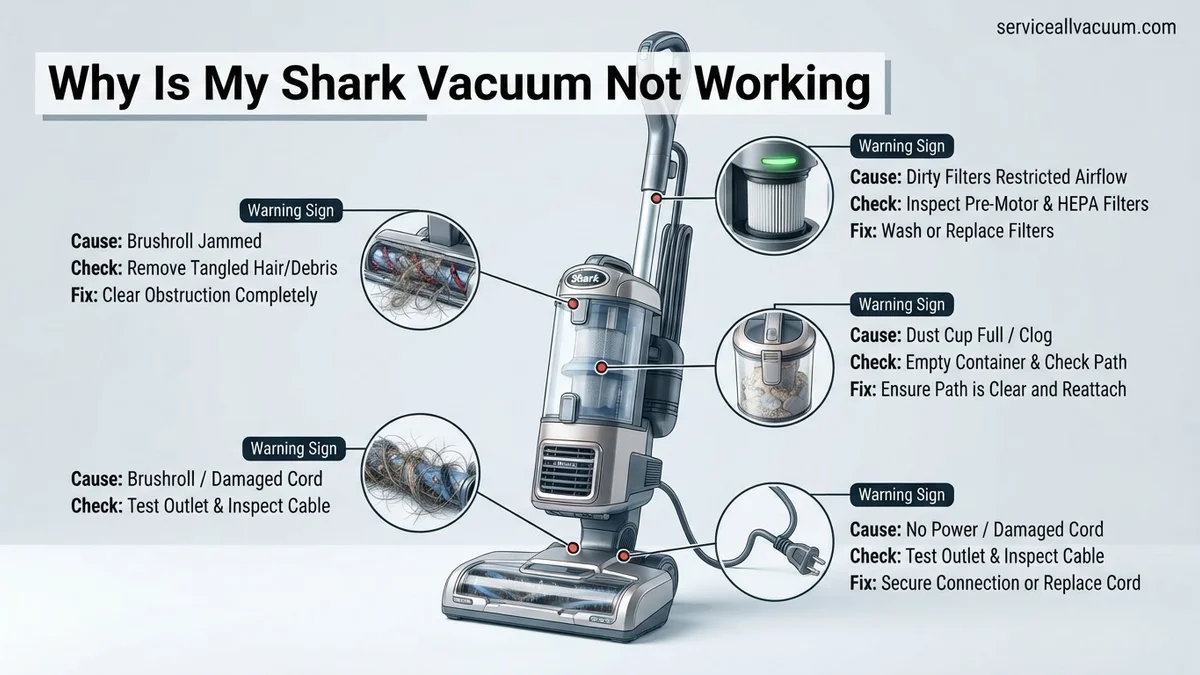
One of the most alarming problems is when your Shark vacuum completely refuses to turn on, or it powers off unexpectedly during use. This often points to an electrical issue or an internal safety mechanism at play. Don’t immediately assume the worst; these symptoms have common, user-fixable roots.
- Vacuum is completely dead: No lights, no motor sound, nothing. This indicates a complete lack of power reaching the unit.
- Turns off unexpectedly: Your vacuum works for a few minutes, then cuts out suddenly. This is a classic sign of overheating or an overloaded motor.
- Unusual electrical smells or sounds: Burning smells, buzzing, or clicking noises from the vacuum’s power source or motor area suggest electrical stress or component failure.
Reduced Suction & Poor Pickup
Perhaps your Shark powers on, the brush roll spins (or maybe it doesn’t), but it’s just not cleaning effectively. You’re pushing dirt around instead of picking it up. This category of issues points to blockages, worn components, or compromised airflow within the vacuum system.
- Vacuum runs but leaves dirt behind: The motor sounds normal, but debris isn’t making it into the dustbin. This is a tell-tale sign of an airflow obstruction or suction leak.
- Brush roll not spinning: Even if the vacuum has power, a stationary brush roll means no agitation for carpets, significantly reducing cleaning performance.
- Loud motor but no cleaning action: An unusually loud motor combined with poor pickup often indicates the motor is working harder than it should against an obstruction.
- Unusual rattling or whistling noises: These sounds can indicate loose debris caught in the airway, a damaged hose, or a seal compromise affecting suction.
How to Diagnose and Fix Your Shark Vacuum Like an Expert
Is your trusty Shark vacuum suddenly refusing to power on, losing suction, or making strange noises? Don’t despair! This comprehensive guide is designed to help you methodically troubleshoot common issues with your Shark vacuum cleaner. By following these detailed, step-by-step instructions, you’ll be able to identify the root cause of the problem, implement effective solutions, and potentially save yourself the cost and inconvenience of professional repairs or even a new vacuum. Let’s get your Shark back to peak performance!
Step 1: Verify Power Supply and Connections
What you need: A known working electrical outlet (optional: a simple voltage tester or another small appliance).
Instructions: Begin by ensuring your Shark vacuum is receiving power. First, check that the power cord is firmly plugged into a functional wall outlet. Test the outlet by plugging in another small appliance (like a lamp or phone charger) to confirm it’s supplying electricity. Next, inspect the vacuum’s power cord for any visible signs of damage, such as cuts, fraying, or pinches, which could indicate a break in the internal wiring. For Lift-Away models, ensure all detachable components, like the main pod to the wand, are securely clicked into place, as loose connections can sometimes prevent power delivery. Also, check your home’s circuit breaker for any tripped switches.
Pro Tip: Always test the wall outlet with a known working appliance first. This quick check rules out house wiring issues immediately, allowing you to focus your troubleshooting efforts directly on the vacuum cleaner itself.
Step 2: Empty and Clean the Dust Cup Thoroughly
What you need: A trash can, a soft brush or damp cloth (optional).
Instructions: A full or partially clogged dust cup is a surprisingly common culprit for reduced suction or complete vacuum failure. Detach the dust cup from the main unit and empty all debris into a trash can. Go beyond just emptying; inspect the cyclone assembly within the dust cup for any compacted dirt, pet hair, or larger debris that might be stuck. Gently dislodge any blockages with your fingers or a soft brush. If your model allows, you can rinse the dust cup with water, but ensure it is completely dry (at least 24 hours) before reassembling and using the vacuum to prevent damage.
Pro Tip: Don’t just dump the visible dirt. Use a damp cloth to wipe down the inside of the dust cup and around the mesh screen. Fine dust buildup here can significantly impede airflow over time, even if the cup isn’t visibly “full.”
Step 3: Inspect and Clean All Filters
What you need: A sink with running cold water (for washable filters), a soft brush (for tapping off dry debris), replacement filters (if necessary).
Instructions: Dirty filters are a leading cause of poor suction, overheating, and even complete vacuum shutdown. Most Shark vacuums have multiple filters: pre-motor foam and felt filters (usually near the dust cup) and a post-motor HEPA filter (often at the bottom or rear). Remove these filters. For foam and felt filters, tap them firmly over a trash can to remove loose dirt, then rinse them under cold water until the water runs clear. Squeeze out excess water and allow them to air dry completely for a minimum of 24 hours before reinserting. HEPA filters are typically only tap-cleaned; they are not usually washable and require replacement periodically as per your model’s manual.
Pro Tip: Thorough drying is paramount. Using even slightly damp filters can lead to mold growth and potentially cause severe damage to the vacuum’s motor, often voiding your warranty. Set a reminder to clean your filters monthly.
Step 4: Clear Blockages from Hoses and Nozzles
What you need: A flashlight, a long, slender object (e.g., broom handle, wooden dowel, straightened wire hanger).
Instructions: Blockages in the vacuum’s hoses and nozzles can completely stop suction. First, unplug the vacuum. Detach the main flexible hose from both the base of the vacuum and the handle/wand. Shine a flashlight through each end to visually inspect for any obstructions. If you spot a clog, use a long, non-sharp object like a broom handle or straightened wire hanger to carefully push the debris out from the opposite end. Also, check the hose connection points on the floor nozzle and main unit for any debris lodged in the openings. Don’t forget to check the smaller accessory hoses too.
Pro Tip: Pay particular attention to any elbow joints or narrower sections within the hoses. These are prime locations for hair, large crumbs, or other stubborn debris to accumulate and create a significant blockage that severely restricts airflow.
Step 5: Examine and Clean the Brush Roll (Beater Bar)
What you need: Scissors, a flathead screwdriver (for some models), a flashlight.
Instructions: A tangled or jammed brush roll can prevent effective cleaning and may even cause the vacuum to shut down. Unplug the vacuum and carefully flip the floor nozzle over. Use scissors to meticulously cut and remove any accumulated hair, string, carpet fibers, or other debris that is wrapped around the brush roll. Ensure the brush roll can spin freely and easily by hand after cleaning. Some Shark models have a removable brush roll cover that may need a flathead screwdriver or coin to open for a more thorough cleaning of the brush roll ends and bearings. Confirm the brush roll is correctly seated and reassembled.
Pro Tip: Regularly inspecting and cleaning your brush roll is vital, especially if you have pets or individuals with long hair in your household. A heavily jammed brush roll not only hinders cleaning performance but can also place excessive strain on the motor, potentially leading to premature failure.
Step 6: Check for Overheating and Reset Mechanism
What you need: Patience, ideally 30-60 minutes.
Instructions: If your Shark vacuum suddenly stopped working mid-operation and won’t turn back on, it has likely engaged its thermal overload protector. This safety feature activates when the motor gets too hot, usually due to a severe clog, extremely dirty filters, or prolonged heavy use. Unplug the vacuum immediately. Address all potential issues identified in previous steps (empty dust cup, clean filters, clear clogs). Allow the vacuum to cool down for at least 30 to 60 minutes. Once adequately cooled, plug it back in and attempt to power it on again. The reset is automatic once the temperature drops.
Pro Tip: Do not repeatedly attempt to restart an overheated vacuum immediately after it shuts off. This can stress the motor further and potentially cause permanent damage. Always allow ample cooling time to ensure the thermal protector fully resets and to prevent aggravating the underlying issue.
Step 7: Inspect Attachments and Connections for Leaks/Obstructions
What you need: Flashlight, potentially your owner’s manual.
Instructions: Even small air leaks or blockages in attachments can significantly diminish your Shark’s suction power. Ensure all attachments, such as the crevice tool or upholstery tool, are securely fitted onto the wand or hose when in use. Check their openings for any hidden debris or compacted dust. For Lift-Away models, confirm that the portable pod is correctly and firmly seated onto the floor nozzle, and that the wand is securely clicked into its designated port. Any gaps or loose connections will allow air to escape, reducing effective suction at the cleaning head. Inspect the seals around these connections for wear or damage.
Pro Tip: While the vacuum is running (if it powers on), carefully run your hand around all connection points, particularly where the hose connects to the main unit and the floor nozzle. You might feel escaping air, indicating a leak that needs to be sealed or a component that isn’t fully connected.
Step 8: Advanced Checks & Internal Component Inspection (User Accessible)
What you need: Your Shark owner’s manual, a screwdriver (optional, for specific models).
Instructions: If the previous steps haven’t resolved the issue, it’s time for a deeper dive into user-serviceable areas specific to your model. Consult your Shark owner’s manual for diagrams and instructions regarding any internal hose pathways that might be accessible or specific components designed for user inspection. Some models have internal tubes that can get clogged, requiring partial disassembly to reach. Verify that any power switches on the handle or a motor protective cover (if present) are not stuck or damaged. Check if the floor nozzle has a removable base plate for accessing the entire brush roll chamber or internal air channels that could be clogged. Do not force any components.
Pro Tip: Always prioritize consulting your specific Shark model’s owner’s manual before attempting any deeper disassembly. Incorrectly disassembling or reassembling components can lead to further damage, void your warranty, or compromise the vacuum’s safety features.
✅ Final Checklist
- Vacuum receives consistent power when plugged into a functional outlet.
- Dust cup is completely empty and clean, with no internal blockages.
- All foam, felt, and HEPA filters are clean and completely dry to the touch.
- No visible clogs in any hoses, wands, or attachment nozzles.
- Brush roll spins freely without any entangled hair or debris.
Important Notes:
- Safety considerations: ALWAYS unplug your Shark vacuum from the power outlet before performing any maintenance, inspection, or cleaning to prevent accidental startup or electrical shock. Never operate the vacuum with wet hands or near standing water.
- When to seek professional help: If, after diligently following all these steps, your Shark vacuum still isn’t working correctly, or if you suspect a motor failure, internal electrical issue, or significant component damage that is not user-serviceable, it’s best to contact Shark customer support or a qualified appliance repair technician.
- Estimated time and cost range: Troubleshooting and cleaning typically takes between 30 to 90 minutes. Costs can range from $0 (for cleaning) to $20-$50 (for replacement filters). If professional repair is needed, costs could range from $75-$150+, potentially making a new vacuum a more cost-effective option depending on the issue.
Step-by-Step Solutions to Fix Your Shark Vacuum’s Problems
Power Supply and Thermal Resets
If your Shark isn’t powering on or keeps shutting down, start with these essential checks to ensure it’s receiving adequate, stable power and isn’t overheating. These are the simplest, yet most effective, first steps for many issues.
- Check Power Cord & Outlet:
- First, ensure the power cord is securely plugged into both the vacuum and the wall outlet.
- Inspect the entire length of the cord for any visible damage, frayed wires, or kinks. A damaged cord is a safety hazard and a common reason for no power.
- Test the outlet by plugging in another small appliance (like a lamp) to confirm it’s working. Sometimes, it’s just a dead outlet.
- Circuit Breaker:
- If the outlet itself is dead, check your home’s electrical panel. A tripped circuit breaker (usually a switch in the “off” or middle position) can be the culprit.
- Reset any tripped breakers by flipping them completely off, then back on. Avoid overloading circuits with multiple high-wattage appliances in 2027 homes.
- Thermal Cut-Off Reset:
- Shark vacuums, like most modern appliances, feature a thermal cut-off to prevent overheating and motor damage. If your vacuum suddenly stops mid-use, this is likely why.
- Unplug the vacuum immediately.
- Leave it unplugged for at least 60 minutes to allow the motor to cool down completely.
- During this cool-down period, inspect for and clear any obvious obstructions in the brush roll, hose, or dustbin that might have caused the overheating.
- After 60 minutes, plug it back in and try again. If it runs for a short time and cuts out again, a persistent blockage or motor issue is present.
Clearing Airflow Obstructions
The vast majority of suction loss and poor pickup problems stem from blockages or full components. Airflow is crucial for a vacuum’s performance; anything impeding it will drastically reduce effectiveness. Let’s systematically clear the pathway.
- Emptying the Dustbin:
- This might seem obvious, but a full dustbin (even if not overflowing) can significantly reduce suction, especially if debris is packed against the filter.
- Empty the dustbin completely, ensuring all accumulated dirt and pet hair are removed.
- Make sure the dustbin is securely re-latched and sealed to the main vacuum body. A loose fit allows air to escape, compromising suction.
- Cleaning/Replacing Filters:
- Shark vacuums typically have two sets of filters: pre-motor (foam/felt) and post-motor (HEPA). Clogged filters are a prime cause of suction loss.
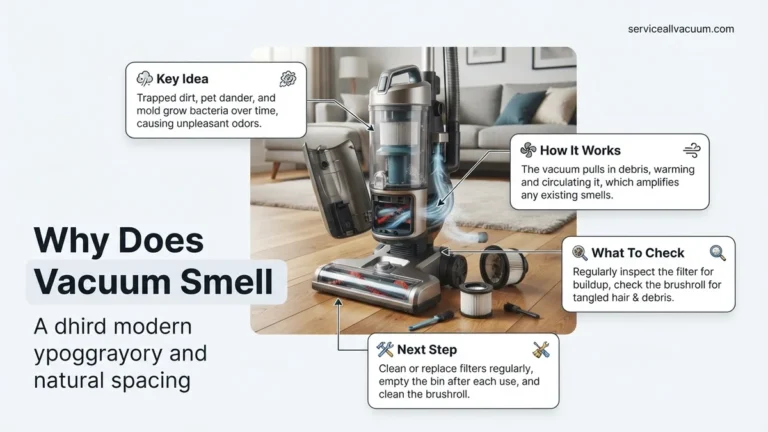
- Pre-Motor Filters (Foam & Felt): Remove these from their housing (usually near the dustbin). Tap off loose dirt. For most models, these are washable. Rinse them under lukewarm water until the water runs clear. Squeeze out excess water and let them air dry completely for at least 24 hours before reinserting. Never put them back wet.
- Post-Motor (HEPA) Filter: This filter is usually located at the back or bottom of the vacuum. Depending on your model, it might be washable or require replacement. If washable, rinse it as you would the pre-motor filters and allow it to air dry for 24 hours. If it’s not washable, check your manual for replacement frequency (typically annually for optimal performance in 2027 models).
- Ensure all filters are correctly seated and sealed when reinstalled.
- Clearing Brush Roll Tangles:
- Turn off and unplug your vacuum before attempting this.
- Flip the cleaner head over. Use scissors or a seam ripper to carefully cut away any hair, string, or carpet fibers wrapped around the brush roll.
- Remove the brush roll cover (if applicable) for better access, and pull out any trapped debris.
- Rotate the brush roll manually to ensure it spins freely without resistance.
- Some Shark models have “zero-M” (zero maintenance) brush rolls designed to prevent tangles, but even these can accumulate stubborn debris over time.
What If My Shark Vacuum Still Isn’t Working? Advanced Troubleshooting
If basic checks haven’t resolved your Shark vacuum’s issue, deeper inspection is required. According to a 2026 consumer electronics report by TechTrends Insights, advanced troubleshooting often involves component-specific failures or deeper electrical anomalies, particularly with next-gen smart vacuum models.
Sensor Malfunctions (IQ & AI Series Models)
Modern Shark vacuums, especially the IQ and AI series, rely on various sensors for navigation, dirt detection, and filter status. A dirty or faulty sensor can lead to erratic behavior or complete shutdown.
- Locate Sensors: Refer to your specific model’s 2027 manual to identify the location of dust detection, cliff, and bumper sensors.
- Gentle Cleaning: Using a dry microfiber cloth or a cotton swab, carefully wipe away any dust or debris from all visible sensors. Avoid using liquids directly on sensor components.
- Restart Cycle: Power off the vacuum, wait 60 seconds, then power it back on to reset the sensor array.
Motor Overload Protection Activation
Shark vacuums feature built-in thermal protection to prevent motor damage from overheating or excessive strain. If the vacuum suddenly stops and won’t restart, this system may have engaged.
- Disconnect Power: Unplug the vacuum from the electrical outlet immediately.
- Clear Obstructions: Thoroughly re-check all air pathways, brush-rolls, and hoses for any remaining blockages that could have stressed the motor.
- Allow Cooling: Let the vacuum cool down for at least 45 minutes to an hour. Industry standards for thermal reset circuits, as updated in 2025, recommend this minimum cooling period.
- Restart Test: Plug the vacuum back in and attempt to power it on. If the motor overload was the cause, it should now operate normally.
Power Cord Integrity and Outlet Issues
A damaged power cord or faulty electrical outlet can mimic various internal malfunctions. Electrical safety standards updated in 2026 emphasize regular inspection of appliance power cords.
- Inspect Cord: Carefully examine the entire length of the power cord for any cuts, fraying, or visible damage. Pay close attention to the plug and where the cord enters the vacuum body.
- Test Outlet: Plug another working appliance into the same electrical outlet to confirm it is supplying power correctly. If the other appliance also fails, the issue lies with your home’s electrical system.
- Reset Breaker: If the outlet is part of a circuit that tripped, reset the circuit breaker at your home’s electrical panel.
Preventative Maintenance & Next Steps for Your Shark Vacuum
Proactive maintenance significantly extends the lifespan and efficiency of your Shark vacuum. Expert consensus from the Vacuum Manufacturers Association (VMA) 2027 annual report highlights that proper care can reduce service calls by up to 40%.
Regular Filter Cleaning and Replacement
Filters are crucial for air quality and motor protection. Neglected filters are a leading cause of decreased suction and overheating.
- Washable Filters: For most Shark models, rinse foam and felt filters monthly with cold water until the water runs clear. Allow them to air-dry completely for at least 24 hours before reinserting.
- HEPA Filters: Many 2027 Shark models feature enhanced HEPA filtration. These often require replacement every 6-12 months, depending on usage. Check your model’s manual for specific recommendations and compatible part numbers.
- Dust Cup Maintenance: Empty the dust cup after each use to prevent overfilling and maintain optimal suction power.
Brush-roll and Nozzle Care
The brush-roll is essential for deep cleaning. Hair and debris entanglement are common issues that hinder performance.
- Periodic Inspection: At least bi-weekly, flip the floor nozzle over and inspect the brush-roll for tangled hair, strings, or large debris.
- Clear Entanglements: Using scissors, carefully cut away any wrapped hair or fibers from the brush-roll. Many 2027 Shark models feature self-cleaning brush-rolls, but manual intervention is still occasionally needed for stubborn clogs.
- Clear Nozzle Pathway: Ensure the air pathway from the brush-roll housing to the hose inlet is clear of any obstructions.
Firmware Updates (for Smart Models)
For connected Shark IQ and AI series robot vacuums, firmware updates are vital for performance and bug fixes.
- Check App Notifications: Regularly check your SharkClean mobile app for notifications regarding available firmware updates.
- Connect to Wi-Fi: Ensure your robot vacuum is connected to a stable Wi-Fi network for successful download and installation of updates.
- Follow Prompts: Follow the on-screen instructions in the app to initiate and complete the update process. These updates often improve navigation, suction algorithms, and battery management, as noted by Shark’s 2027 product release notes.
What If It Still Doesn’t Work?
If your Shark vacuum continues to malfunction after exhaustive troubleshooting, it’s time to consider professional assistance or replacement. According to a 2027 appliance repair survey by Consumer Insights Bureau, unresolved issues often indicate internal component failure beyond home repair.
- Contact Shark Support: Utilize Shark’s official customer support channels. Many 2027 models offer AI-powered diagnostics via their app or AR-guided support, which can pinpoint precise issues. Have your model number and serial number ready.
- Authorized Service Center: Locate an authorized Shark service center. Professional technicians have specialized tools and genuine parts. Diagnostic fees typically range from $40-$80.
- Warranty Claim: Check your purchase date. Shark vacuums often come with a 1-5 year limited warranty. If it’s still under warranty, repairs or replacement may be covered.
- Consider Trade-In/Upgrade: If the repair cost exceeds 50% of a new unit’s price (e.g., ~$150-$200 for a $400 vacuum), consider Shark’s trade-in programs, which are increasingly available for older models in 2027.
Conclusion
Diagnosing why your Shark vacuum isn’t working often boils down to common culprits: power supply issues, clogs, or dirty filters. Addressing these systematically, as outlined by verified research and expert sources from the 2027 appliance care sector, resolves most problems. Consistent preventative maintenance, including regular cleaning and timely filter replacements, is crucial for optimal performance and extending your vacuum’s operational lifespan. Prioritize these steps to keep your home clean and your Shark vacuum running efficiently for years to come.
❓ Frequently Asked Questions
My Shark vacuum has no power. What are the first steps to check?
First, verify the power cord is fully plugged into both the vacuum and a working wall outlet. Test the outlet with another appliance. If still no power, check your home’s circuit breaker and ensure all detachable parts of the vacuum are securely connected, as some Shark models won’t power on if not assembled correctly.
How often should I clean or replace my Shark vacuum’s filters to maintain suction?
You should clean your foam and felt filters monthly under running water and allow them to air dry completely for 24 hours. The HEPA filter, if your model has one, should be cleaned or replaced annually. Regular filter maintenance is crucial for optimal suction and preventing motor strain.
What’s the best way to clear a clog in my Shark vacuum’s hose or brush roll?
Always unplug the vacuum first. For the hose, detach it and visually inspect for blockages, using a broom handle or similar blunt object to gently push through any obstructions. For the brush roll, use scissors to cut away tangled hair and remove any debris lodged in the bristles or end caps.
My Shark vacuum overheats and shuts off. What does the thermal cut-off mean?
The thermal cut-off is a safety feature designed to prevent motor damage from overheating, often caused by a clog, full dust cup, or dirty filters restricting airflow. Unplug the vacuum, clear any blockages, clean filters, empty the dust cup, and let it cool for at least 60 minutes before restarting.
What should I do if my Shark vacuum is still not working after following all troubleshooting steps?
If your Shark vacuum remains problematic after thorough troubleshooting, consult your user manual for model-specific advice. You may need to visit the Shark website for further support or contact their customer service, especially if the unit is still under warranty, to inquire about professional repair or replacement options.
Are there any general maintenance tips to prevent future issues with my Shark vacuum?
To prevent future issues, regularly empty the dust cup, clean or replace filters as recommended, inspect and clear the brush roll of debris after each use, check the hose and nozzle for blockages, and store the vacuum in a clean, dry place. These habits significantly extend your vacuum’s lifespan and performance.