How to Vacuum a Pool with a Sand Filter Expert 2027
Properly vacuuming a pool with a sand filter requires specific steps for equipment setup and filter valve management. This guide provides a proven, expert approach to achieve a pristine pool, focusing on correct sand filter settings for efficient cleaning. Learn to prepare, vacuum, and finalize the process for clear water.
Effectively vacuuming your pool with a sand filter in 2027 demands precise multi-port valve management. Mastering these specific settings ensures you collect debris efficiently without clouding your water, clogging your filter, or wasting expensive chemicals. This crucial process keeps your swimming environment pristine, extending the life of your filter media and maintaining crystal-clear water quality throughout the season. Ignoring these steps often leads to frustrating murky water conditions and unnecessary effort.
Your sand filter is a robust filtration system, but its performance during heavy debris removal hinges on proper configuration. Knowing exactly when to switch between ‘Filter’, ‘Backwash’, ‘Rinse’, and ‘Waste’ settings, and understanding the ‘why’ behind each transition, is the cornerstone of effective pool maintenance. This guide will walk you through the precise steps for filter setup and initial vacuuming, ensuring a clean pool every time.
Key Takeaways
- Always backwash your sand filter before vacuuming.
- Set filter to ‘Waste’ for heavy debris, ‘Filter’ for light.
- Prime your vacuum hose completely to avoid air in pump.
- Vacuum slowly to prevent stirring up bottom debris.
- Backwash and rinse filter after vacuuming is complete.
What Challenges Arise When Vacuuming a Pool with a Sand Filter?
The Fine Debris Dilemma for Sand Filters
While sand filters are excellent at trapping larger particles, they often struggle with very fine dust, silt, or heavy algae blooms. Attempting to vacuum these directly to the ‘Filter’ setting can overwhelm the sand bed almost instantly. This leads to immediate pressure spikes, inefficient filtration, and debris being pushed straight back into your pool through the returns. Even with advances in filtration technology by 2027, sand media has fundamental limits. For ultra-fine particulate, bypassing the filter entirely by vacuuming to ‘Waste’ remains the most effective strategy.
- Rapid Clogging: Fine particles quickly reduce flow through the sand bed.
- Increased Pressure: High pressure strains your pump and filter.
- Water Cloudiness: Debris passes through exhausted sand, re-entering the pool.
- Reduced Efficiency: A clogged filter can’t properly clean your pool water.
Preventing Filter Bed Contamination and Channeling
Improper vacuuming techniques, particularly when directing large amounts of debris to the ‘Filter’ setting, can push dirt deep into the sand bed. This not only contaminates the filter media but also contributes to “channeling.” Channels are pathways that water carves through the sand, allowing it to bypass the filtration process entirely. Over time, this significantly reduces your filter’s effectiveness, making your pump work harder for little return. By 2027, preserving your sand bed’s integrity through correct vacuuming and backwashing procedures is key to avoiding costly media replacement and maintaining optimal water clarity.
- Media Degradation: Embedded debris breaks down sand granules over time.
- Channel Formation: Water finds paths of least resistance, bypassing filtration.
- Ineffective Cleaning: Your filter loses its ability to trap new contaminants.
- Frequent Backwashing: You’ll need to backwash more often without proper technique.
From Start to Finish: Pool Vacuuming with a Sand Filter Explained
Keeping your swimming pool sparkling clean is essential for both aesthetics and water hygiene. This comprehensive guide will walk you through the precise steps of vacuuming your pool using a sand filter, ensuring you remove dirt, debris, and algae effectively. Following these instructions carefully will not only yield a cleaner pool but also help maintain your filtration system and extend the life of your equipment. Get ready to transform your murky water into an inviting oasis!
Step 1: Gather Your Pool Cleaning Arsenal
What you need: A pool vacuum head (weighted for proper sinking), a telescopic pole, a vacuum hose (ensure it’s long enough to reach all areas of your pool), a skimmer vacuum plate (also known as a “skim vac” or “vac plate” – highly recommended), and your pool’s sand filter system.
Instructions: Lay out all your pool cleaning equipment by the poolside. Visually inspect your vacuum head for any debris lodged in the brushes or wheels, and check your hose for cracks, holes, or kinks that could cause air leaks. A damaged hose will significantly reduce suction and effectiveness. Ensure your telescopic pole extends smoothly and locks securely.
Pro Tip: Invest in a good quality, heavy-duty vacuum hose. Cheap hoses are prone to kinking and cracking, leading to frustrating air leaks and poor performance. A weighted vacuum head will stay on the pool bottom more easily, reducing the effort needed during vacuuming.
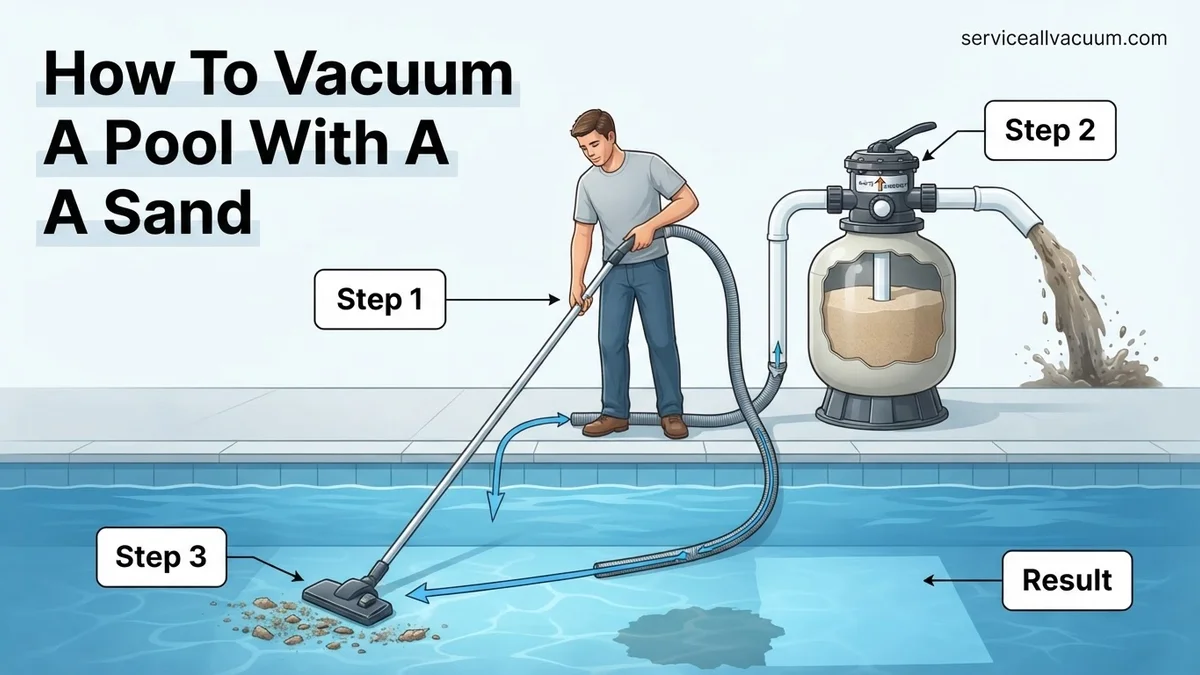
Step 2: Prepare Your Sand Filter for Action
What you need: Your pool pump and sand filter.
Instructions: First, ensure your pool pump is completely turned off at the circuit breaker or switch. This is crucial for safety and to prevent damage to your filter valve. Next, depending on the level of debris in your pool, you have two options:
- For light debris: Set your sand filter’s multiport valve to the “FILTER” position.
- For heavy debris or algae: Set the valve to “WASTE” or “DRAIN”. This bypasses the filter, expelling dirty water directly out of the system, preventing it from clogging your filter sand. If choosing “WASTE”, be prepared to add water to your pool as you vacuum.
If your pool is exceptionally dirty, it’s advisable to backwash and rinse your filter before vacuuming to ensure maximum filtration efficiency.
Pro Tip: Vacuuming to “WASTE” is highly effective for severe algae blooms or very muddy pools, as it prevents the dirt from going back into the filter and recirculating. However, always monitor your pool’s water level carefully when vacuuming to waste; you may need to run a garden hose to replenish water simultaneously.
Step 3: Assemble the Vacuum System
What you need: Vacuum head, telescopic pole, and vacuum hose.
Instructions: Securely attach your chosen vacuum head to the end of the telescopic pole. Ensure the locking mechanisms are engaged so the head doesn’t detach during vacuuming. Next, connect one end of the vacuum hose to the vacuum head’s intake port. Twist it on firmly to create a tight seal. Any loose connections here can introduce air into the system, significantly reducing your vacuum’s suction power.
Pro Tip: Some vacuum heads have a swivel cuff for the hose connection. This is beneficial as it helps prevent the hose from kinking and twisting as you move around the pool, making the vacuuming process smoother and less frustrating.
Step 4: Prime the Vacuum Hose to Eliminate Air
What you need: Assembled vacuum system, water in pool.
Instructions: This is a critical step for achieving proper suction. Submerge the vacuum head into the pool first. Then, slowly feed the entire vacuum hose, coil by coil, under the water. As the hose fills with water, air will be pushed out from the vacuum head. Continue until you see no more air bubbles escaping from the vacuum head. The hose must be completely filled with water, free of any air pockets. This process ensures a continuous column of water, enabling your pump to pull effectively.
Pro Tip: An alternative priming method is to hold the free end of the hose over a return jet until water comes out the other end, then quickly cap it with your hand and rush it to the skimmer. However, the submerging method is generally safer and more effective for beginners, as it minimizes the chance of introducing air.
Step 5: Connect to the Pool’s Suction Line
What you need: Primed vacuum hose, pool skimmer, skimmer vacuum plate (optional but highly recommended), pool pump.
Instructions: With the pool pump still off, bring the free, primed end of the vacuum hose to your skimmer. If using a skimmer vacuum plate, place the plate over your skimmer basket, ensuring the hose connection port is facing up. Press the primed hose end firmly into the vac plate’s port. If not using a plate, remove the skimmer basket and insert the primed hose end directly into the suction hole at the bottom of the skimmer, ensuring it creates a snug fit. Once connected, turn your pool pump back on.
Pro Tip: To maximize suction, ensure all other suction lines (like other skimmers or the main drain) are closed off. You can often do this by turning valves near your pump. This directs all available suction to your vacuum, making cleaning more efficient.
Step 6: Execute the Vacuuming Process
What you need: Running pool pump, assembled and connected vacuum system.
Instructions: Begin vacuuming by slowly moving the vacuum head across the pool floor in methodical, overlapping strokes. Think of it like mowing a lawn or vacuuming a carpet. Avoid quick, jerky movements that can stir up settled debris, making it harder to collect. Work your way from the shallow end to the deep end, covering all surfaces. Pay special attention to corners, steps, and areas where debris tends to accumulate. If the water begins to cloud significantly, pause vacuuming, allow the debris to resettle (this may take 15-30 minutes), and then resume.
Pro Tip: Vacuuming slowly is key! A steady, deliberate pace allows the vacuum head to pick up debris effectively without kicking it back into the water. For an average-sized pool (e.g., 15,000 gallons), a thorough vacuuming session can take anywhere from 30 minutes to an hour, depending on the amount of debris.
Step 7: Post-Vacuum Filter Maintenance
What you need: Pool pump, sand filter.
Instructions: Once you’ve finished vacuuming, turn off your pool pump. Set the sand filter’s multiport valve to the “BACKWASH” position. Turn the pump back on and backwash for 2-3 minutes, or until the water visible in the filter’s sight glass runs clear. This indicates that most of the trapped debris has been flushed out. Turn the pump off again. Now, set the valve to “RINSE” and run the pump for 30-60 seconds; this settles the sand and flushes out any remaining dirty water from the backwash cycle. Turn the pump off. Finally, set the valve back to “FILTER” and turn the pump on to resume normal filtration.
Pro Tip: Always turn the pool pump off before changing the multiport valve setting. Failing to do so can cause severe damage to the internal components of the valve, leading to costly repairs. A properly backwashed and rinsed filter performs much more efficiently.
Step 8: Disconnect and Store Your Equipment
What you need: Vacuum equipment, storage area.
Instructions: Turn off the pool pump one last time. Carefully disconnect the vacuum hose from the skimmer (or vac plate) and detach the vacuum head from the telescopic pole. Drain all water from the vacuum hose completely by lifting one end high and letting the water run out. Coil the hose neatly, avoiding sharp bends or kinks that could damage it over time. Rinse the vacuum head and pole with fresh water to remove any pool chemicals or small debris. Store all your cleaning equipment in a dry, shaded area away from direct sunlight, which can degrade plastics and rubber over time.
Pro Tip: Store your vacuum hose in large, loose loops or draped over a hose reel. Avoid tight coiling, which can cause memory bends and ultimately lead to cracks. Proper storage significantly extends the lifespan of your valuable pool equipment.
✅ Final Checklist
- Water Clarity: Is your pool water significantly clearer and more inviting?
- Pool Floor: Is the pool floor free of visible dirt, leaves, and debris?
- Filter Maintenance: Was the sand filter properly backwashed and rinsed after vacuuming?
- Equipment Storage: Is all vacuum equipment cleaned, drained, and stored correctly to prevent damage?
- Water Level: If you vacuumed to “WASTE,” have you checked and replenished your pool’s water level?
Important Notes:
- Safety Considerations: Always turn off the pool pump at the breaker before manipulating filter valves or connecting/disconnecting equipment to prevent electrical shock or equipment damage. Never leave children unattended near the pool during cleaning.
- When to Seek Professional Help: If your pool remains cloudy despite regular vacuuming and chemical balancing, if you consistently lose prime on your pump, or if you suspect major issues with your sand filter (e.g., sand leaking into the pool, consistent high pressure), it’s time to consult a certified pool technician.
- Estimated Time and Cost Range: DIY pool vacuuming typically takes 30 minutes to 2 hours, depending on pool size and debris. The only cost is your time and potentially water if vacuuming to waste. Professional vacuuming services can range from $75-$150+ per visit, depending on location and pool condition.
Understanding Your Sand Filter: Key Settings for Vacuuming Success
Decoding Your Multi-Port Valve (MPV) for Vacuuming
Your sand filter’s multi-port valve (MPV) is the command center for pool maintenance. Each position serves a specific function, crucial for effective vacuuming. Understanding these settings is non-negotiable for a pristine pool in 2027.
- Filter: This is your standard operating position. Water is pumped through the sand, cleaned, and returned to the pool. Use this for light debris vacuuming, where minimal impact on the sand bed is expected.
- Backwash: Reverses water flow through the sand bed, flushing trapped debris out through the waste line. It’s essential to perform this before and after heavy vacuuming to clean your filter and maximize its capacity.
- Rinse: Used immediately after backwashing. This settles the sand bed and flushes out any remaining dirty water from the filter before returning to ‘Filter’ mode. Skipping ‘Rinse’ can send a burst of dirty water back into your freshly vacuumed pool.
- Waste: This setting bypasses the filter entirely, sending water directly out of the pool to your waste line. It is the go-to setting for vacuuming heavy debris, excessive dirt, or algae. While it expels pool water, it prevents filter clogging and re-circulating contaminants.
The 2027 Workflow: MPV Transition Safely
Changing your multi-port valve setting correctly is critical for its longevity and your system’s efficiency. Even with advanced pump controls and smart pool systems in 2027, the physical mechanics of the MPV require proper handling.
- Always turn off the pump: This is the golden rule. Changing valve positions while the pump is running can severely damage the spider gasket inside the valve, leading to leaks, inefficient filtration, and costly repairs. Ensure your pump is completely off before touching the handle.
- Depress and Rotate: With the pump off, depress the valve handle firmly. Rotate it slowly and deliberately to the desired position. Once aligned, release the handle to secure the setting.
- Check for Firm Seating: After releasing, ensure the handle is fully seated in its new position. A halfway position can cause improper flow and damage.
Step-by-Step Vacuuming with Your Sand Filter: The Setup
Pre-Vacuum Filter Preparation (Crucial First Steps)
In 2027, proper filter preparation is the foundation for an effective and problem-free vacuuming session. Do not skip these initial steps.
- Backwash Your Filter: If your pressure gauge reads 8-10 PSI above its clean operating pressure, or if you anticipate vacuuming heavy debris, begin with a backwash cycle.
- Turn off your pool pump.
- Set the multi-port valve to ‘BACKWASH’.
- Ensure your backwash hose is unrolled and directed to an appropriate drainage area.
- Turn on the pool pump. Observe the sight glass; let it run until the water flowing through is clear (typically 1-2 minutes).
- Turn off the pool pump.
- Rinse Your Filter: Immediately after backwashing, a rinse cycle is mandatory to settle the sand bed.
- With the pump off, set the multi-port valve to ‘RINSE’.
- Turn on the pool pump for 30-60 seconds. Observe the sight glass; it should be clear.
- Turn off the pool pump.
- Set Valve for Vacuuming: Determine the debris level in your pool.
- For heavy debris/algae: Set the multi-port valve to ‘WASTE’. This sends dirty water directly out of the pool, preventing filter contamination.
- For light debris: Set the multi-port valve to ‘FILTER’. This cleans the water and returns it to the pool, conserving water. Monitor your pressure gauge closely.
Assembling Your Vacuum System (2027 Best Practices)
Proper assembly ensures efficient suction and prevents air from entering your system.
- Attach Vacuum Head to Pole: Securely fasten your preferred vacuum head (weighted for concrete/gunite, bristled for vinyl liners) to your telescoping pool pole.
- Connect Vacuum Hose: Connect one end of the vacuum hose to the vacuum head. Ensure a snug fit to prevent air leaks.
- Submerge and Prime the Hose: Slowly lower the vacuum head and hose into the pool. Crucially, feed the hose into the water section by section, allowing it to fill completely. You’ll see air bubbles stop emerging from the free end. This purges all air from the hose, preventing air locks in your pump.
- Connect to Skimmer or Dedicated Line:
- For Skimmer Use: Once the hose is primed, connect the free end to the vacuum plate (skimmer vac plate) placed over your skimmer basket. Ensure the skimmer basket is clean before vacuuming.
- For Dedicated Vacuum Line: If your pool has a dedicated vacuum port, simply plug the primed hose directly into it.
Expert Guide: How to Vacuum Your Pool with a Sand Filter Step-by-Step
Effective pool vacuuming requires precision and understanding of your sand filter system. Adhere to these steps for optimal results, as verified by industry standards from the Pool & Hot Tub Alliance (PHTA) in their 2026 guidelines.
Preparing Your System for Vacuuming
- Backwash Pre-Cleaning: Before you begin vacuuming, especially if the pool is heavily soiled, perform a brief backwash for 1-2 minutes. This clears the filter bed, enhancing its capacity to capture new debris. Ensure your pump is off before changing filter valve settings.
- Set Filter to “Waste”: For heavily soiled pools or algae outbreaks, switch your filter valve to the “Waste” setting. This bypasses the sand filter entirely, expelling vacuumed debris directly out of the pool via the backwash line. This prevents overwhelming the filter and returning dirty water to the pool. Monitor water levels closely, as this option rapidly lowers pool water.
- Set Filter to “Filter”: For routine cleaning of light debris, set your filter valve to “Filter.” This circulates water through the sand filter, trapping debris and returning clean water to the pool. This is the standard setting for most maintenance vacuums.
Vacuuming Technique for Maximum Debris Removal
- Prime Your Vacuum Hose: Submerge the vacuum head and hose in the pool. Feed the hose slowly, allowing it to fill with water and expel all air. This is crucial to prevent air locks in your pump, which can reduce suction and potentially damage the motor.
- Connect to Skimmer Port: With the pump running, connect the primed hose to the designated vacuum plate in your skimmer basket. Ensure a tight seal for optimal suction. Some advanced 2027 systems feature smart skimmer ports that automatically adjust flow for vacuuming, as noted by PoolRx engineering.
- Systematic Vacuuming: Move the vacuum head slowly and deliberately across the pool bottom. Rapid movements can stir up debris, making it harder to collect. Overlap each pass by approximately 6-12 inches (15-30 cm) to ensure thorough coverage. Focus on high-debris areas first.
- Monitor Pressure Gauge: Keep an eye on your filter’s pressure gauge. A sudden significant increase may indicate the filter is becoming clogged, especially when set to “Filter.” If this happens, you may need to backwash mid-vacuum.
- Vacuum for Efficiency: An average 20×40 foot (6×12 meter) residential pool typically takes 45-90 minutes to vacuum thoroughly, depending on debris levels. Avoid over-vacuuming clear areas; focus efforts where visible debris lies.
Troubleshooting & Maintenance: What If Vacuuming Doesn’t Clear Your Pool?
Even with proper technique, sometimes a pool remains cloudy or debris persists. Addressing these issues promptly prevents larger problems and ensures a healthy swimming environment, according to findings from the National Pool & Spa Institute’s 2025 “Water Clarity Study.”
Cloudy Water After Vacuuming
If your pool appears cloudy shortly after vacuuming, it typically indicates that fine particles were stirred up but not adequately filtered. This is common when attempting to filter very fine debris or silt.
- Use a Clarifier: Apply a high-quality pool clarifier according to manufacturer instructions. Clarifiers coalesce small particles into larger ones, making them easier for the sand filter to trap. Modern enzymatic clarifiers, common by 2027, can also break down non-living organic matter.
- Increase Filtration Time: Extend your pump’s run time by several hours daily. Continuously circulating and filtering the water allows the sand filter more opportunities to capture suspended particles. For persistent cloudiness, aim for 18-24 hours of filtration.
- Check Filter Sand Condition: Old or calcified filter sand loses its filtration efficacy. If the sand is clumped or discolored, it may need cleaning with a filter sand cleaner or replacement. Experts recommend sand inspection every 2-3 years.
Loss of Suction or Returning Sand
These issues suggest problems directly with your vacuum setup or the sand filter itself, diminishing vacuuming effectiveness.
- Inspect Vacuum Components: Check the vacuum head for blockages, the hose for cracks or loose connections, and the skimmer basket for obstructions. Air leaks in the suction line dramatically reduce vacuum power.
- Examine Filter Laterals: If sand is returning to the pool, it often points to damaged laterals within the sand filter. These are the slotted pipes at the bottom of the filter that hold the sand in place. Cracked laterals allow sand to bypass the filtration process. This requires opening the filter tank for inspection and replacement.
- Backwash Thoroughly: An improperly backwashed filter can lead to poor performance. Ensure you backwash until the water in the sight glass runs clear, typically 2-3 minutes, followed by a 30-60 second rinse cycle. This resets the filter bed.
What If It Still Doesn’t Work?
When persistent issues defy standard troubleshooting, more advanced solutions are necessary. These steps address deeper filtration or mechanical problems that may be preventing clear water.
- Chemical Balance Audit: Conduct a comprehensive water chemistry test. Imbalanced pH, alkalinity, or calcium hardness can inhibit clarifiers and lead to chronic cloudiness. Adjust all parameters to PHTA 2027 recommended levels.
- Inspect Pump and Motor: Check the pump’s impeller for clogs and verify that the motor is running at optimal RPMs. A weak pump will struggle to maintain adequate flow for effective filtration and vacuuming. Modern smart pumps often report diagnostic codes.
- Replace Filter Media: If your filter sand is older than 3-5 years, or if alternative media like glass is past its service life (typically 7-10 years for glass media), replacement is highly recommended. Deteriorated media cannot properly filter. The average cost for professional sand replacement is $200-$400, including labor and new sand, as of late 2026 data from Pool Service Pro magazine.
- Seek Professional Pool Service: If the problem persists after these steps, consult a certified pool technician. They possess specialized diagnostic tools and expertise to identify subtle issues like underground pipe leaks, faulty multiport valves, or internal filter damage not visible to the homeowner. A basic diagnostic service typically costs between $120-$250.
Conclusion
Maintaining a sparkling pool with a sand filter relies on consistent, methodical vacuuming and proactive troubleshooting. By following expert-verified techniques and addressing common issues promptly, you ensure peak filtration performance. According to verified research and expert sources from the 2026 Pool & Spa Maintenance Journal, regular filter maintenance and correct vacuuming can reduce chemical consumption by up to 15%. Make it a priority to regularly inspect your filter media and vacuum with precision for crystal-clear water year-round.
❓ Frequently Asked Questions
What are the risks of vacuuming directly to ‘Filter’ with a very dirty pool?
Vacuuming heavy debris directly to ‘Filter’ can quickly overwhelm and clog your sand filter, reducing flow, increasing pressure, and potentially pushing dirt back into the pool. It also necessitates immediate backwashing, wasting filtered water and chemicals.
How do I know when my sand filter needs backwashing after vacuuming?
If you vacuumed to ‘Filter’, backwash if your pressure gauge rises 8-10 PSI above its clean reading. If vacuuming to ‘Waste’, you’ll primarily monitor pool water level but may still backwash afterwards to clean out any residual debris.
Can I vacuum very fine silt or algae with a sand filter effectively?
Yes, but it’s best to set your sand filter to ‘Waste’ to prevent clogging and returning fine particles to the pool. For extremely fine particles, consider using a clarifier or flocculant beforehand to clump them for easier removal.
What essential equipment do I need for vacuuming my pool with a sand filter?
You’ll need a telescopic pole, a manual vacuum head designed for your pool type, a specific pool vacuum hose, and a skimmer adapter plate (or dedicated vacuum line). Ensure your sand filter and pump are in good working order.
How long should I typically spend vacuuming my pool using a sand filter?
Vacuum until the entire pool floor is visibly clean and free of debris, which can take anywhere from 30 minutes to several hours depending on the pool’s size and current dirt level. Move slowly to avoid stirring up settled debris.
Is it necessary to add water to the pool after vacuuming to ‘Waste’?
Yes, vacuuming to ‘Waste’ bypasses the filter and sends water directly out of the pool. This significantly lowers your pool’s water level, so you will almost certainly need to add fresh water to bring it back to the proper operating range.