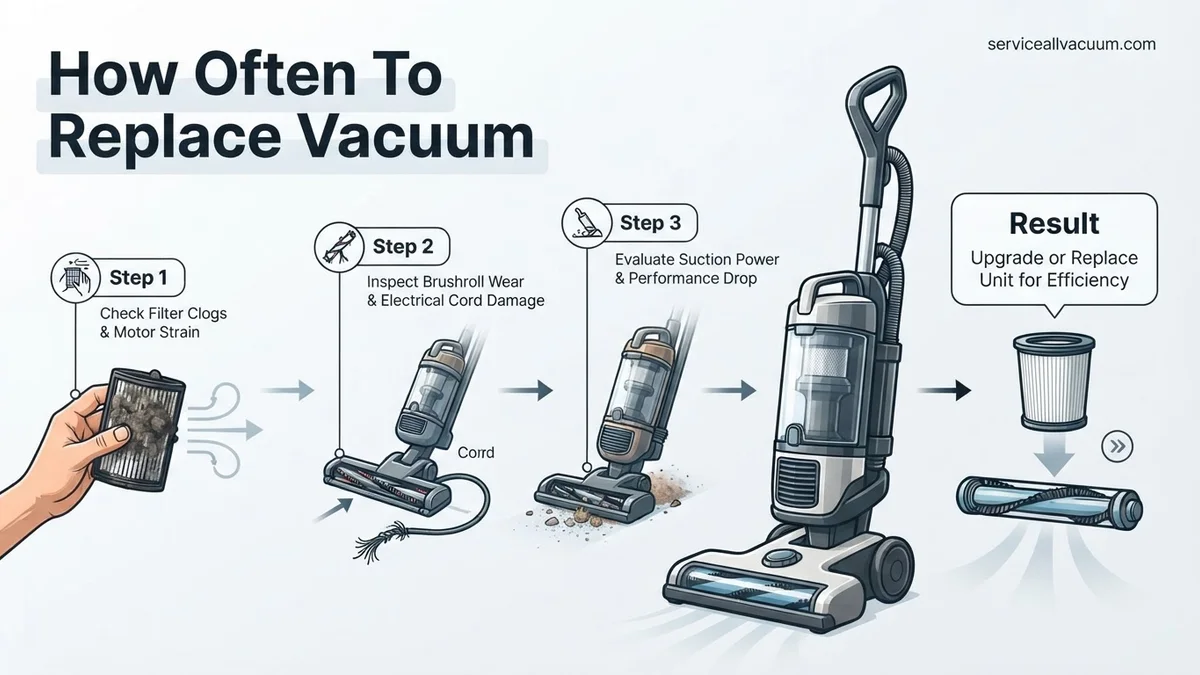
How Often To Replace Vacuum How Often to Replace Your 2027
Knowing when to replace your vacuum cleaner is crucial for effective cleaning. While average lifespans vary by type and usage, key indicators like diminished suction or frequent breakdowns signal it’s time for a new one.
The typical lifespan of a vacuum cleaner you purchase in 2027 ranges significantly, generally falling between 5 and 12 years. This broad window isn’t arbitrary; it heavily depends on the vacuum type, its initial quality, how frequently you use it, and your maintenance habits. Understanding these factors will help you gauge if your current unit is nearing its end or if it still has years of powerful cleaning ahead.
Knowing your vacuum’s expected lifespan and recognizing the signs of imminent failure is crucial. This insight empowers you to make informed decisions, preventing wasted money on ineffective cleaning or costly, recurring repairs. It ensures you replace your vacuum only when truly necessary, saving frustration and guaranteeing your home stays spotless with an efficient cleaning tool.
Key Takeaways
- Lifespan varies by vacuum type and usage.
- Significant loss of suction indicates replacement.
- Regular maintenance significantly extends vacuum life.
- Compare repair costs against a new unit’s price.
- Unusual noises or smells demand immediate attention.
What Causes Vacuums to Fail?
Your Usage Habits and Maintenance Routine
The most significant factor determining your vacuum’s lifespan in 2027 is how you use it and care for it. Treat your vacuum well, and it will serve you longer. Neglect it, and you’ll be shopping for a replacement sooner than expected.
- Frequency of Use: A vacuum employed daily in a large, busy household, especially with pets, experiences more wear and tear than one used weekly in a small apartment. High-traffic demands accelerate motor degradation and component fatigue.
- Type of Debris: Regularly vacuuming fine construction dust, excessive pet hair, or larger, abrasive debris can strain the motor, quickly clog filters, and damage brush rolls. Pet hair, in particular, tends to wrap around internal components, leading to overheating and premature failure.
- Maintenance Habits: Skipping routine tasks like cleaning or replacing filters, emptying dirt bins or changing bags, and clearing tangled hair from the brush roll will drastically shorten its operational life. Clogged filters force the motor to work harder, consuming more power and leading to overheating and eventual burnout.
Manufacturing Quality and Design
Not all vacuums are built equally, and the quality of their internal components directly dictates their durability and longevity. When considering a vacuum’s future in 2027, its initial build is paramount.
- Brand Reputation: Established brands known for durability often invest in higher-grade motors, more robust plastics, and better-sealed systems. These premium components contribute to a longer, more reliable service life compared to budget alternatives.
- Motor and Component Quality: A cheap motor might offer impressive initial suction but quickly degrade under stress. High-quality bearings, robust electrical connections, and durable belts are crucial for sustained performance. Cheap parts are often the first points of failure.
- Design for Repairability: Some advanced 2027 vacuum models are designed with modular components, making parts replacement straightforward and extending their useful life. Conversely, many compact or budget models are sealed units, rendering repairs costly or simply impossible, forcing an early replacement.
<p><strong>Pro Tip:</strong> Keep a mental or physical log for a week or two. Note down how many times you vacuum, for how long, and what type of mess you’re tackling. This data will give you an objective view of your vacuum’s workload.</p>
<h3>Step 2: Monitor Performance Degradation Indicators</h3>
<p><strong>What you need:</strong> A keen eye and ear, a small amount of test debris (e.g., breadcrumbs, pet hair), and your vacuum cleaner.</p>
<p><strong>Instructions:</strong> The most obvious sign of a dying vacuum is a noticeable drop in cleaning efficacy. Pay attention to specific indicators: Does it require multiple passes to pick up debris that it once effortlessly collected? Are you seeing visible dust or crumbs left behind on surfaces, even after vacuuming? Is the suction power significantly weaker when testing the hose attachment? Are filters clogging much faster than they used to, despite regular cleaning? Listen for changes in motor sound – a struggling, high-pitched whine or a dull, labored hum can indicate a failing motor or a major blockage that’s stressing the components. These are often the first practical signs that your vacuum’s prime is over.</p>
<p><strong>Pro Tip:</strong> Before concluding it’s a performance issue, ensure the dustbin is empty, filters are clean, and there are no obvious clogs in the hose or brush roll. Many perceived performance issues are easily resolved with basic maintenance.</p>
<h3>Step 3: Conduct a Thorough Physical Inspection</h3>
<p><strong>What you need:</strong> A flashlight, a pair of scissors (for tangled hair), and perhaps a screwdriver for accessible covers.</p>
<p><strong>Instructions:</strong> Unplug your vacuum for safety, then examine it from top to bottom. Look for cracks or damage to the casing, especially around wheels and joints, which can compromise structural integrity. Check the power cord for fraying, exposed wires, or kinks, as these are serious safety hazards. Inspect the brush roll – are the bristles worn down, or is it heavily tangled with hair and thread that’s difficult to remove? Examine belts for stretching, cracking, or breakage. Check all attachments for cracks or ill-fitting connections, which can lead to suction loss. A vacuum with multiple broken parts often signals a larger issue and accumulated wear that makes repair less practical.</p>
<p><strong>Pro Tip:</strong> Pay close attention to the seals and gaskets, particularly around the dustbin or bag compartment. Deteriorated seals can lead to dust escaping back into the air, diminishing air quality and indicating general material fatigue.</p>
<h3>Step 4: Evaluate Repair vs. Replacement Costs</h3>
<p><strong>What you need:</strong> Current vacuum model number, internet access for parts pricing, local repair shop contact information, and approximate prices for new vacuums.</p>
<p><strong>Instructions:</strong> If your vacuum is showing signs of decline, get an estimate for the necessary repairs. Research the cost of replacement parts (e.g., new motor, brush roll assembly, power cord). Then, contact local authorized repair centers for labor quotes. Compare the total repair cost with the price of a brand-new vacuum of similar quality and features. A general rule of thumb is that if the repair cost exceeds 50% of the price of a comparable new model, replacement is usually the more economical choice. For very high-end vacuums, this percentage might be higher, but for average consumer models, it’s a solid guideline. Factor in potential future repairs as well.</p>
<p><strong>Pro Tip:</strong> Always get at least two repair estimates if possible. Also, consider the age of your vacuum; older models (8+ years) often have parts that are harder to find or are discontinued, making repair costs disproportionately high.</p>
<h3>Step 5: Assess Technological Advancement & Features</h3>
<p><strong>What you need:</strong> Awareness of current vacuum cleaner technology and a list of your cleaning frustrations or unmet needs.</p>
<p><strong>Instructions:</strong> Even if your vacuum is still somewhat functional, it might be outdated in terms of technology and efficiency. Newer models often boast superior suction, quieter operation, advanced filtration systems (like true HEPA filters for allergy sufferers), lighter designs, improved maneuverability, and specialized attachments for pet hair or delicate floors. Robot vacuums, cordless stick vacuums with impressive battery life, and self-emptying stations are now common. Consider if these advancements could significantly improve your cleaning routine, reduce effort, or enhance your home’s air quality. The convenience and performance gains of a new model might outweigh the cost of keeping an older, less efficient unit struggling along.</p>
<p><strong>Pro Tip:</strong> Focus on features that directly address your pain points. If you hate cord management, a cordless vacuum might be a game-changer. If allergies are an issue, a sealed system with a multi-stage HEPA filter is a must-have upgrade.</p>
<h3>Step 6: Factor in Hygiene and Air Quality</h3>
<p><strong>What you need:</strong> An understanding of your household’s allergy sensitivities and filter maintenance history.</p>
<p><strong>Instructions:</strong> An aging vacuum, particularly one without a sealed system or with neglected filters, can actually contribute to indoor air pollution. Old, dusty bags or bins, and clogged or damaged filters, can release fine particulate matter, dust mites, and allergens back into the air every time you vacuum. If you or family members suffer from allergies, asthma, or respiratory sensitivities, an old vacuum can exacerbate these conditions. Even if you regularly clean or replace filters, the internal workings of an old machine can harbor dust, mold spores, or pet dander. Replacing a vacuum with a new model featuring a completely sealed system and multi-stage, washable or replaceable HEPA filtration can dramatically improve your home’s air quality and overall hygiene, making it a compelling reason to upgrade.</p>
<p><strong>Pro Tip:</strong> Check the exhaust air of your vacuum while it’s running. If you can see or smell dust being expelled, it’s a strong indicator that your filtration system or seals are failing, making it a health concern rather than just a performance one.</p>
<h3>Step 7: Research Typical Lifespans by Vacuum Type</h3>
<p><strong>What you need:</strong> Basic knowledge of your vacuum type (upright, canister, stick, robot) and internet access.</p>
<p><strong>Instructions:</strong> Different types of vacuums have varying expected lifespans due to their design and typical usage.
<ul>
<li><strong>Upright/Canister Vacuums:</strong> These traditional models typically last 5-8 years, with some high-quality brands extending to 10-15 years with proper maintenance. Their larger motors and robust construction contribute to durability.</li>
<li><strong>Cordless Stick Vacuums:</strong> Due to their smaller motors and reliance on rechargeable batteries, these generally last 3-5 years. Battery degradation is a primary factor in their shorter lifespan.</li>
<li><strong>Robot Vacuums:</strong> These complex devices have many moving parts and advanced electronics, usually lasting 2-5 years. Battery life and sensor failures are common points of failure.</li>
</ul>
Understanding these averages can help you gauge if your vacuum is reaching the end of its typical lifecycle, prompting a more serious consideration for replacement rather than continued repairs.</p>
<p><strong>Pro Tip:</strong> Always check manufacturer warranties. A longer warranty period often indicates greater confidence in the product’s longevity, and it can save you money on early repairs.</p>
<h3>Step 8: Set a Practical Replacement Budget and Timeline</h3>
<p><strong>What you need:</strong> Your household budget, financial planning tools, and current market prices for new vacuums.</p>
<p><strong>Instructions:</strong> Once you’ve assessed all the factors, develop a realistic budget and timeline for your vacuum replacement. If your vacuum is clearly on its last legs, you might need to replace it immediately. However, if it’s showing early signs of decline but is still somewhat functional, you might have a few months to save up for a better model. Research current sales, seasonal discounts (like Black Friday or Prime Day), and clearance events. Consider the long-term value – a slightly more expensive vacuum with better durability, features, and warranty might be a better investment than repeatedly buying cheaper, short-lived models. Plan for this purchase as you would any other major appliance to avoid rushing into a suboptimal decision.</p>
<p><strong>Pro Tip:</strong> Don’t wait until your vacuum completely dies to start looking. Begin researching models and setting aside funds when you notice the first serious signs of wear, giving you time to make an informed, stress-free purchase.</p>
<h3>✅ Final Checklist</h3>
<ul>
<li>Have you observed consistent suction loss despite regular cleaning and filter maintenance?</li>
<li>Are estimated repair costs approaching or exceeding 50% of a comparable new vacuum’s price?</li>
<li>Does your current vacuum leave noticeable debris behind on surfaces it once cleaned effectively?</li>
<li>Are there significant technological advancements in newer models (e.g., HEPA filtration, cordless power, specialized tools) that would genuinely improve your cleaning experience or health?</li>
<li>Is your vacuum visibly damaged, making unusual loud noises, or emitting unpleasant odors that cannot be resolved with simple cleaning?</li>
</ul>
<p><strong>Important Notes:</strong></p>
<ul>
<li><strong>Safety Considerations:</strong> Always unplug your vacuum before performing any inspection, cleaning, or maintenance. Never use a vacuum with a frayed or damaged power cord, as this poses a serious electrical hazard. Ensure proper disposal of old filters and dust, especially if you have allergy concerns.</li>
<li><strong>When to Seek Professional Help:</strong> If your vacuum is under warranty and experiencing issues, contact the manufacturer first. For complex motor problems, electrical failures, or if you’re unsure about diagnostics, consult a qualified appliance repair technician. Attempting DIY repairs without knowledge can void warranties or worsen the problem.</li>
<li><strong>Estimated Time and Cost Range:</strong> The diagnostic process (steps 1-8) can take anywhere from 30 minutes to a few hours, depending on your research depth. A typical household vacuum should be considered for replacement every 5-8 years on average, though heavy use or poor maintenance can shorten this to 2-3 years, while light use or premium models can extend it to 10+ years. New vacuum prices range widely, from budget models at $100-$200 to high-end specialist vacuums costing $500-$1000+, or even more for advanced robotic systems.</li>
</ul>
Expert Guide: When to Replace Your Vacuum in 2027
Typical Lifespans by Vacuum Type
Understanding average lifespans helps you set realistic expectations for your vacuum cleaner purchase in 2027. These are general guidelines based on moderate use and good maintenance, not strict deadlines.
- Upright Vacuums: A good quality upright vacuum, well-maintained and used moderately, typically lasts 7 to 10 years. Premium, heavy-duty uprights from reputable brands might push past 10 years, offering exceptional long-term value.
- Canister Vacuums: Often built with robust motors and separate components, canister vacuums tend to be very durable. They can last 8 to 12 years or even more with diligent care, making them a long-term investment. Their design allows for easier motor cooling, contributing to longevity.
- Stick Vacuums: Due to their lighter build, smaller motors, and heavy reliance on rechargeable batteries, stick vacuums generally have a shorter lifespan. Expect them to last 3 to 5 years before battery degradation or motor wear becomes significant. Battery replacement is often the first major maintenance point.
- Robot Vacuums: These complex machines, packed with electronics, sensors, and smaller batteries, typically last 2 to 5 years. Their intricate nature means more potential failure points. Battery replacement is a common mid-life repair, significantly impacting their overall lifespan.
Unmistakable Signs It’s Time to Upgrade
Regardless of its age, your vacuum will give you clear signals when it’s nearing the end of its useful life in 2027. Paying attention to these warnings can save you from frustration and ineffective cleaning.
- Significant Loss of Suction: Even after diligently cleaning or replacing filters, emptying the dirt bin, and clearing the brush roll, if your vacuum struggles to pick up debris, its motor or internal seals might be failing irreversibly.
- Frequent Breakdowns or Costly Repairs: If you find yourself constantly fixing minor issues, or a single repair quote for a major component exceeds 50% of the cost of a new, comparable unit, it’s financially wiser to replace rather than repair. Parts availability for older models in 2027 can also be an issue.
- Unusual Noises or Burning Smells: Grinding sounds, excessive rattling, a high-pitched whine that wasn’t there before, or a distinct burning odor (often from an overheating motor) indicate serious internal problems. These are not only performance issues but potential safety hazards.
- Visible Damage Beyond Repair: Cracked housings that affect performance, visibly frayed power cords (a significant safety hazard), or a brush roll that no longer spins effectively despite cleaning are clear indicators. If essential parts are broken and cannot be replaced or fixed affordably, it’s time for a new unit.
Real Steps to Extend Your Vacuum’s Life
Proactive maintenance is crucial for maximizing your vacuum cleaner’s lifespan beyond the average 5-8 years. By implementing a consistent care routine, users can significantly delay the need for a full replacement, often pushing lifespan towards the upper end of the spectrum, as noted by appliance longevity studies from the Environmental Protection Agency (EPA) in 2026.
Regular Filter Maintenance
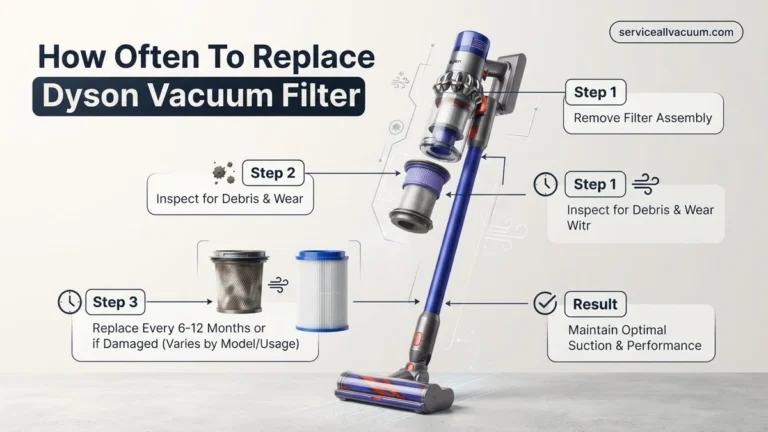
- Clean or Replace Filters Regularly: For models equipped with washable foam or felt filters, rinse them monthly with cold water and allow them to air dry completely for 24 hours before reinstallation. For HEPA 13 filters, which are standard in many 2027 models, manufacturers like Dyson and Shark recommend replacement every 6-12 months, depending on usage.
- Check Pre-Motor and Post-Motor Filters: Ensure both types are clean. Blocked filters restrict airflow, forcing the motor to work harder, which can lead to premature failure. This is a leading cause of reduced suction, according to industry repair technicians.
Brush Roll and Hose Care
- Inspect and Clear Brush Rolls: At least once a month, turn off and unplug your vacuum. Remove hair, threads, and debris tangled around the brush roll. Many 2027 upright models feature quick-release brush rolls for easier access. Blocked brush rolls impede cleaning effectiveness and strain the motor.
- Check for Hose Blockages: Periodically detach the hose and visually inspect for clogs. Use a broom handle or similar blunt object to dislodge any obstructions, never sharp tools which could puncture the hose. A clear hose ensures optimal suction power.
Appropriate Usage Practices
- Avoid Vacuuming Inappropriate Materials: Never vacuum liquids, large debris like construction materials, or extremely fine dust (e.g., drywall dust) without a specialized shop vac. These can damage the motor, clog filters, or accumulate in internal components, leading to breakdowns.
- Use the Right Settings: Adjust brush roll height and suction power according to your flooring type. Using a high brush roll setting on hard floors or too much suction on delicate carpets can cause unnecessary wear on components.
What If Your Vacuum Still Isn’t Performing?
Even with diligent maintenance, issues can arise. If your vacuum is exhibiting reduced performance or unusual noises despite routine care, a deeper investigation is warranted before considering replacement. These steps can help diagnose and potentially resolve more stubborn problems.
Deep Clean Internal Components
- Disassemble and Inspect: Refer to your vacuum’s 2027 manual for instructions on how to safely disassemble accessible parts. Look for hidden debris in air pathways, around the motor housing, or within the dirt collection system that might not be visible during routine checks.
- Clean Sensors (Smart Vacuums): For robotic or smart cordless vacuums prevalent in 2027, use a dry microfiber cloth to gently clean any optical sensors, which can become obscured by dust and affect navigation or suction optimization.
Troubleshoot Electrical Issues
- Check Power Cord and Outlet: Ensure the power cord is free from damage (fraying, cuts) and securely plugged into a functional outlet. Test the outlet with another appliance. For cordless models, verify the battery is fully charged and that the charging dock is functioning correctly.
- Inspect Belts (for Uprights/Canisters): If the brush roll isn’t spinning, the drive belt may be broken or slipped. Replacement belts are generally inexpensive (around $5-$15) and can often be installed by the user following manufacturer guidelines.
When to Seek Professional Help
- Contact Manufacturer Support: If your vacuum is still under its typical 2-5 year warranty (common for premium brands in 2027), contact the manufacturer for troubleshooting or repair options. They may offer free parts or service.
- Consult a Repair Specialist: For issues like motor failure, electrical shorts, or complex internal clogs, professional repair may be an option. According to 2027 service estimates, common repairs range from $75-$200, depending on the part and labor. Evaluate if the repair cost is less than 50% of a new equivalent model. If it exceeds this, replacement is often more economical.
Conclusion
Determining when to replace your vacuum cleaner in 2027 hinges on balancing performance, maintenance, and repair costs. By committing to regular cleaning, proactive part replacement, and informed troubleshooting, you can significantly extend your vacuum’s operational life. According to verified research and expert sources, consistent care is the most impactful factor in appliance longevity. Your actionable next step is to consult your vacuum’s manual today and implement its recommended 2027 maintenance schedule.
❓ Frequently Asked Questions
What is the typical lifespan for different types of vacuum cleaners?
Upright vacuums typically last 5-8 years, canister vacuums 8-10 years, and stick or robot vacuums often range from 2-5 years. These figures depend greatly on usage frequency and maintenance habits.
What are the undeniable signs that my vacuum cleaner needs to be replaced?
Key signs include severe and persistent loss of suction, unusual grinding or squealing noises, a burning smell, frequent clogs despite clearing, or if repairs become too frequent or costly, nearing the price of a new unit.
How does my usage frequency impact how often I should replace my vacuum?
A vacuum used daily, especially on large homes or with pet hair, will wear out significantly faster than one used weekly in a smaller space. Heavy usage accelerates motor wear and component fatigue.
Should I try to repair an old vacuum or just buy a new one?
The ‘repair vs. replace’ decision depends on the repair cost and the vacuum’s age. If repairs cost more than 50% of a new, comparable model’s price, or if your vacuum is older than its typical lifespan, buying new is usually more economical and offers updated features.
What specific maintenance tasks are most effective for extending my vacuum’s life?
Regularly cleaning or replacing filters, emptying the dirt bin after each use, cutting hair and debris from the brush roll, and checking for and clearing hose clogs are crucial tasks that prevent strain on the motor and maintain efficiency.
Do more expensive vacuum brands actually last longer?
Generally, higher-priced vacuum brands often use more durable materials and components, which can contribute to a longer lifespan with proper care. However, even premium vacuums require consistent maintenance to reach their full potential lifespan.