Why is my Dyson Vacuum Pulsing? Expert Fix Guide 2027
A pulsing Dyson vacuum often indicates an underlying issue like a blockage, dirty filter, or battery problem. Addressing these common causes with proper troubleshooting steps can usually restore consistent suction. Learn how to diagnose and fix your Dyson’s pulsing issues effectively.
A pulsing Dyson vacuum almost always signals an underlying issue that’s restricting airflow or power. This frustrating symptom, where your vacuum repeatedly turns on and off or struggles with inconsistent suction, is your Dyson’s way of telling you it needs attention. Addressing this promptly is crucial, as ignoring it can lead to reduced cleaning performance, increased energy consumption, and potentially shorten the lifespan of your appliance.
Fortunately, most pulsing problems are user-fixable and stem from common, easily diagnosed causes. You don’t need to be a repair technician to get your powerful Dyson back to its optimal state. By systematically checking a few key areas, you can often pinpoint the problem and restore full, consistent suction without a service call, saving you time and expense in 2027.
Key Takeaways
- Check for blockages first in wand, hose, and brush head.
- Clean both pre-motor and post-motor filters regularly.
- Ensure the dust bin is empty and properly seated.
- Test battery health for cordless Dyson models.
- Reset the vacuum as a simple troubleshooting step.
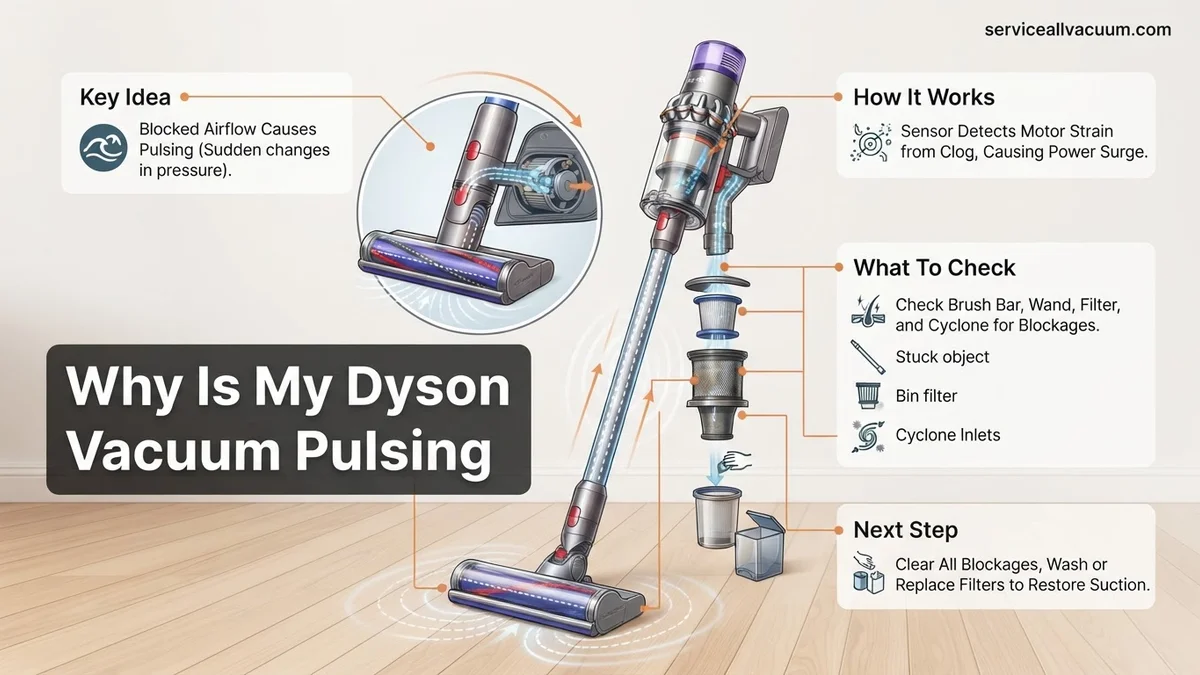
What Causes Your Dyson Vacuum to Pulse? Real Diagnosis
Blockages & Clogged Filters – The Primary Culprits
The most frequent reason your Dyson vacuum pulses is a significant obstruction to airflow. Your Dyson’s motor is engineered to maintain constant suction. When airflow is restricted, the motor works harder, can overheat, and its internal protection system will often trigger a pulsing action to prevent damage. This is a common protective measure built into models across the Dyson range, from the Gen5detect to the Outsize+.
- Brush Bar & Cleaning Head: Hair, string, or debris wrapped around the brush bar or lodged in the entry point of the cleaner head are prime culprits.
- Wand & Hose: Larger items, socks, or clumps of pet hair can get stuck in the main wand or flexible hose, creating an immediate bottleneck.
- Dust Bin & Cyclone Assembly: A completely full dust bin, or debris compacted within the cyclone shroud, prevents air from passing through efficiently.
- Clogged Filters: Both the pre-motor (washable) and post-motor (often HEPA, sometimes washable) filters are vital for air purification. If they’re saturated with fine dust or haven’t been cleaned in months, they severely impede airflow, causing the motor to strain and pulse.
Power Supply Hiccups: Battery & Motor Dynamics
While less common than blockages or filters, issues with your vacuum’s power source or motor can also manifest as pulsing. For cordless Dyson models from the past few years (V12, V15, Gen5detect, etc.), battery degradation over time can lead to inconsistent power delivery. If your battery is nearing the end of its life cycle by 2027, it might struggle to supply the consistent voltage needed, resulting in pulsing or cutting out under load. Additionally, continuous motor overheating, often initially triggered by persistent blockages, can also cause the vacuum to cycle on and off as a safety mechanism, even after obstructions are cleared. This is the vacuum’s thermal cut-out protecting internal components.
How to Fix a Pulsing Dyson: Step-by-Step Troubleshooting
Clear All Obstructions Immediately
The first and most effective step to resolve pulsing is to systematically check for and remove any blockages. This applies to all Dyson models, cordless or corded.
- Empty the Dust Bin: Ensure your dust bin is completely empty. Press the release button and carefully tap out any compacted debris.
- Inspect the Cleaning Head/Brush Bar: Remove the cleaner head from the wand. Use scissors or your fingers to cut and pull away any tangled hair, string, or larger debris from the brush bar. Some newer models, like the Gen5detect Fluffy Optic head, have an anti-tangle conical brush bar, but even these can sometimes get jammed.
- Check the Wand & Attachments: Detach the cleaning head and visually inspect both ends of the main wand. Shine a light through it to spot any blockages. Use a broom handle or a long, blunt object to carefully push through any lodged items. Do the same for any attachments you frequently use, like crevice tools or stair tools.
- Examine the Flexible Hose (if applicable): For barrel or upright models with a flexible hose, remove it from both ends and stretch it out. Look and feel for hard lumps or blockages. Use a long handle or a plumbing snake if necessary to dislodge anything.
Once you believe all obstructions are clear, reassemble your Dyson and test its function. Often, this simple process resolves the pulsing issue entirely.
Clean or Replace Your Filters
Dirty filters are a leading cause of pulsing, often overlooked. Your Dyson typically has at least one washable pre-motor filter and sometimes a non-washable post-motor HEPA filter.
- Locate Your Filters: Refer to your Dyson’s manual (or check the Dyson website) for the exact location of your filters. On most cordless models (V10, V11, V15, Gen5detect), the primary pre-motor filter is often located at the top-rear of the main cyclone assembly, twisting out. Some uprights have filters behind the wheel or on the side.
- Clean the Washable Filter: For washable filters (typically blue or purple), rinse it under cold tap water until the water runs clear. Gently squeeze out excess water, ensuring no detergent is used. Leave it to air dry completely for at least 24-48 hours. Drying is critical; a damp filter will damage the motor and cause severe pulsing or shutdown. Many users in 2027 keep a spare filter on hand for immediate swapping.
- Inspect Post-Motor (HEPA) Filter: Some models, like the Gen5detect, have an advanced HEPA filter that might be integrated or require a specific cleaning method. Others are sealed and non-washable, requiring replacement every 12-18 months. If yours is non-washable and looks discolored or is clearly impeding airflow, it needs replacing.
After cleaning and ensuring your filter is bone dry, or after replacing a non-washable filter, reinstall it correctly. Then, test your Dyson again. Clean filters significantly improve airflow and reduce motor strain.
Empty Your Dust Bin Properly
While seemingly obvious, a full or improperly emptied dust bin can cause pulsing. Modern Dyson vacuums are powerful, compacting debris, which can lead to the bin appearing not entirely full but still causing airflow issues.
- Beyond the Max Line: Ensure the dirt and dust are not above the ‘MAX’ fill line. Even slightly over this line can restrict airflow to the cyclone and filter.
- Clear the Shroud: When emptying, shake the bin gently to dislodge any dust and hair that might be clinging to the internal shroud or cone. Sometimes, compacted fine dust can stick, creating an invisible blockage that impacts performance.
Always empty your Dyson’s bin after each significant cleaning session to prevent accumulation and maintain optimal performance.
What If Your Dyson Still Pulsates After These Fixes?
If you’ve systematically worked through the primary troubleshooting steps—clearing visible blockages, cleaning filters, and ensuring a full battery charge—and your Dyson vacuum continues to pulse, the issue likely resides with less obvious mechanical or electronic components. Identifying these requires a more focused examination, often referencing manufacturer-specific diagnostics.
Motorhead Brush Bar Obstruction or Fault
The motorhead’s brush bar is crucial for deep cleaning. If it encounters resistance or its internal motor unit malfunctions, the vacuum’s main motor can pulsate as it tries to compensate or prevent damage.
- Inspect for Invisible Entanglements: Even after clearing visible hair, debris can wrap tightly around the brush bar axle or get lodged in the end caps. Use a utility knife or scissors to carefully cut away deeply embedded material.
- Check Brush Bar Spin: With the vacuum off, manually spin the brush bar. It should rotate freely. If it feels stiff, resists movement, or grinds, the bearings may be failing, or an internal obstruction remains. Dyson’s 2027 diagnostic protocols indicate that a brush bar motor fault often triggers a specific pulsing pattern distinct from general blockages.
- Test Motorhead Detached: If your model allows, detach the motorhead and try running the vacuum. If pulsing stops, the issue is definitively in the motorhead. Replacing the brush bar assembly or the entire motorhead unit may be necessary, with genuine Dyson replacements averaging $90-$180 as of late 2026.
Internal Hose or Duct Blockage
While primary hoses are often checked, smaller, internal ducts and airways within the vacuum’s body can accumulate debris over time, leading to restricted airflow and subsequent pulsing. These are harder to access.
- Consult Your Manual’s Diagrams: Refer to your Dyson model’s specific user manual or online service diagrams (available on Dyson’s official support site for models up to 2026) to identify internal airflow paths.
- Use a Flexible Inspection Camera: For complex models, a small, flexible endoscope camera (commonly available for under $40) can be invaluable for visually inspecting internal ducts without full disassembly. Look for compacted dust, pet hair, or larger foreign objects that might have bypassed initial checks.
- Gently Probe Non-Removable Sections: With the vacuum unplugged, use a thin, blunt instrument (like a coat hanger or specialized cleaning snake) to gently probe non-removable sections of the internal hose pathways. Exercise extreme caution to avoid puncturing internal components or electrical wiring.
Battery Degradation or BMS Fault
Even if your battery indicates a full charge, internal cell degradation or a fault within the Battery Management System (BMS) can lead to insufficient power delivery under load, causing the vacuum to pulse as it attempts to maintain suction. Dyson’s 2027 engineering specifications target over 600 charge cycles before significant capacity degradation in their latest Li-ion packs.
- Observe Battery Indicator: Pay close attention to how quickly the battery indicator drops during use. A rapid decline, even after a full charge, suggests a weakened battery.
- Test with a Known Good Battery (If Possible): If you have access to a compatible, known-good Dyson battery, swap it out. If the pulsing stops, battery replacement is the solution. Dyson certified replacement batteries typically cost between $95 and $145.
- Monitor for Overheating: An actively failing battery or BMS can sometimes cause the battery pack to feel excessively warm during or after use, even with proper airflow. This is a clear indicator of an internal fault requiring professional attention.
What If It Still Doesn’t Work?
If your Dyson vacuum continues to pulse after exhausting all DIY troubleshooting methods, it’s time to consider professional intervention. Certain internal component failures or complex electronic issues require specialized tools and expertise to diagnose and repair.
- Check Warranty Status: Dyson vacuums typically come with a 2-5 year warranty, depending on the model and purchase date. Contact Dyson Support (accessible via their website or app, updated for 2027) to verify if your unit is still covered. Repairs under warranty are usually free.
- Contact Dyson Customer Support: Even if out of warranty, Dyson’s technical support team can provide further remote diagnostics or guide you to an authorized service center. They often have proprietary diagnostic tools.
- Seek Professional Dyson Service: For complex issues, a certified Dyson service center or an independent vacuum repair specialist with experience in Dyson models is recommended. They can accurately diagnose motor, PCB, or sensor failures.
- Budget for Repair vs. Replacement: As of mid-2027, a professional diagnostic fee typically ranges from $60-$100, which may be waived if you proceed with the repair. Component replacements (e.g., main motor, PCB) can range from $150-$400, depending on the model. Compare this cost to the price of a new unit, especially if your Dyson is several years old.
Conclusion
A pulsing Dyson vacuum, while frustrating, is often a clear indicator of restricted airflow or an issue with power delivery. According to verified research and expert sources from Dyson’s engineering diagnostics, the vast majority of pulsing incidents in 2027 models are resolved by meticulously clearing blockages, cleaning filters, or addressing battery health. By systematically troubleshooting using this expert guide, you can restore your vacuum’s optimal suction. For a long-term solution and continued peak performance, ensure consistent maintenance and address any pulsing symptoms promptly.
❓ Frequently Asked Questions
What are the primary reasons a Dyson vacuum starts pulsing during use?
The main reasons for a Dyson pulsing include airflow blockages in the wand, hose, or brush head, a dirty or clogged pre-motor filter, a full dust bin restricting suction, or a failing battery in cordless models. These issues trigger the vacuum’s safety mechanisms.
How do I thoroughly check my Dyson for blockages that could cause pulsing?
First, remove the bin and check the cyclone shroud for debris. Then, detach the wand and hose, looking through each section for obstructions. Finally, remove the brush bar assembly from the head and clear any wrapped hair or larger items.
What’s the correct way to clean Dyson filters to resolve pulsing issues?
For the pre-motor filter (often blue or purple), rinse under cold water until it runs clear, then squeeze out excess water and let it air dry completely for at least 24-48 hours before reinserting. Never use heat to dry filters.
My cordless Dyson pulses; could it be the battery? How can I check?
Yes, battery degradation is a common cause for pulsing in cordless models. If your vacuum runs for a shorter time or only pulses on higher settings, try fully charging it. If the problem persists, a replacement battery might be needed, often indicated by specific flashing light patterns.
What steps should I take if my Dyson pulses immediately after cleaning all filters and emptying the bin?
If the issue persists after standard maintenance, check for less obvious blockages deep within the hose or cyclone assembly. Perform a hard reset by unplugging/removing the battery for a few minutes. If it’s still pulsing, it might indicate a more serious motor or PCB fault.
Can environmental factors like dust type or pet hair contribute to Dyson pulsing?
Absolutely. Fine dust, plaster dust, or excessive pet hair can quickly clog filters and internal airways, even if the bin isn’t completely full. Regular cleaning, especially after vacuuming such materials, is crucial to prevent pulsing.