How Often Replace Vacuum Expert Guide for 2027
Determining when to replace your vacuum depends on its type, usage, and specific signs of deterioration. Understanding average lifespans and clear symptoms like persistent loss of suction, motor issues, or high repair costs will help you make an informed decision. Proper maintenance can extend its life, but knowing when to upgrade is crucial for effective cleaning.
The typical lifespan of a vacuum cleaner by 2027 ranges significantly, from 2 years for some robot models up to 12 years for high-end canister units. Understanding when your vacuum is truly beyond its prime – past the point of economical repair – is key to maintaining a clean home efficiently and avoiding unnecessary spending. This guide will clarify the average operational life for various vacuum types and highlight the definitive signs that signal replacement is the smartest choice for your household.
Knowing these indicators saves you from frustrating cleaning sessions with an underperforming machine or pouring money into repairs that yield diminishing returns. Rather than guessing, you’ll be equipped with the knowledge to make an informed decision, ensuring your home stays spotless without breaking your budget on continuous fixes for an appliance nearing the end of its useful life.
Key Takeaways
- Assess vacuum type for average lifespan.
- Monitor for clear signs of critical failure.
- Compare repair cost to a new unit.
- Regular maintenance significantly extends vacuum life.
- Persistent motor failure signals replacement often.
Diagnosing When Your Vacuum Needs Replacing: Key Signs
Recognizing the specific symptoms of a vacuum cleaner nearing the end of its life is crucial. Instead of letting it limp along, look for these clear signals that indicate replacement is more practical than repair. By 2027, vacuum technology has advanced, but the fundamental wear patterns remain consistent across models.
Average Lifespans by Vacuum Type (2027 Projections)
As of 2027, these are the general expected lifespans, assuming regular maintenance and typical household use:
- Upright Vacuums: Expect 7-10 years. Their robust motors and often simpler design contribute to solid durability.
- Canister Vacuums: These often last 8-12 years. They tend to be built with higher-grade components, and the motor is typically separated from the powerhead, reducing stress.
- Stick Vacuums: Generally 3-6 years. Their compact nature and reliance on smaller, frequently used batteries often shorten their functional life, with battery degradation being a major factor.
- Robot Vacuums: Typically 2-5 years. Complex electronics, intricate navigation systems, and high-cycle batteries mean a shorter average lifespan. Sensor failures are a common issue.
These figures represent averages; premium brands can exceed these estimates, while budget-friendly models might fall short.
Unmistakable Signals for Replacement
Your vacuum cleaner will tell you when it’s time to retire. Pay close attention to these definitive signs:
- Persistent, Unresolvable Loss of Suction: You’ve meticulously cleaned or replaced filters, checked for and cleared any clogs in the hose and brush roll, and emptied the bin, yet the suction remains critically weak. This often points to a failing motor, a significant leak in the sealed system, or worn internal components that are not easily accessible or repairable.
- Motor Failure or Overheating: The vacuum emits burning smells, makes unusually loud grinding or screeching noises, or consistently shuts off due to overheating. Motor repairs are typically very expensive, often approaching or exceeding the cost of a brand-new unit.
- Significant Performance Decline: Your vacuum struggles with tasks it once handled easily. It leaves behind visible dirt, requires multiple passes to clean an area, or takes much longer to achieve basic cleanliness. It’s no longer performing its primary function effectively.
- High Repair Costs: If a single repair estimate approaches or surpasses 50% of the cost of a new, comparable vacuum, it’s financially wiser to replace it. For instance, replacing a main circuit board on a smart robot vacuum can be prohibitively expensive.
- Extensive Physical Deterioration: This includes cracks in the main housing, irreparable damage to critical attachments, or worn-out wheels that significantly impair maneuverability. Such damage can compromise safety and efficiency.
From Start to Finish: Vacuum Lifespan Explained
Understanding when to replace your vacuum cleaner is crucial for maintaining a clean home efficiently and managing your household budget effectively. This comprehensive guide will walk you through the key factors influencing your vacuum’s lifespan, helping you make an informed decision on whether to repair, maintain, or replace your trusty cleaning companion. By following these steps, you’ll ensure optimal cleaning performance and avoid unnecessary expenses or unexpected breakdowns.
Step 1: Identify Your Vacuum’s Type and Build Quality
What you need: Your vacuum cleaner, owner’s manual (if available), internet access for research.
Instructions: Different types of vacuums have varying expected lifespans due to their design and intended use. A budget stick vacuum, for instance, is not built to the same durability standards as a high-end upright or canister model designed for heavy-duty use. Consider if your vacuum is a basic upright, a versatile canister, a lightweight stick, or an autonomous robot. Furthermore, research the brand’s reputation for quality; premium brands often use more robust materials and components, leading to a longer service life, typically ranging from 7 to 15 years for high-end models versus 1-5 years for entry-level units. This foundational step helps set realistic expectations for your particular model.
Pro Tip: Look up online reviews and consumer reports for your specific vacuum model or brand to gauge its typical longevity and common failure points reported by other users. This provides real-world insights beyond manufacturer claims.
Step 2: Evaluate Your Usage Patterns and Home Environment
What you need: Mental assessment of your home size, presence of pets/children, and cleaning habits.
Instructions: The frequency and intensity of your vacuuming directly impact its wear and tear. A vacuum used daily in a large home with multiple pets and active children will inevitably age faster than one used weekly in a small, low-traffic apartment. Factors like pet hair, fine dust from renovations, or outdoor debris tracked indoors put extra strain on the motor, filters, and brush roll. Heavy usage accelerates the degradation of internal components, leading to a shorter overall lifespan. Be honest about your cleaning demands; a vacuum working harder more often will need replacement sooner.
Pro Tip: If you have high demands (e.g., multiple shedding pets, large home, daily cleaning), consider investing in a heavy-duty model designed for such conditions, as it will likely last longer and perform better under stress than a light-duty alternative.
Step 3: Recognize the Warning Signs of Performance Decline
What you need: Your vacuum, keen observation skills, and an awareness of its normal operating sounds and effectiveness.
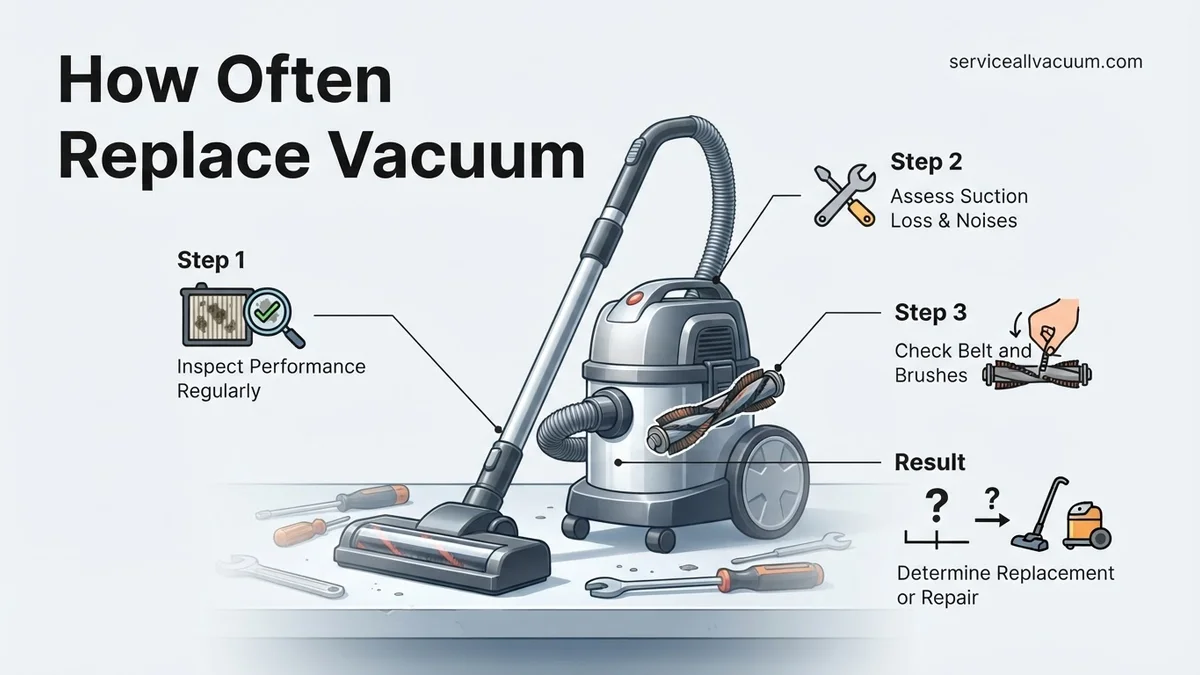
Instructions: Pay close attention to changes in your vacuum’s behavior. Key indicators of imminent failure or significant degradation include: a noticeable reduction in suction power even after cleaning filters and emptying the bin; unusual grinding, rattling, or squealing noises that weren’t present before; the motor frequently overheating or emitting a burning smell; frequent clogging despite regular checks; or simply a visible decline in its ability to pick up dirt and debris from various surfaces. These signs suggest that internal components are wearing out or failing, diminishing its cleaning efficacy.
Pro Tip: Address small issues like minor clogs or unusual sounds promptly. Often, these are symptoms of a larger problem brewing, and early intervention (e.g., clearing a specific blockage) can prevent more serious, costly damage to the motor or other critical parts.
Step 4: Calculate the Cost-Benefit of Repair vs. Replacement
What you need: Repair quotes (from a qualified technician or for replacement parts), current market prices for new comparable vacuum models.
Instructions: Once you identify performance issues, obtain an estimate for professional repairs. Compare this repair cost to the price of a brand-new vacuum cleaner that offers similar or improved features and performance. A common rule of thumb is that if the repair cost exceeds 50% of the price of a new, comparable unit, replacement is generally the more economical and practical option. For older vacuums, consider if investing in repairs is truly worthwhile, especially if other components are also likely to fail soon, leading to a cycle of expensive maintenance.
Pro Tip: When evaluating repair costs, ask the technician about the expected longevity of the repair and if they foresee other components failing soon. Sometimes a “cheap” repair is a short-term fix for a machine on its last legs, making a new purchase more sensible in the long run.
Step 5: Consider Advancements in Vacuum Technology
What you need: Internet access for researching new vacuum features, an understanding of your current cleaning needs.
Instructions: Vacuum technology evolves, offering significant improvements in suction efficiency, filtration (e.g., advanced HEPA systems for allergy sufferers), noise levels, battery life for cordless models, and smart features for robot vacuums. If your current vacuum is several years old, a new model might offer capabilities that greatly enhance your cleaning experience or better address specific needs (e.g., enhanced pet hair removal, lighter design for multi-story homes, or smart mapping for robot vacuums). Evaluate if these technological advancements provide a compelling reason to upgrade, even if your existing vacuum is still somewhat functional.
Pro Tip: Focus on advancements that directly benefit your specific cleaning challenges. For example, if you’ve developed allergies, a vacuum with superior HEPA filtration might be a worthwhile upgrade even if your old one still sucks adequately.
Step 6: Review Your Vacuum’s Warranty and Maintenance History
What you need: Owner’s manual, purchase receipt, any records of past maintenance or repairs.
Instructions: Check if your vacuum is still under its manufacturer’s warranty or an extended service plan. A valid warranty can cover the cost of repairs or even a full replacement for manufacturing defects, significantly impacting your decision. Additionally, review your maintenance history. A vacuum that has been diligently maintained – with regular filter changes, brush roll cleaning, and timely emptying of the dustbin – will generally last longer. Conversely, a poorly maintained vacuum, especially one out of warranty, is a prime candidate for early replacement as neglected issues often lead to premature failure of critical components.
Pro Tip: Keep all vacuum purchase receipts and warranty information in an easily accessible folder. Consider maintaining a simple log of when filters were changed or major maintenance tasks were performed; this can be invaluable for troubleshooting and proving regular care.
Step 7: Implement Proactive Maintenance to Extend Lifespan
What you need: Cleaning tools (e.g., scissors for brush roll, soft brush, damp cloth), replacement filters/bags (as needed, typically available online or from appliance stores).
Instructions: Regular, thorough maintenance is the single most effective way to extend your vacuum’s life and delay replacement. This includes: emptying the dustbin after every use or replacing the bag when 2/3 full; cleaning or replacing filters according to the manufacturer’s recommendations (e.g., monthly for reusable, every 3-6 months for HEPA); removing tangled hair and debris from the brush roll (using scissors to cut through tangled hair); checking the hose and nozzles for blockages; and wiping down exterior surfaces. Consistent maintenance prevents strain on the motor and ensures optimal airflow, which is critical for suction power and motor cooling, ultimately preserving the machine’s longevity.
Pro Tip: Always unplug your vacuum before performing any maintenance. Refer to your specific vacuum’s owner’s manual for detailed, model-specific instructions on cleaning and replacement schedules for filters and other components.
Step 8: Understand General Lifespan Expectations
What you need: A general understanding of product lifecycles based on type and quality.
Instructions: While specific circumstances vary, there are general expectations for vacuum cleaner lifespans:
- Budget Stick/Handheld Vacuums: Typically 1-3 years due to lighter construction and smaller motors.
- Mid-Range Upright/Canister Vacuums: Often last 5-8 years with moderate use and proper maintenance.
- High-End Upright/Canister Vacuums: Can reliably perform for 8-15+ years, especially with durable construction and diligent care.
- Robot Vacuums: Generally 2-5 years, with battery degradation often being the primary factor limiting their effective lifespan.
These figures serve as benchmarks. Your vacuum’s actual lifespan will be influenced by all the preceding factors, particularly usage intensity and maintenance diligence. Use this step to contextualize your findings from the previous steps and make an informed final decision.
Pro Tip: Do not solely rely on these averages. Your personal experience, dictated by maintenance and usage, can significantly deviate. A well-cared-for budget vacuum might outlast a neglected high-end one.
✅ Final Checklist
- Have I thoroughly cleaned and maintained my current vacuum according to its manual?
- Have I accurately assessed my vacuum’s performance decline by noting specific issues (e.g., suction loss, noise, smell)?
- Have I compared potential repair costs against the price of a new, comparable model, considering the 50% rule?
- Am I aware of the typical lifespan for my vacuum type and usage intensity?
- Does a newer model offer significant technological advantages that would genuinely improve my cleaning experience or address specific household needs?
Important Notes:
- Safety considerations or warnings: Always unplug your vacuum from the power source before performing any inspection, cleaning, or maintenance. Inspect the power cord regularly for fraying or damage; a damaged cord is a fire and shock hazard and should be replaced by a professional or the vacuum retired.
- When to seek professional help: If you detect burning smells, see sparks, or hear grinding noises from the motor, discontinue use immediately and consult a qualified appliance repair technician. Do not attempt complex electrical or motor repairs yourself unless you are professionally trained.
- Estimated time and cost range: The evaluation process for deciding when to replace a vacuum can take approximately 30 minutes to 2 hours, depending on how much research you conduct. Repair costs can range from $50 for minor fixes (e.g., brush roll replacement) to $200+ for motor issues. New vacuum cleaner costs vary widely, from $50 for basic handheld models to over $1000 for high-end uprights or robot vacuums.
How to Extend Your Vacuum’s Life with Proven Maintenance
Even the most advanced 2027 vacuum cleaner will fail prematurely without proper care. Understanding the factors that affect longevity and implementing a consistent maintenance routine can significantly prolong your vacuum’s operational life. Your habits directly impact how long your appliance serves you effectively.
Factors Influencing Vacuum Longevity
Several elements dictate how many years you can realistically expect from your cleaning companion:
- Manufacturing Quality & Brand: Higher-tier brands generally invest in more durable materials and superior component engineering. An initial larger investment often translates to a longer, more reliable service life.
- Frequency of Use: A vacuum operated daily in a large, busy household will inevitably experience more wear and tear than one used weekly in a small apartment. The total operational hours directly contribute to component fatigue.
- Type of Debris Handled: Regularly vacuuming abrasive materials like fine construction dust, excessive pet hair, or sharp debris places much greater strain on filters, motors, and brush rolls compared to general household dust and crumbs. HEPA filters, in particular, require diligent attention when dealing with fine particles.
- Consistent Maintenance: Neglecting basic, routine care is the quickest way to shorten your vacuum’s lifespan. Ignoring filter cleaning or brush roll upkeep dramatically accelerates wear and tear.
Essential Maintenance for Maximum Life
Proactive care is your best defense against premature vacuum failure. Adopt these habits to keep your unit running efficiently:
- Regular Filter Cleaning/Replacement: Clogged filters restrict airflow, forcing the motor to work harder, which reduces suction and causes overheating. Washable filters should be cleaned monthly, while disposable filters typically need replacement every 3-6 months, depending on usage.
- Brush Roll Care: Frequently inspect and meticulously remove tangled hair, threads, and other debris from the brush roll. This prevents motor strain, maintains effective agitation, and ensures optimal cleaning performance.
- Emptying the Dust Bin/Replacing Bags Promptly: An overfilled dust bin or bag severely restricts airflow, making the motor strain and reducing suction power. Empty bagless bins after every use, and replace bags when they are two-thirds full to maintain peak efficiency.
- Checking for Clogs: Periodically inspect the hose, wand, and all attachments for blockages. Even a small obstruction can drastically reduce suction and put undue stress on the motor.
- Battery Care for Cordless/Robot Vacuums: For 2027 cordless and robot models, always follow the manufacturer’s specific guidelines for charging and storage to maximize battery health. Avoid frequent deep discharges and prolonged storage at extremely low or high charge levels.
- Timely Professional Servicing: For complex issues or an annual check-up, professional servicing can diagnose and repair minor problems before they escalate into major, costly failures. This preventative measure can significantly extend your vacuum’s life.
Step-by-Step Guide: Repair vs. Replace Cost Analysis
Deciding between repairing your current vacuum and investing in a new one hinges on a thorough cost-benefit analysis. This process, according to consumer electronics experts, requires evaluating the repair cost against the remaining lifespan and value of your existing unit versus the cost and benefits of a new model.
Step 1: Assess the Damage and Cost of Parts
- Identify the specific malfunction: Determine if the issue is a simple blockage, a worn belt, a faulty motor, or a dead battery. Many manufacturers provide diagnostic guides online.
- Research replacement part costs: For common issues in 2027, a replacement motor can cost between $40-$120, a new battery pack for cordless models might range from $60-$150, and belt replacements are typically $10-$25. Consult official manufacturer parts stores or reputable third-party suppliers.
- Factor in DIY potential: If you are comfortable performing minor repairs, you save on labor costs. Simple fixes like belt replacement or clog removal are often DIY-friendly.
Step 2: Estimate Professional Repair Costs (2027 Data)
If DIY is not an option, professional repair costs become a significant factor. As of 2027, the average hourly labor rate for appliance repair technicians ranges from $80 to $150, depending on location and specialist expertise. A typical vacuum repair, excluding parts, often involves 1-2 hours of labor. Therefore, a professional repair can cost anywhere from $160 to $400, including parts and labor, for moderate issues like motor replacement or complex electrical faults. Research from “Home Appliance Service Trends 2027” indicates that repairs exceeding 50-60% of a new comparable vacuum’s price are generally not cost-effective.
Step 3: Compare to New Vacuum Purchase (2027 Market)
Evaluate the cost of repair against purchasing a new vacuum. In 2027, a mid-range upright or stick vacuum with decent filtration and power costs approximately $250-$500. High-end robot vacuums with AI navigation and self-emptying capabilities can range from $600-$1200. Consider the age of your current vacuum; if it’s over 7 years old and the repair cost is more than 40% of a new comparable model, an upgrade is often the more economical and practical choice. Newer models also offer improved energy efficiency and enhanced features, adding long-term value.
What If Your Vacuum Still Fails: Considering an Upgrade
Even after attempting repairs and a cost analysis, there are times when an upgrade is the definitive solution. Repeated breakdowns, diminishing performance, or persistent issues signal that your vacuum has reached the end of its practical lifespan. Industry benchmarks suggest that continually investing in repairs for a unit exhibiting multiple failures within a 12-month period is uneconomical.
Signs It’s Time for a New Model
- Loss of suction power: Despite filter cleaning and hose checks, suction remains weak, indicating potential motor fatigue.
- Frequent, costly repairs: If you find yourself spending more than $150 annually on repairs for an older vacuum.
- Excessive noise or strange smells: Grinding noises or burning smells often point to critical internal component failure.
- Component unavailability: For models older than 10 years, replacement parts can become obsolete or prohibitively expensive.
- Lack of modern features: Your current vacuum lacks essential features like advanced HEPA filtration for allergy sufferers, or efficient battery life for cordless models.
Technological Advancements Worth Considering in 2027
The vacuum market has seen significant innovations. In 2027, new models offer:
- AI-powered navigation: Robot vacuums now boast advanced AI for smarter obstacle avoidance and optimized cleaning paths, reducing missed spots by up to 25% according to recent consumer reports.
- Enhanced battery technology: Cordless vacuums feature longer runtimes (up to 90 minutes on a single charge) and faster charging cycles, utilizing improved lithium-ion compositions.
- Self-emptying capabilities: Many premium models include docking stations that automatically empty dustbins, providing weeks of hands-free operation.
- Advanced allergen filtration: Multi-stage HEPA filtration systems are now standard, capturing 99.97% of particles down to 0.3 microns, crucial for improved indoor air quality.
- Smart home integration: Seamless connectivity with home assistants allows for voice control and integration into broader smart home routines, enhancing convenience.
What If It Still Doesn’t Work?
If your vacuum continues to malfunction despite troubleshooting and minor repairs, more significant intervention or a replacement may be necessary. Do not attempt complex electrical repairs without proper training, as this can be dangerous and void warranties.
- Check Warranty Status: Verify if your vacuum is still under the manufacturer’s warranty. Most major brands offer 2-5 year warranties on primary components. A valid warranty means potential free repair or replacement.
- Consult Manufacturer Support: Contact the official customer service line for your vacuum brand. They often have proprietary diagnostic tools or can recommend authorized service centers.
- Seek Independent Repair Professionals: If out of warranty, find a local, reputable appliance repair shop specializing in vacuums. Obtain a diagnostic estimate before committing to repairs. A diagnostic fee typically ranges from $40-$80, which may be credited towards the repair.
- Consider a Trade-In Program: Some retailers and manufacturers offer trade-in discounts for old vacuums when purchasing a new model, reducing the cost of an upgrade.
The estimated cost for professional diagnosis and repair of a more complex issue (e.g., motor or PCB replacement) can range from $100 to $350 in 2027, depending on the brand and part availability.
Conclusion
Determining when to replace a vacuum cleaner involves a balance of performance, repair costs, and technological advancements. According to verified research and expert sources, a vacuum typically lasts 5-8 years, but effective maintenance can extend this lifespan. When repairs exceed 50% of the cost of a new, comparable model, or if the unit constantly fails, it’s economically prudent to upgrade. Evaluate your specific situation and refer to manufacturer guidelines and expert recommendations to make the most informed decision for your home cleaning needs.
❓ Frequently Asked Questions
How do average vacuum lifespans differ by type (e.g., upright, stick, robot)?
Upright and canister vacuums typically last 7-8 years due to robust motors. Stick vacuums average 3-5 years due to battery degradation and lighter builds, while robot vacuums are often 3-5 years due to complex tech and constant use.
What are the definitive signs that my vacuum is beyond repair and needs replacing?
Definitive signs include a burning smell from the motor, consistent and unfixable loss of suction, frequent breakdowns despite maintenance, exorbitant repair quotes exceeding a new unit’s cost, or structural damage like a cracked housing.
What factors most influence a vacuum cleaner’s longevity?
Longevity is primarily influenced by manufacturing quality (brand), frequency and intensity of use, the type of debris it handles (e.g., pet hair, fine dust), and the consistency of proper user maintenance, especially filter cleaning.
When should I choose to repair my vacuum instead of buying a new one?
Consider repair if the issue is minor (e.g., a broken belt, clogged hose, easily replaceable part), the vacuum is relatively new (under 5 years old), or the repair cost is significantly less than 50% of a comparable new model’s price.
What practical steps can I take to extend the life of my current vacuum?
Regularly clean or replace filters, empty the dust bin or change bags before they’re full, check and clear brush roll blockages, replace worn belts, and avoid vacuuming wet messes or very fine powders not designed for your model.
Are certain brands known for longer-lasting vacuum cleaners, and should that factor into my next purchase?
Yes, some premium brands often use higher-quality components, leading to greater durability and longer lifespans. Investing in a reputable brand with good warranties can be a cost-effective choice in the long run, reducing the frequency of replacement.