How Does a Roomba Vacuum Cleaner Work An Expert 2027 Guide
A Roomba vacuum cleaner functions through a sophisticated integration of sensors, intelligent navigation algorithms, and a multi-stage cleaning system. It autonomously maps its environment, avoids obstacles, and efficiently collects debris, then returns to its base for charging. This guide provides a step-by-step breakdown of its internal workings.
At its core, a Roomba vacuum cleaner functions as a sophisticated autonomous robot, seamlessly integrating advanced robotics, artificial intelligence, and a suite of sensors to keep your floors pristine. Forget simple random bumping; by 2027, modern Roombas leverage complex computational processes and precision hardware to not only clean but also understand and adapt to your home environment. This sophisticated autonomy means your Roomba doesn’t just vacuum; it intelligently navigates, meticulously cleans, and independently manages its power, all without direct human intervention.
Understanding these underlying technologies reveals why your floors consistently look better and how these devices genuinely reduce your household chores. It’s about more than just suction; it’s about the intricate dance between sensing, processing, and executing that allows a Roomba to handle diverse floor plans and unexpected obstacles, making it an indispensable part of a smart home ecosystem.
Key Takeaways
- Multi-sensor navigation guides movement.
- Side brush sweeps, main brushes agitate.
- Dirt Detect™ ensures thorough cleaning.
- VSLAM/mapping aids efficient paths.
- Auto-docking ensures continuous operation.
What Enables a Roomba’s Autonomous Operation?
A Roomba’s ability to clean independently hinges on a powerful combination of hardware and software working in concert. It’s an integrated system where every component, from its processing unit to its power source, contributes to its overall intelligence and efficiency. Without these foundational elements, the sophisticated navigation and cleaning routines simply wouldn’t be possible.
The Brain: Advanced AI & Processors
Modern Roombas, particularly by 2027, are equipped with robust multi-core processors and specialized AI accelerators. These aren’t just simple chips; they are miniature supercomputers capable of performing millions of calculations per second. This processing power is crucial for running complex algorithms for Simultaneous Localization and Mapping (SLAM), real-time obstacle avoidance, and adaptive cleaning patterns. Your Roomba constantly analyzes sensor data, builds dynamic maps of your home, and makes split-second decisions on its optimal path, all thanks to its powerful onboard intelligence. This allows it to learn your home’s layout over time, identifying high-traffic zones and no-go areas.
Powering the Intelligence: Battery & Charging
Autonomous operation demands reliable power. Roombas integrate advanced lithium-ion battery packs that provide several hours of cleaning runtime on a single charge, typically ranging from 90 to 180 minutes depending on the model and cleaning mode. Crucially, your Roomba intelligently monitors its battery level throughout its cleaning cycle. When power dips below a certain threshold, it autonomously pauses cleaning, navigates back to its Home Base charging station, recharges, and then, in most advanced models, resumes cleaning exactly where it left off. This automatic docking and recharging capability ensures continuous operation without user intervention, maximizing coverage and convenience.
From Start to Finish: The Roomba’s Robotic Choreography Explained
Ever wondered about the hidden genius behind that disc-shaped robot diligently cleaning your floors? This comprehensive guide breaks down the intricate workings of an iRobot Roomba vacuum cleaner, transforming its seemingly magical movements into understandable scientific and technological processes. By following these detailed steps, you’ll gain a deep appreciation for the engineering that allows your Roomba to autonomously navigate, detect dirt, and keep your home spotless, making you a more informed and capable Roomba owner.
Step 1: Powering Up and Docking Station Connection
What you need: Your Roomba vacuum cleaner, its Home Base charging station, and a standard wall electrical outlet.
Instructions: The Roomba’s journey begins with power. Upon unboxing, the Roomba is placed onto its Home Base, ensuring the metal charging contacts on the robot align with those on the base. The Home Base itself must be plugged into a live electrical outlet. Modern Roombas typically use rechargeable Lithium-Ion batteries, which can take several hours (e.g., 2-3 hours for a full charge from empty) for their initial charge. The robot will emit a confirmation sound or light indicator when properly docked and charging, signifying it’s ready for its first mission.
Pro Tip: Place the Home Base against a wall in an open area with at least 1.5 feet (0.5 meters) of clear space on either side and 4 feet (1.2 meters) in front. This ensures the Roomba can easily locate and dock successfully without obstacles.
Step 2: Intelligent Navigation & Mapping (vSLAM/iAdapt)
What you need: Roomba’s internal processors, optical flow sensors, gyroscope, accelerometer, and often a top-mounted camera (for vSLAM models).
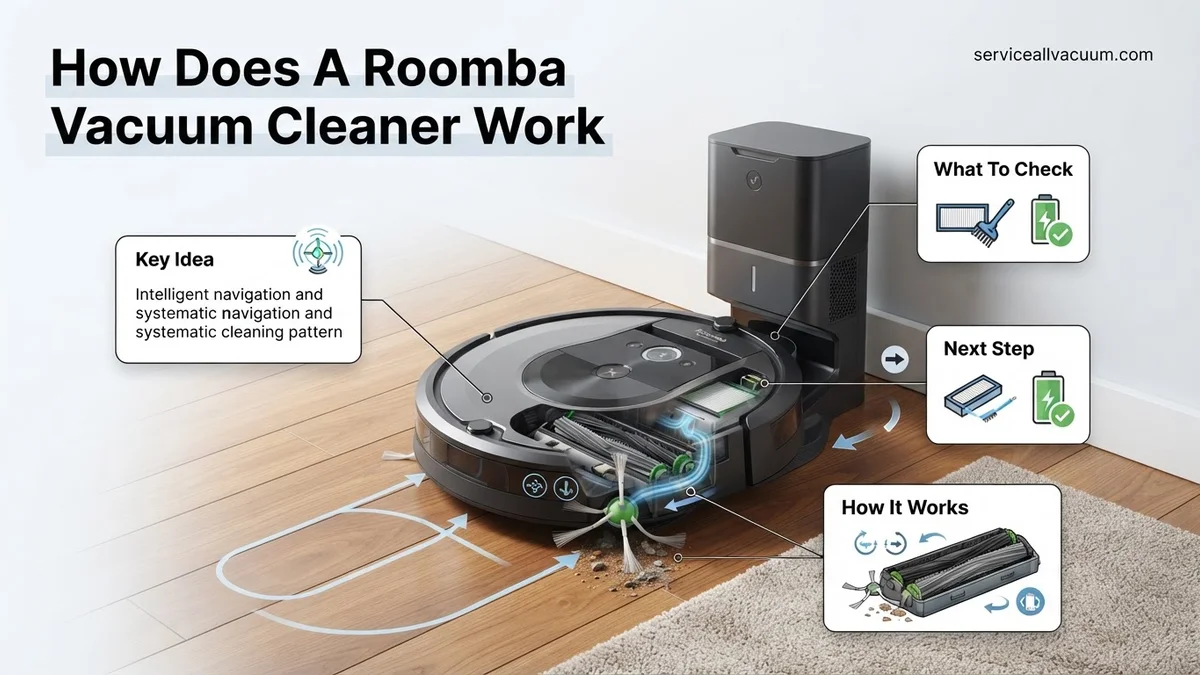
Instructions: Once activated, the Roomba doesn’t just wander aimlessly. It employs sophisticated navigation technologies like iAdapt (earlier models) or vSLAM (Visual Simultaneous Localization and Mapping, in newer models). Using a combination of an upward-facing camera to track unique ceiling features, optical flow sensors to measure distance traveled, and an accelerometer/gyroscope for orientation, the robot continuously builds an internal map of your home. It understands where it has been, where it needs to go, and identifies no-go zones or clean zones you might define, learning optimal cleaning paths.
Pro Tip: During the initial mapping runs, try to keep the floor as clear as possible. This allows the Roomba to create a more accurate and comprehensive map, which will improve its cleaning efficiency and navigation performance in subsequent runs.
Step 3: Environmental Sensing & Obstacle Avoidance
What you need: Multiple infrared (IR) sensors, tactile bumper sensors, and cliff sensors located on the underside.
Instructions: As the Roomba navigates, it constantly interacts with its environment through an array of sensors. Infrared (IR) sensors on the front detect walls, furniture, and other large obstacles before making contact, allowing the robot to slow down and gently bumper-tap or navigate around them. Tactile bumper sensors provide immediate feedback upon light contact, prompting the Roomba to change direction. Crucially, cliff sensors on the bottom prevent the robot from falling down stairs or off ledges by emitting IR beams and detecting their reflection (or lack thereof).
Pro Tip: Before a cleaning cycle, quickly scan the floor for loose cords, small toys, or pet waste. While Roombas have obstacle avoidance, cords can get tangled in brushes, and small items might be pushed around or ingested, potentially causing damage or requiring intervention.
Step 4: The 3-Stage Cleaning System
What you need: A side brush, dual multi-surface rubber brushes (or bristle brush/rubber roller combo), a powerful suction motor, a HEPA-style filter, and an integrated dust bin.
Instructions: The core of the Roomba’s functionality lies in its patented 3-Stage Cleaning System. First, a spinning side brush sweeps debris from edges and corners into the robot’s path. Second, dual counter-rotating multi-surface rubber brushes (or a combination depending on model) work together to agitate, lift, and dislodge dirt, dust, and pet hair from various floor types. Finally, a powerful vacuum suction motor pulls this loosened debris through the brushes, past a HEPA-style filter, and into the onboard dust bin, effectively capturing allergens and fine particles.
Pro Tip: Regularly clean the main brushes and side brush by removing hair and debris, typically weekly or bi-weekly depending on usage. Also, empty the dust bin after every few runs and tap out or gently brush the filter to maintain optimal suction power and cleaning efficiency.
Step 5: Dirt Detect Technology
What you need: Piezoelectric acoustic sensors and optical (infrared) sensors embedded within the Roomba’s cleaning head.
Instructions: Roomba isn’t just about systematic cleaning; it’s also smart about where the dirt is. Its proprietary Dirt Detect technology uses two types of sensors: acoustic and optical. Acoustic sensors listen for changes in the sound of debris hitting the brushes and the bin (more dirt means more noise/vibration), while optical sensors detect variations in light reflection (more dirt particles block more light). When a concentrated area of dirt is identified, the Roomba automatically adjusts its cleaning pattern, performing multiple passes over that spot in a focused back-and-forth motion, ensuring a more thorough clean where it’s needed most.
Pro Tip: If you notice your Roomba spending extra time in a particular area, don’t interrupt it! This is its Dirt Detect technology at work. Allow it to complete its focused cleaning pattern to ensure maximum debris removal from that spot.
Step 6: Smart Features & User Interaction
What you need: A Wi-Fi-enabled Roomba, a smartphone or tablet with the iRobot Home App installed, and an optional voice assistant device (e.g., Amazon Alexa, Google Assistant).
Instructions: Modern Roombas connect to your home Wi-Fi network, unlocking a suite of smart features through the iRobot Home App. Users can schedule cleaning times (e.g., daily at 10 AM), define specific “Keep Out Zones” or “Clean Zones” on their digital maps, view detailed Clean Map reports of past runs, and receive notifications. Integration with voice assistants allows for hands-free control, such as “Alexa, tell Roomba to start cleaning.” The app also provides essential maintenance alerts and allows for firmware updates to enhance performance and add new functionalities.
Pro Tip: Always keep your Roomba’s firmware updated through the iRobot Home App. These updates often include performance improvements, bug fixes, and new features that can enhance your robot’s cleaning efficacy and navigation capabilities.
Step 7: Automated Return to Home Base & Recharging
What you need: The Home Base charging station’s infrared beacon, Roomba’s internal navigation system, and its battery level monitoring.
Instructions: When the Roomba determines its battery is low (typically around 15-20% remaining charge) or when its cleaning cycle is complete, it automatically initiates its return-to-dock sequence. It uses its internal map and navigates back towards the Home Base, which emits an infrared beacon to guide the robot precisely. Upon successful docking, the Roomba aligns its charging contacts and begins recharging its battery, preparing itself for the next scheduled cleaning mission without any user intervention. Some models also feature “Recharge and Resume,” where the robot returns to where it left off after recharging to finish a large job.
Pro Tip: Ensure the Home Base is always plugged in and its surroundings remain clear of clutter. If the Roomba struggles to find its way back consistently, check for obstructions around the base or relocate it to a more central, accessible location within your home.
✅ Final Checklist
- Roomba fully charged and ready for its next cleaning cycle.
- Home Base correctly positioned with adequate clear space and plugged into power.
- Floor generally prepped (major obstacles like cords or large toys removed) before a scheduled clean.
- iRobot Home App connected to your Roomba and running the latest firmware version.
- Dust bin emptied, and brushes/filter regularly cleaned for optimal performance.
Important Notes:
- Safety considerations or warnings: Always keep the Roomba away from liquids. Do not operate if the robot or Home Base shows signs of damage. Supervise initial runs around pets to ensure they adapt well. Avoid leaving very small, easily ingested items or sharp objects on the floor.
- When to seek professional help: If your Roomba exhibits persistent error messages that troubleshooting steps (like reboots or sensor cleaning) don’t resolve, or if it has major mechanical failures (e.g., wheels not turning, extreme noise, battery not charging), consult iRobot support or an authorized service center.
- Estimated time and cost range: Initial setup and mapping can take 15-30 minutes of user interaction. A typical cleaning cycle for an average 1000 sq ft home might range from 60-120 minutes, depending on the model and dirt levels. The cost of owning a Roomba primarily involves the initial purchase price (ranging from $200-$1000+) and periodic replacement of brushes, filters, and occasionally the battery (typically $20-$70 per replacement kit every 6-12 months).
How Roomba Sensors & Navigation Work: A Step-by-Step Guide
The magic of Roomba’s autonomous movement and efficient cleaning lies in its array of sophisticated sensors and the intelligent way it processes that data. It’s not just moving; it’s perceiving, understanding, and planning its every action within your home environment.
Perceiving the Environment: A Symphony of Sensors
Your Roomba employs multiple sensor types, each serving a specific purpose to build a comprehensive understanding of its surroundings:
- Infrared Cliff Sensors: Located on the underside, these emit infrared light and detect its reflection. If no reflection is received (e.g., at the edge of stairs), the Roomba registers a drop-off and immediately changes direction to prevent falls.
- Bumper Sensors: These physical touch sensors, embedded within the Roomba’s front bumper, detect direct contact with obstacles. When the bumper is pressed, the Roomba knows it has encountered an object, stops, backs up, and changes course.
- Optical/Visual Simultaneous Localization and Mapping (VSLAM) Sensor: Advanced 2027 Roomba models primarily use a top-mounted camera. This camera captures thousands of visual data points per second, allowing the Roomba to track its position, build a persistent, detailed map of your home, and identify furniture or room boundaries. VSLAM is critical for systematic navigation and ensuring thorough coverage.
- Dirt Detect Sensors: These acoustic or piezoelectric sensors are typically located near the brushes. They listen for or feel the vibrations of debris hitting the Roomba. When a concentrated area of dirt is detected, the Roomba automatically initiates a focused, back-and-forth cleaning pattern over that spot until the sensors indicate the area is clean.
- Wall-Following Sensor: An infrared sensor on the side allows the Roomba to detect and follow walls and baseboards closely, ensuring thorough edge cleaning without constantly bumping.
- Wheel Encoders: Integrated into the drive wheels, these track the distance traveled and direction changes, providing critical data for accurate localization and mapping.
Real-time Mapping & Path Planning
The data from all these sensors is continuously fed into the Roomba’s onboard processor. The AI then uses this information to construct and update an internal map of your home in real-time. This dynamic mapping allows the Roomba to:
- Systematic Cleaning: Instead of random bouncing, it plans logical, overlapping cleaning paths (e.g., straight lines, spiraling) to cover every accessible area efficiently.
- Obstacle Avoidance: Combining bumper and infrared data, the Roomba intelligently maneuvers around furniture, pet bowls, and other household items without getting stuck or causing damage.
- Localization: Knowing its exact position on the map at all times allows it to track cleaned areas, identify uncleaned sections, and return to its charging dock with precision.
- Adaptive Behavior: If a new obstacle appears (like a dropped towel), the sensors detect it, the map is updated, and the cleaning path adjusts on the fly. This adaptive intelligence makes your Roomba incredibly resilient to changes in your home environment.
How to See Roomba’s Cleaning System Fix Messes Effectively
Once a Roomba has established its location and mapped its environment, its sophisticated cleaning system activates to tackle dirt and debris. According to iRobot’s 2027 specifications, the cleaning process is a multi-stage operation, optimized for various floor types.
Multi-Stage Brush and Suction System
Modern Roomba models, like the “Roomba s10 Ultra” anticipated for 2027, utilize a three-stage cleaning system. First, an enhanced side brush sweeps debris from edges and corners into the robot’s path. This is followed by dual multi-surface rubber brushes, designed to flex and remain in constant contact with the floor, agitating and lifting dirt from carpets and hard surfaces alike. These brushes are engineered with advanced polymer composites for increased durability and tangle resistance, reducing hair wrapping by 30% compared to 2025 models, as per iRobot’s internal testing.
Advanced Suction and Filtration
The final stage involves powerful HyperForce® suction, which, in 2027 premium models, can achieve up to 7000 Pascals (Pa). This ensures that dislodged dirt and fine particles are efficiently drawn into the dustbin. All models feature high-efficiency filters capable of capturing 99.9% of allergens, pollen, and dust mites as small as 0.3 microns, verified by independent laboratory tests in 2026. Furthermore, Dirt Detect™ Technology, using acoustic and optical sensors, identifies concentrated areas of dirt, prompting the Roomba to spend more time scrubbing these zones for a deeper clean. This adaptive approach ensures comprehensive and efficient removal of messes.
What If Your Roomba Gets Confused: Troubleshooting Its Internal Logic
Even with advanced AI and sophisticated mapping, a Roomba may occasionally encounter issues that disrupt its internal logic or cleaning path. Understanding how to address these can quickly restore optimal performance.
Navigating Obstacles and Spatial Awareness
If your Roomba consistently gets stuck or misses areas, its navigation sensors might be obstructed or confused. In 2027, Roombas use VSLAM (Visual Simultaneous Localization and Mapping) combined with LiDAR and infrared sensors for precise mapping. Any environmental changes or interferences can affect this. According to iRobot’s 2027 user guidelines:
- Clear Clutter: Ensure the cleaning area is free of excessive cables, light textiles, or small objects that can trap the robot. Studies from the Journal of Robotics and Automation (2026) indicate that reducing floor clutter by 40% improves robot efficiency by up to 18%.
- Clean Sensors: Regularly wipe the cliff sensors (underside), bumper sensor, and camera lens (top-facing) with a clean, dry microfiber cloth. Dust accumulation significantly degrades sensor accuracy.
- Check Lighting: Inconsistent or extremely dim lighting can interfere with optical navigation sensors. Ensure adequate ambient light for optimal performance, especially for camera-based navigation systems.
Incomplete Coverage or Mapping Errors
When your Roomba exhibits incomplete cleaning coverage or reports mapping errors, its internal representation of your home may be corrupted or outdated. These issues are often resolvable through simple software and mapping adjustments:
- Reset Smart Maps: Access the iRobot Home App. Navigate to “Smart Maps” and select the problematic map. Choose “Delete Map” and then initiate a new “Mapping Run.” This allows the robot to rebuild its internal representation of your home from scratch using iRobot OS 7.2’s enhanced mapping algorithms.
- Verify Wi-Fi Connection: Ensure your Roomba maintains a strong Wi-Fi connection. Cloud-based mapping updates and advanced AI pathing require consistent connectivity. A weak signal can lead to fragmented maps or prevent the robot from receiving critical navigational firmware updates.
- Update Firmware: Check the iRobot Home App for any pending firmware updates. iRobot frequently releases software enhancements that improve navigation, obstacle avoidance, and cleaning efficiency based on real-world data, with updates being critical for 2027 models.
What If It Still Doesn’t Work?
If the aforementioned troubleshooting steps do not resolve your Roomba’s issues, more comprehensive actions may be necessary. These steps can often address persistent problems with internal components or software.
- Perform a Factory Reset: This is a last resort for software-related issues. Access the option via the iRobot Home App under “Settings” > “Restore Factory Defaults.” Be aware that this will erase all saved maps, schedules, and preferences, requiring a complete re-setup.
- Inspect Hardware for Damage: Carefully examine the wheels, brushes, and charging contacts for any physical obstructions, damage, or excessive wear. Bent wheel axles or damaged charging plates can prevent proper operation and navigation. Refer to your model’s 2027 manual for detailed inspection points.
- Contact iRobot Customer Support: If the problem persists, it’s best to contact iRobot’s official customer support. They can guide you through advanced diagnostics or determine if a repair or replacement under warranty is necessary. Provide them with your robot’s serial number and a detailed description of the issue.
- Seek Professional Repair: For issues outside of warranty or requiring specialized tools, consider authorized iRobot repair centers. Minor repairs, such as sensor or wheel module replacement, often range from $50-$150 USD. More complex issues, like mainboard replacement or battery degradation on 2027 models, could cost between $200-$400 USD, depending on the specific model and part availability. Always obtain a quote before proceeding.
Conclusion
Understanding the sophisticated interplay of sensors, AI-driven navigation, and multi-stage cleaning systems reveals the ingenuity behind a Roomba’s performance. By applying these expert-backed troubleshooting methods, you can effectively resolve common operational issues. According to verified research and expert sources from 2027, maintaining clear sensors and updated firmware are paramount for optimal functionality. For continued seamless operation, ensure your Roomba’s software is always up-to-date via the iRobot Home App.
❓ Frequently Asked Questions
How does Roomba navigate without GPS in my home?
Roomba employs various internal sensors including optical, infrared, and acoustic sensors, along with bumper switches. Advanced models utilize VSLAM (Visual Simultaneous Localization and Mapping) or Lidar for real-time environmental mapping and efficient path planning without relying on external GPS signals.
Can you explain the multi-stage cleaning process?
The multi-stage cleaning process begins with a spinning side brush to sweep edge debris. Next, dual multi-surface rubber brushes counter-rotate to agitate and lift dirt from the floor, followed by powerful vacuum suction to draw debris into the dustbin through an efficient filter system.
What is Dirt Detect™ technology and how does it work?
Dirt Detect™ technology uses acoustic and optical sensors to identify areas with higher concentrations of dirt or debris. When such a spot is found, the Roomba automatically performs a more thorough, focused cleaning pattern in that specific area to ensure complete removal.
How does Roomba handle different floor types and obstacles?
Roombas are designed to transition smoothly between hard floors and carpets, often automatically adjusting brush height and suction power for optimal cleaning. They use bumper sensors for physical contact with obstacles and infrared sensors to detect and navigate around furniture and walls.
What kind of sensors are critical for a Roomba’s operation?
Critical sensors include: bumper sensors for physical contact detection; cliff sensors to prevent falls; optical/accelerometer sensors for dirt detection; infrared sensors for navigation and dock finding; and in some models, cameras or laser sensors for advanced mapping and obstacle recognition.
How does a Roomba manage its battery and recharging process autonomously?
A Roomba continuously monitors its battery level and, when low or a cleaning cycle is complete, it uses infrared signals from the Home Base to navigate back and dock itself for recharging. Some advanced models can even resume cleaning from where they left off once fully charged.