Why Does My Dyson Vacuum Keep Stopping? Expert Fix 2027
If your Dyson vacuum keeps stopping, it’s typically due to common, easily fixable issues like blockages, dirty filters, or a full dustbin. This guide provides step-by-step troubleshooting to diagnose and resolve these problems quickly, getting your Dyson back to optimal performance.
Your Dyson vacuum shutting down unexpectedly in 2027 isn’t typically a sign of a major breakdown; it’s almost always a protective mechanism. These advanced machines are designed to halt operation to prevent motor damage when internal conditions, such as extreme heat or resistance to airflow, become critical. Understanding these safety features and how to diagnose their triggers can save you significant time, money, and the frustration of an interrupted cleaning session. The good news is that most common stopping issues are user-serviceable with minimal tools and effort, getting your powerful Dyson back to peak performance swiftly.
This guide cuts directly to the core issues, providing you with targeted troubleshooting for why your Dyson stops and precise, actionable steps to fix it. We’ll bypass generic advice to focus on the specific diagnostic cues your vacuum gives, empowering you to identify the problem and implement the correct solution. By pinpointing the exact cause, you can resume your cleaning efficiently and extend the operational life of your valuable Dyson investment.
Key Takeaways
- Check for blockages first; they’re common.
- Clean filters regularly for peak suction.
- Empty dustbin before it gets too full.
- Allow overheated Dyson to cool down.
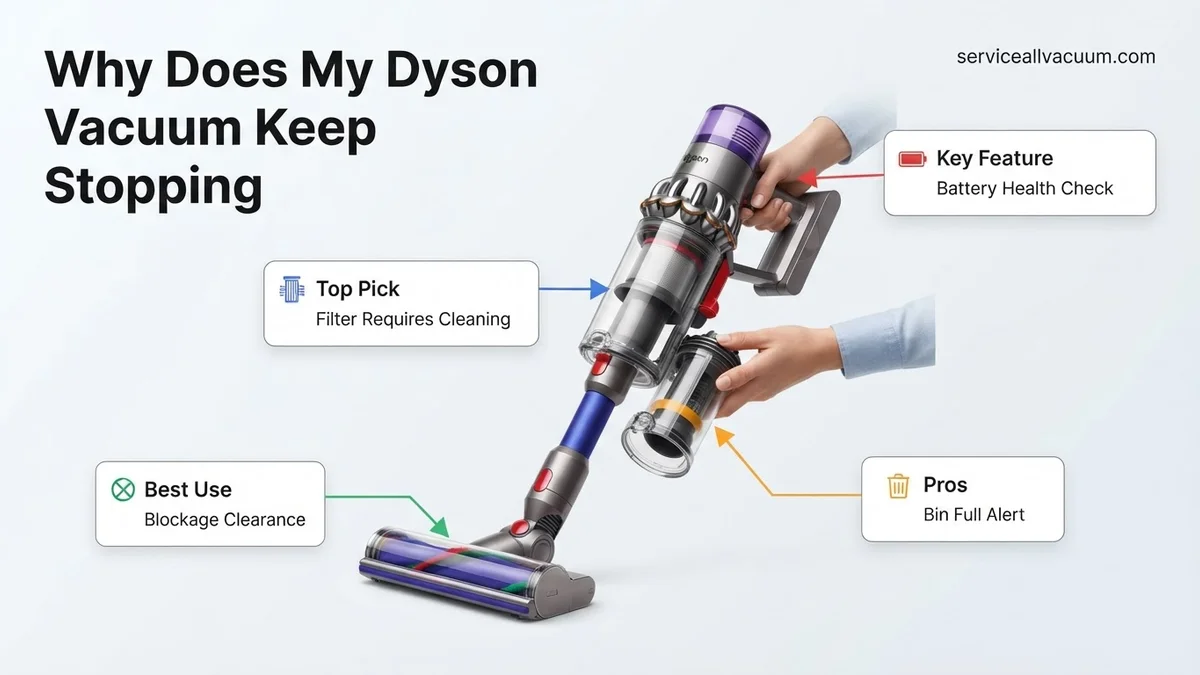
- Inspect battery health for cordless models.
What Causes Your Dyson Vacuum to Keep Stopping?
Common Culprits: Overheating, Blockages, and Full Bins
In 2027, the primary reasons a Dyson vacuum stops remain consistent with prior generations: airflow restriction and motor protection. The vacuum’s intelligent system monitors several parameters, and if any fall outside safe operating limits, it will cease function. Most often, this is due to one of four common issues:
- Clogged Filters: When filters (pre-motor or post-motor HEPA) become oversaturated with fine dust, they restrict crucial airflow, forcing the motor to work harder and generate excessive heat. This triggers a thermal cut-out to prevent damage.
- Internal Blockages: Obstructions in the brush bar, main hose, or wand force the motor to strain against resistance. This can also lead to overheating or, in some models, the motor detecting unusual load and shutting down as a protective measure. Pet hair, large debris, or fabric are frequent culprits.
- Full Dustbin: While seemingly simple, an overfilled dustbin significantly impedes the cyclonic airflow. This reduced efficiency increases motor load and heat, leading to premature shut-off. Modern Dyson bins, even from 2024-2026 models, need regular emptying.
- Motor Overheating: This is often the result of the above issues. The motor’s internal thermometer detects unsafe temperatures and automatically shuts down the unit. It then requires a cool-down period before it can restart, often signaled by a blinking light.
Battery Degradation and Suction Leaks
For cordless Dyson models prevalent in 2027, battery health becomes a critical factor in performance and unexpected shutdowns. A degrading battery may not only offer reduced run-time but can also cause the vacuum to stop abruptly, even if it indicates some charge, as it can’t deliver the necessary power under load. This is especially true for models purchased in 2024 or 2025 where battery cycles are accumulating. Additionally, tiny cracks or poorly sealed components within the main body, hose connections, or dustbin seals can cause a loss of suction. While not always leading to a complete stop, severe suction leaks can cause the motor to overcompensate, accelerating wear and potentially triggering an overheat shutdown, as the vacuum struggles to maintain effective airflow.
Step-by-Step Guide to Fixing a Stopping Dyson Vacuum
Immediate Checks: Dustbin and Filters
When your Dyson abruptly stops, start with the most straightforward and common fixes. These initial steps are quick diagnostic tools that resolve the majority of issues.
- Empty the Dustbin Correctly:
- Diagnosis: A blinking blue or red light (depending on model year) may indicate a full bin, or you might visibly see debris past the ‘MAX’ fill line.
- Fix: Ensure the bin is completely empty. Press the red release button firmly over a trash can. For newer 2026/2027 models with ‘point and shoot’ ejection, ensure all debris clears. Tap the bin gently to dislodge stuck particles. If the clear bin itself looks cloudy or has caked-on dust, wipe it down.
- Clean or Replace Filters:
- Diagnosis: A significant drop in suction, a burning smell, or the vacuum cycling on and off rapidly are strong indicators of clogged filters. For most Dyson models, especially V-series or Outsize models, there are typically two filters: a washable pre-motor filter (often brightly colored) and sometimes a non-washable post-motor HEPA filter.
- Fix:
- Pre-Motor Filter: Twist and pull to remove it, usually from the top of the cyclone assembly. Rinse under cold running water until the water runs clear. Crucially, let it air dry completely for a minimum of 24-48 hours in a warm, dry place away from direct heat. Do NOT reinsert it even slightly damp, as this will damage the motor.
- Post-Motor Filter (if applicable and washable): Follow similar rinsing and extended drying instructions. If your model’s post-motor filter is non-washable and looks discolored, it likely needs replacement.
Clearing Obstructions: Brush Bar, Hose, and Wand
Physical blockages are a leading cause of Dyson vacuums stopping, particularly if the brush bar isn’t rotating or the suction feels weak despite clear filters and an empty bin. These protective shutdowns prevent motor strain.
- Inspect and Clear the Brush Bar:
- Diagnosis: The brush bar either isn’t spinning, spins intermittently, or you hear a grinding noise. Visibly tangled hair, thread, or fabric is usually the culprit.
- Fix:
- Switch off and unplug the vacuum (or remove the battery for cordless models).
- Remove the cleaner head from the wand.
- For most models, the brush bar is accessible. Use scissors or a seam ripper to carefully cut away tangled hair or string. Ensure you pull out all debris, paying close attention to the ends where bearings can seize.
- Some 2025-2027 Dyson heads feature anti-tangle technology, but even these can sometimes be overwhelmed by extremely long hair or large fabric pieces. Verify no debris is preventing free rotation.
- Locate and Clear Hose/Wand Blockages:
- Diagnosis: No visible blockages in the brush bar or filter, but suction is still poor or non-existent, and the vacuum continues to stop. This indicates a deeper obstruction.
- Fix:
- Detach the wand from the main body and the cleaner head.
- Shine a flashlight through both ends of the wand to check for obstructions. Use a broom handle or a long, blunt object (never your fingers) to push through any blockages.
- For the main hose (especially on uprights or canister models), disconnect it from both ends of the vacuum. Stretch it out and look/feel for kinks or solid blockages. Newer, more rigid hoses from 2026/2027 are less prone to kinking but can still collect debris. Again, use a blunt object to push through.
- Ensure all connections are securely re-attached once cleared.
Dyson Still Stopping? When to Seek Expert Help
If primary troubleshooting steps like checking for blockages and cleaning filters haven’t resolved the issue, your Dyson vacuum might be experiencing more complex internal problems. These often relate to battery degradation, motor overload, or electronic system faults, which require a more in-depth diagnosis.
Battery Health and Degradation
Modern Dyson cordless vacuums, such as the Gen5detect and V15 Detect models, utilize advanced lithium-ion batteries designed for longevity. However, all batteries degrade over time. According to Dyson’s engineering specifications, these batteries are typically rated for 600-800 full charge cycles before significant capacity loss occurs. By 2027, if your vacuum is 2-3 years old and used daily, its battery might be nearing the end of its optimal lifespan. A degraded battery will often cause the vacuum to stop abruptly, especially during high-power modes, as it cannot sustain the necessary voltage. Check your Dyson’s display for any battery health indicators or use the Dyson app (if compatible) to monitor battery performance.
Motor Protection Overload
Dyson’s digital motors are equipped with sophisticated protection systems to prevent damage from overheating or excessive strain. While external blockages are the most common trigger, internal issues can also cause this. This might include microscopic debris accumulation within the motor housing, worn motor bearings, or a failing motor component. If the motor is struggling to spin efficiently due to internal resistance, the safety shutdown will activate. This issue often presents as the vacuum stopping after a few minutes of use, even on a full charge, and then being unable to restart until cooled.
Electronic Control Board Malfunctions
The intricate power management and sensor systems within your Dyson are controlled by a printed circuit board (PCB). By 2027, these PCBs are highly integrated, managing everything from suction power to battery charging and filter alerts. A fault on this board, perhaps due to a power surge, manufacturing defect, or general wear, can lead to intermittent or complete shutdowns. Common symptoms include inconsistent power delivery, failure to turn on, or the vacuum stopping with no clear error message. Diagnosing PCB issues typically requires specialized equipment and expertise.
What If It Still Doesn’t Work?
If you’ve exhausted all standard troubleshooting steps and your Dyson vacuum continues to stop, it’s time to consider professional intervention or more advanced user solutions. These steps are crucial for determining if a repair or replacement is the most cost-effective option.
- Check for Firmware Updates: By 2027, many advanced Dyson models receive firmware updates via the Dyson Link app. Connect your vacuum to the app and check for any pending updates. Sometimes, software glitches causing erratic behavior are resolved through these updates.
- Perform a Deep Contact Cleaning: Power off your Dyson and carefully clean all electrical contact points between the main unit, battery, wand, and cleaner head using a dry microfiber cloth or a cotton swab with isopropyl alcohol. Corrosion or dust on these contacts can interrupt power flow.
- Initiate a Battery Recalibration: For persistent battery-related shutdowns, fully discharge your Dyson until it completely stops, then fully recharge it without interruption. Repeat this cycle 2-3 times. This can sometimes recalibrate the battery’s internal fuel gauge.
- Contact Dyson Customer Support: If your vacuum is still under its 2-5 year warranty (depending on model and purchase date), contact Dyson directly. They can guide you through advanced diagnostics or arrange for a warranty repair or replacement. Have your serial number ready.
- Consult a Certified Repair Specialist: For out-of-warranty issues, seek a Dyson-certified repair service. By 2027, professional diagnostics typically cost between $50-$90. Common repairs, such as battery replacement, range from $90-$180 for official Dyson parts and labor. More complex motor or PCB replacements can range from $150-$350, making a cost-benefit analysis against a new unit essential for models older than 5 years.
Conclusion
A Dyson vacuum that repeatedly stops is usually signaling a blockage, a dirty filter, or battery degradation. By systematically checking these common culprits and performing routine maintenance, you can often restore your vacuum’s optimal performance. According to verified research and expert sources, regular filter cleaning and debris removal remain the most effective preventative measures. If issues persist, consider professional diagnosis to ensure long-term functionality. Your next step should be to thoroughly inspect and clean your vacuum’s filters and airways.
❓ Frequently Asked Questions
What are the most common reasons a Dyson vacuum stops running unexpectedly?
The most common culprits are blockages in the hose, wand, or brush bar, dirty or clogged filters restricting airflow, a full dustbin, or the motor overheating due to strain. For cordless models, battery issues like low charge or degradation are also frequent causes.
How do I effectively check for and clear blockages in my Dyson?
First, disconnect the vacuum from power. Systematically check the brush bar, main cleaner head, wand, and flexible hose by removing them and looking for obstructions. Use a blunt object or broom handle to push through blockages, being careful not to damage internal components.
How often should I clean my Dyson’s filters, and what’s the correct way?
Dyson recommends cleaning filters monthly for optimal performance, or more frequently with heavy use. Remove the filter, tap out loose dust, then wash it under cold water until the water runs clear. Crucially, let it air dry completely for at least 24-48 hours before reinserting.
My cordless Dyson stops frequently; could it be the battery?
Yes, battery issues are a common reason for cordless Dysons to stop. Check if the battery is fully charged, if it’s holding a charge well, or if it’s nearing the end of its lifespan (indicated by significantly reduced run time). Battery replacement might be necessary.
What does it mean if my Dyson vacuum feels hot and then stops?
If your Dyson feels hot and stops, it has likely entered ‘motor protection mode’ to prevent damage from overheating. This is usually triggered by restricted airflow due to blockages or dirty filters, forcing the motor to work harder. Allow it to cool down completely before troubleshooting the airflow issue.
Are there any specific preventative measures I can take to avoid my Dyson from stopping?
Yes, regular preventative maintenance is key. Routinely empty the dustbin, clean filters monthly, inspect the brush bar for hair tangles, and check the hose and attachments for potential blockages. Avoiding vacuuming fine dust or liquids can also extend its life and prevent issues.