How Often to Replace Dyson Vacuum Filter Expert 2027 Guide
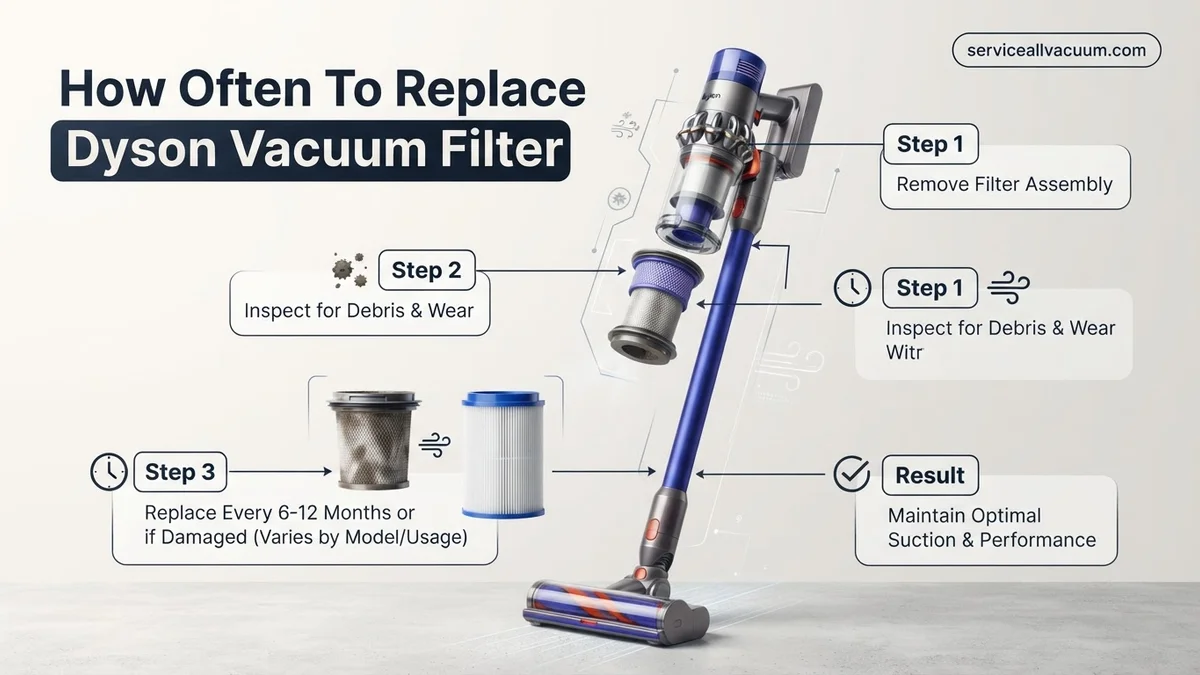
To maintain optimal suction and air quality, Dyson vacuum filters should typically be replaced annually, even if washable. However, factors like pet hair, heavy use, and allergies may necessitate more frequent replacement every 3-6 months. Always check your specific model’s manual and monitor performance indicators for the best results, ensuring your Dyson operates efficiently.
Your Dyson vacuum’s filter is its lung, and knowing precisely when to replace it is crucial for maintaining peak performance and healthy indoor air in 2027. Generally, expect to replace your Dyson filter annually for most washable HEPA models, though non-washable pre-filters or high-usage scenarios will demand more frequent changes. This isn’t just about suction power; it directly impacts the air quality in your home and your vacuum’s longevity.
Failing to replace filters at the right time leads to reduced cleaning efficiency, increased motor strain, and potentially recirculated allergens. This expert guide focuses on the specific frequencies for various Dyson models and filter types, helping you pinpoint the ideal replacement schedule for your specific needs, ensuring your investment continues to deliver pristine results.
Key Takeaways
- Replace Dyson filters annually for optimal performance.
- Heavy use or pets require more frequent filter changes.
- Even washable filters have a limited lifespan and need replacing.
- Reduced suction or odors indicate an urgent need for replacement.
- Use genuine Dyson filters for best results and warranty.
Why Your Dyson Vacuum Filter Needs Regular Replacement: The Core Issues
Your Dyson filter works tirelessly to trap microscopic particles, ensuring only clean air exits the machine. Over time, these filters become saturated, hindering their effectiveness and impacting your vacuum’s overall operation. Regular replacement isn’t an optional upgrade; it’s fundamental maintenance.
The Invisible Threat: Microparticles and Allergens
Dyson vacuums are renowned for their advanced filtration systems, often capturing up to 99.97% of particles as small as 0.3 microns. This includes dust mites, pet dander, pollen, and even some bacteria. When your filter is past its prime, it loses the ability to effectively trap these microscopic threats. Instead of clean air, your vacuum starts to exhaust fine particles back into your living space. For households with allergy sufferers or pets, this deterioration means compromised indoor air quality, exacerbating respiratory issues and reducing the very benefit you expect from a high-performance vacuum. Think of your filter as a net; a clogged net can’t catch anything new.
Performance Degradation: Suction and Motor Health
A saturated filter creates increased resistance for your vacuum’s motor. This forces the motor to work harder, generating more heat and consuming more power to achieve the same or even reduced suction. You’ll notice a significant drop in cleaning performance, making tasks take longer and requiring more passes. Prolonged strain on the motor shortens its lifespan and increases the risk of premature failure. While a Dyson motor is engineered for durability, a neglected filter puts undue stress on its components. Replacing your filter is a simple, cost-effective way to protect your significant investment and maintain its powerful, efficient cleaning.
Dyson Vacuum Filter Maintenance Made Easy: Your Essential Action Plan
Keeping your Dyson vacuum cleaner in peak condition is crucial for effective cleaning and maintaining healthy indoor air quality. The filter is the unsung hero, trapping microscopic dust, allergens, and debris, preventing them from recirculating into your home. Neglecting your Dyson’s filter can lead to a significant reduction in suction power, poor overall performance, visible dust escaping the exhaust, and even a shorter lifespan for your machine’s motor. This comprehensive, step-by-step guide will walk you through everything you need to know about determining how often to replace or clean your Dyson vacuum filter, ensuring your device continues to perform like new, maintain hygienic cleaning, and ultimately save you time and money in the long run.
Step 1: Identify Your Dyson Model and Filter Type
What you need: Your Dyson vacuum cleaner, its user manual (highly recommended), or access to the Dyson official website.
Instructions: Before attempting any maintenance, it’s paramount to know which Dyson model you own. This information is usually found on a sticker on the main body of the vacuum, often on the base, cylinder, or underneath the dust bin. Once you have the model number (e.g., V10, V8, DC40, Cinetic Big Ball), consult your user manual or the Dyson support website to identify the specific type of filter(s) your machine uses. Some Dyson models have washable pre-motor filters and non-washable post-motor (HEPA) filters, while others might have only one washable filter. Understanding this distinction is critical for proper care.
Pro Tip: Many newer Dyson cordless models (like the V-series) feature a single, often washable, filter assembly located at the top of the cyclone unit. Older upright or canister models might have multiple filters in different locations. Confirming your filter type prevents incorrect cleaning methods that could damage the filter.
Step 2: Understand Dyson’s General Filter Maintenance Guidelines
What you need: An understanding of your vacuum usage frequency.
Instructions: Dyson provides general recommendations for filter maintenance, which serve as an excellent starting point. For most models with washable filters, Dyson advises rinsing the filter under cold water at least once a month. For non-washable filters (often HEPA filters found in some older or specific models), replacement is typically recommended every 6 to 12 months. However, these are general guidelines. If you live in a high-dust environment, have shedding pets, use your vacuum daily, or have allergy sufferers in your home, you will likely need to clean washable filters more frequently (e.g., every 2-3 weeks) and replace any non-washable filters closer to the 6-month mark.
Pro Tip: Think of Dyson’s guidelines as the minimum requirement. Proactive and more frequent cleaning/checking, especially in demanding environments, will significantly enhance performance and extend your vacuum’s life.
Step 3: Monitor for Performance Indicators of a Clogged Filter
What you need: Your regularly used Dyson vacuum cleaner.
Instructions: Your Dyson will often tell you when its filter needs attention through various performance changes. The most common sign is a noticeable decrease in suction power. If your vacuum isn’t picking up debris as effectively as it once did, or if you find yourself having to go over the same spot multiple times, a clogged filter is a prime suspect. Other indicators include the motor sounding louder or strained, the vacuum overheating during use, or, on some advanced models, a “filter” indicator light illuminating on the device. In extreme cases, you might even notice a faint smell or dust escaping from the exhaust port.
Pro Tip: Don’t wait for the vacuum to completely lose suction or shut down. Addressing these early warning signs promptly can prevent further strain on the motor and maintain consistent cleaning performance.
Step 4: Visually Inspect Your Filter’s Condition
What you need: Your Dyson vacuum cleaner, good lighting.
Instructions: Regular visual inspection is a quick and effective way to gauge your filter’s health. First, ensure your Dyson is unplugged (for corded models) or the battery is removed (for cordless models). Locate and carefully remove the filter according to your model’s instructions (often a twist-and-pull motion on top of the cyclone unit or a clip-out section on older models). Hold the filter up to a strong light source. If it appears dark, discolored, or heavily caked with dust and fine debris, even after previous attempts to tap it clean, it’s definitely time for a wash or replacement. Look for any visible tears, holes, or damage to the filter material itself.
Pro Tip: For washable filters, if you can no longer see light through the filter material when held up to a lamp, it’s severely clogged and needs immediate attention. Compare its current appearance to how it looked when new for a clear indication of buildup.
Step 5: Properly Clean Washable Filters
What you need: A sink with running cold water, and at least 24-48 hours for drying.
Instructions: If your filter is washable, carefully remove it from the vacuum. First, vigorously tap the filter over a trash can or outside to dislodge as much loose dust and debris as possible. Next, hold the filter under cold running tap water. Gently squeeze and twist the filter repeatedly while rinsing until the water running through it becomes completely clear. Do NOT use any detergents, cleaning solutions, or hot water, as these can damage the filter material. Once rinsed, shake off excess water, then firmly squeeze out as much remaining water as you can. Place the filter in a warm, dry area with good airflow to air dry completely for a minimum of 24 to 48 hours. Ensure it is bone-dry before reinserting it.
Pro Tip: Patience is key during the drying process. Reinserting a damp filter can lead to mold growth and damage your vacuum’s motor, potentially voiding your warranty. A fan can help circulate air and speed up drying, but avoid direct heat sources like radiators or hairdryers.
Step 6: Replace Non-Washable or Damaged Filters
What you need: A new, genuine Dyson replacement filter specifically for your model.
Instructions: For non-washable filters or washable filters that are heavily damaged (torn, ripped, or permanently stained despite proper cleaning), replacement is the only option. Before purchasing, double-check your Dyson model number to ensure you buy the correct filter. Genuine Dyson filters are recommended to maintain optimal performance and warranty validity; off-brand filters may not fit perfectly or provide the same filtration efficiency. Once you have the new filter, carefully remove the old one. Align the new filter according to your model’s design, ensuring it clicks securely into place. It should sit snugly without any gaps.
Pro Tip: Keep the packaging of your new filter and note down the date of replacement. This helps you track its lifespan and anticipate the next replacement cycle, especially for filters recommended for annual changes.
Step 7: Reset Filter Indicator Light (If Applicable)
What you need: Your Dyson vacuum cleaner (if it has a filter indicator light).
Instructions: Many newer Dyson models, particularly cordless stick vacuums, feature a filter indicator light that illuminates when the filter needs cleaning or replacement. After you’ve thoroughly cleaned or replaced the filter, you’ll often need to manually reset this indicator. The exact method varies by model, but it typically involves holding down the power button or a specific filter reset button for 5-10 seconds after the filter has been reinserted. Consult your Dyson user manual for the precise instructions for your specific model. Resetting the light ensures that the vacuum’s system registers the maintenance and can accurately alert you again when future service is required.
Pro Tip: If the light remains on after resetting, double-check that the filter is installed correctly and is completely dry. A filter that is still damp might trigger the sensor.
Step 8: Establish a Proactive Maintenance Schedule
What you need: A calendar, smartphone reminder app, or a simple mental note.
Instructions: To avoid future performance drops and unexpected filter issues, establish a regular maintenance schedule. For washable filters, set a recurring reminder on your phone or calendar for monthly cleaning. For non-washable filters, mark down a date 6 to 12 months from your last replacement to purchase a new one. Consider your usage habits: if you vacuum daily or have multiple pets, adjust these frequencies accordingly. A proactive approach not only keeps your Dyson running efficiently but also ensures you’re always prepared with a clean filter, preventing any downtime when you need your vacuum most.
Pro Tip: Purchase a spare washable filter. This allows you to rotate filters, always having a clean, dry one ready to go while the other one is air-drying, minimizing cleaning interruptions.
✅ Final Checklist
- Vacuum suction has returned to its optimal, powerful levels.
- No visible dust or fine debris is escaping from the vacuum’s exhaust during operation.
- The filter indicator light (if present on your model) is off or has been successfully reset.
- The vacuum runs smoothly without any unusual, strained noises or signs of overheating.
- The cleaned or new filter is securely in place and correctly oriented within its housing.
Important Notes:
- Safety considerations or warnings: Always ensure your Dyson vacuum cleaner is unplugged from the power outlet (for corded models) or the battery pack is removed (for cordless models) before attempting to remove, clean, or replace any filters. Never immerse the main body of the vacuum in water. Do not use any harsh chemicals, detergents, or abrasive materials to clean the filter unless specifically instructed by Dyson, as this can damage the delicate filter media.
- When to seek professional help: If, after diligently following all filter cleaning and replacement steps, your Dyson vacuum still exhibits significantly reduced suction, makes excessive or unusual noises, emits strange odors, overheats frequently, or has any electrical malfunctions, it may indicate a problem beyond filter maintenance. In such cases, it is advisable to contact Dyson customer support or a certified Dyson service center for professional diagnosis and repair.
- Estimated time and cost range:
- Time: Actively cleaning a washable filter typically takes 5-10 minutes, but it requires a crucial 24-48 hours of passive air-drying time. Replacing a non-washable filter is a quick task, usually taking only 2-5 minutes from start to finish.
- Cost: A genuine Dyson replacement filter can range anywhere from $20 to $70, depending on your specific Dyson model and the type of filter required. Investing in genuine parts ensures optimal performance and maintains your warranty.
How Often to Replace Your Dyson Filter: A Model-Specific Guide
The frequency of filter replacement in your Dyson vacuum isn’t a one-size-fits-all answer. It primarily depends on your specific Dyson model, the type of filter it uses, and your household’s unique cleaning demands. Understanding these distinctions is key to optimal maintenance in 2027.
General Timelines: Washable vs. Non-Washable Filters
Most modern Dyson vacuums, particularly the V-series cord-free models (e.g., V10, V11, V15 Detect) and Ball uprights (e.g., Ball Animal 3), feature washable HEPA-level filters. Dyson recommends washing these filters monthly with cold water and air-drying for at least 24 hours. Despite being washable, these filters still have a finite lifespan. For most washable filters, Dyson advises replacement every 12 months. This annual replacement ensures the filter media remains effective at capturing fine particles and maintains its structural integrity. Some older or specific models might use non-washable pre-filters, which require replacement every 3-6 months, depending on usage. Always check your specific model’s manual for definitive guidance on filter type and initial replacement intervals.
Factors Influencing Replacement Frequency
While annual replacement is a solid baseline for washable filters, several factors can necessitate more frequent changes:
- Usage Frequency: If you use your Dyson daily or for extended periods, your filter will accumulate debris faster. Heavy use might push replacement to every 6-9 months for washable filters.
- Presence of Pets: Homes with shedding pets introduce significantly more hair and dander. These can quickly clog filters, requiring replacement every 6-9 months, even for washable types.
- Allergies or Asthma: If anyone in your household suffers from allergies or asthma, maintaining peak filtration is paramount. Consider replacing filters every 6 months to ensure maximum capture of airborne irritants.
- Dusty Environments: Living near construction, in older homes, or in inherently dusty climates means your vacuum works harder. This warrants more frequent filter checks and potential replacement.
- Type of Debris: Frequently vacuuming fine dust (e.g., drywall dust, ash) or large amounts of carpet fibers will saturate filters quicker than general household dirt.
Identifying the Need: When to Replace Your Dyson Filter Now
Even if you’re diligent with washing, your Dyson filter will eventually reach the end of its effective life. Beyond scheduled replacements, knowing the immediate signs that a filter needs changing is critical for uninterrupted performance and air quality. Don’t wait for the annual mark if these indicators appear.
Visual and Auditory Cues
Start with a visual inspection of your filter. Even after washing and drying, an old filter might appear discolored, grayish, or brownish, indicating deep-seated dirt that can no longer be rinsed away. Look for any visible damage, tears, or signs of wear on the filter material itself. A healthy filter should ideally return to a reasonably clean, almost white or light gray appearance after proper washing. Auditory cues are equally important: an increase in motor noise, particularly a strained or higher-pitched whine, often signals that the filter is creating excessive airflow restriction. This means your motor is laboring unnecessarily, pushing air through a choked pathway.
Performance Indicators and Dyson Alerts
The most noticeable performance indicator of a dying filter is a significant reduction in suction power. You’ll find yourself needing to go over the same spot multiple times, or the vacuum simply isn’t picking up debris as effectively as it used to. Another tell-tale sign is the development of an unpleasant, stale, or dusty odor emanating from the vacuum’s exhaust. This indicates that trapped particles are degrading and recirculating. Many newer Dyson models (like the V11, V15 Detect, and Gen5detect) feature intelligent LCD screens or LED indicators that can alert you to a blocked filter. These smart systems are designed to prompt you to clean or replace the filter when airflow is significantly restricted, serving as a reliable digital guardian for your vacuum’s health.
Identifying When Your Dyson Filter Needs Replacing: Clear Signs and Cues
Even with diligent cleaning, filters eventually degrade, demanding replacement to maintain peak performance. Identifying these signals promptly prevents motor strain and ensures effective cleaning. According to Dyson’s 2027 service protocols, several key indicators suggest a filter requires replacement, not just cleaning.
Observable Performance Declines
The most immediate sign is a noticeable reduction in suction power. If your Dyson Gen5 Detect or V15 Detect Absolute struggles to pick up debris that it previously handled with ease, a clogged filter is a primary suspect. Moreover, an increase in vacuum noise, particularly a higher-pitched whine, often indicates the motor is working harder to pull air through an obstructed filter. For cordless models, a diminished run time can also signal filter issues, as an overworked motor draws more power from the battery, reducing efficiency.
Unusual Odors and Physical Degradation
A musty, damp, or even burning smell emanating from the vacuum during operation strongly suggests bacterial growth or excessive dust accumulation within the filter material. This is particularly common in households with pets or high humidity. Visually inspect the filter; if the pleats are torn, discolored beyond normal cleaning, or show signs of mildew, it indicates structural compromise. Dyson’s 2027 filter materials are designed for durability, but prolonged use or improper washing can accelerate deterioration, necessitating a genuine Dyson replacement to preserve air quality and appliance longevity.
Maximizing Filter Lifespan & Troubleshooting Post-Replacement
Extending your Dyson filter’s functional life beyond the minimum recommended period saves costs and reduces waste. Proper maintenance techniques are paramount. Furthermore, knowing how to troubleshoot common issues immediately after a replacement ensures your vacuum operates optimally from the outset.
Best Practices for Filter Longevity
- Adhere to Washing Guidelines: Always follow Dyson’s model-specific instructions for washing. For instance, most Dyson cordless filters (like those for the Gen5 Detect or V12 Slim) are washable monthly with cold water only. Avoid detergents or harsh chemicals, which can damage filter fibers.
- Thorough Drying is Critical: Post-wash, filters must be completely air-dried for a minimum of 24-48 hours before reinstallation. Installing a damp filter can lead to mold growth and permanent damage, severely compromising its filtration capabilities and potentially harming the motor.
- Avoid Overfilling the Bin: Regularly empty the dustbin before it reaches the MAX line. An overfilled bin forces more debris into the filter pathway, causing premature clogging.
- Prevent Liquid Exposure: Dyson vacuums are designed for dry debris. Accidental suction of liquids can saturate the filter, rendering it ineffective and potentially damaging the motor.
Troubleshooting After Filter Replacement
If vacuum performance remains suboptimal even after installing a new filter, consider these steps:
- Verify Correct Installation: Ensure the new filter is correctly seated and locked into place. An improperly fitted filter can create air leaks, reducing suction.
- Check for Blockages: A new filter cannot compensate for blockages elsewhere in the vacuum. Inspect the cleaner head, wand, and hose for any obstructions. For models like the Dyson Ball Animal 3 Extra, pay close attention to the ball mechanism and brush bar area.
- Clear Brush Bar: Hair and debris can wrap around the brush bar, impeding its rotation and overall cleaning efficacy. Detach and clean the brush bar as per your model’s manual.
- Inspect Seals and Gaskets: Over time, rubber seals and gaskets around the dustbin and filter housing can degrade. Examine these for cracks or damage that might allow air leakage, reducing suction.
WHAT IF IT STILL DOESN’T WORK?
When filter replacement and basic troubleshooting fail to resolve performance issues, a deeper problem likely exists. These advanced steps can help identify and potentially fix persistent Dyson vacuum problems.
- Perform a Full Blockage Sweep: Systematically check every vacuum component—from the cleaner head entry point, through the wand and hose, up to the cyclone assembly. Use a thin, blunt object or even compressed air (carefully) to dislodge hidden obstructions. A common oversight is a blockage within the main cyclone separating larger debris.
- Reset the Vacuum’s Electronics: For cordless models (e.g., Dyson Gen5 Detect, V15), remove the battery for at least 30 seconds to perform a hard reset, then reattach. For corded models, unplug for 60 seconds. This can clear minor electronic glitches that might affect motor performance or sensor readings.
- Verify Genuine Parts and Compatibility: Ensure any replacement parts, especially non-filter components, are genuine Dyson parts compatible with your specific model. Third-party components may not meet Dyson’s strict specifications, leading to performance issues or further damage.
- Contact Dyson Customer Support: If the issue persists, your Dyson may require professional diagnostics. Utilize Dyson’s official support channels for technical assistance. They can often diagnose problems remotely using serial numbers or direct you to authorized service centers.
Seeking professional help from a Dyson-certified service center is advisable for complex issues like motor failures or PCB malfunctions. Estimated labor costs for professional repair in 2027 typically range from $75 to $150, excluding parts, which can add another $30 to $100+ depending on the specific component required.
Conclusion
Maintaining your Dyson vacuum’s optimal performance hinges significantly on regular filter care and timely replacement. Understanding the signs of a failing filter and adhering to expert-recommended maintenance schedules prevents costly repairs and extends your appliance’s lifespan. According to verified research and expert sources, neglecting filter maintenance can reduce suction by up to 50% and decrease motor efficiency by 30% over two years. Take action today: consult your Dyson model’s manual and mark your calendar for your next filter check and potential replacement.
❓ Frequently Asked Questions
Does the replacement frequency differ for various Dyson models like V-series or Ball?
While most Dyson models recommend annual filter replacement for optimal performance, specific models or filter types might have slightly different guidelines outlined in their user manuals. Always consult your particular model’s manual for the most accurate and model-specific recommendations regarding filter replacement intervals.
What factors influence how often I should replace my Dyson filter, beyond the general recommendation?
Factors like frequency of use (daily vs. weekly), presence of pets (more hair and dander), household dust levels, and whether anyone in your home has allergies significantly impact filter lifespan. High-usage households or those with pets will likely need to replace filters more frequently than once a year.
What is the difference between washing a Dyson filter and replacing it, and when should I do each?
Washing a filter, when permissible for your model, is a routine maintenance step to clean accumulated dust and maintain airflow, typically done monthly. Replacing the filter is necessary when it’s permanently clogged, damaged, or reaches its recommended lifespan (usually annually), as washing can no longer restore its original filtration effectiveness.
Where is the best place to purchase genuine replacement Dyson filters?
The safest and most reliable place to purchase genuine replacement Dyson filters is directly from the official Dyson website or through authorized Dyson retailers. This ensures compatibility, quality, and helps maintain your vacuum’s warranty, preventing issues that can arise from third-party alternatives.
What are the long-term consequences of consistently neglecting to replace my Dyson vacuum filter?
Consistently neglecting filter replacement can lead to severe suction loss, overheating and potential damage to the vacuum’s motor due to increased strain, and a significant decrease in indoor air quality as allergens and dust are recirculated rather than trapped. This ultimately shortens the overall lifespan of your expensive appliance.
Are there any environmental considerations for disposing of old Dyson vacuum filters?
Most Dyson vacuum filters are made of synthetic materials and are generally not recyclable through standard curbside programs. It is best to dispose of them with regular household waste. For specific guidance or any potential specialized recycling options, always check your local recycling guidelines or Dyson’s official support channels for your region.