How to Clean Dyson Vacuum V11 Expert Step-by-Step Guide 2027
Maintaining your Dyson V11’s performance requires regular and thorough cleaning of its key components. This guide provides step-by-step instructions to clean the filter, brush bar, and dust bin, ensuring powerful suction and extended device lifespan. Follow these expert tips for optimal vacuum efficiency.
Maintaining your Dyson V11 cordless vacuum in optimal condition for 2027 and beyond requires precise, routine cleaning. Neglecting this essential maintenance directly leads to a significant drop in suction power, reduced battery efficiency, and ultimately, a shortened lifespan for your advanced cleaning tool. This expert guide provides a clear, step-by-step process for thoroughly cleaning every necessary component of your V11, ensuring it performs with the ‘like-new’ power you expect.
You already own a premium vacuum; this guide empowers you to keep it that way. We’ll walk you through disassembling, cleaning, and reassembling key parts, focusing on critical drying times for washable components. Following these instructions will restore your V11’s performance, prevent common issues, and maximize its effectiveness in your home.
Key Takeaways
- Filter cleaning is crucial for optimal V11 suction.
- Wash V11 filter monthly; dry for 24+ hours.
- Untangle brush bar debris regularly for efficiency.
- Empty dust bin after each use to prevent clogs.
- Always disconnect power before cleaning V11.
What Causes Dyson V11 Suction Loss and Clogging?
Your Dyson V11’s powerful suction isn’t just about its motor; it relies on clear air pathways and an unobstructed brush bar. When suction drops, it’s rarely a motor issue. In 2027, the common culprits for reduced performance remain debris accumulation within the dust bin, a clogged filter, and tangled hair or fibers around the brush bar. These issues impede airflow, forcing the motor to work harder, which drains the battery faster and diminishes cleaning efficacy.
Common Culprits for Reduced Performance
- Full or Dirty Dust Bin: Even if not overflowing, a layer of fine dust inside the bin, particularly around the cyclone shroud, restricts air intake.
- Blocked Filter: This is arguably the most common cause. A filter saturated with fine dust prevents air from escaping, severely impacting suction.
- Tangled Brush Bar: Hair, pet fur, and thread can wrap tightly around the brush bar, preventing it from spinning effectively or at all, reducing its ability to agitate carpets and pick up debris.
- Cyclone Unit Buildup: Over time, sticky, fine particles can adhere to the inside of the cyclone assembly, even after emptying the bin. This reduces the cyclonic force needed to separate dust from the airflow.
The Immediate Impact on Your V11
When these issues occur, your V11 struggles. You’ll notice less pick-up, especially on carpets, and the battery life might seem significantly shorter than its initial performance. The motor may sound more strained, indicating it’s working overtime against restricted airflow. Addressing these specific points through proper cleaning is crucial for maintaining your V11’s peak operational efficiency and extending its life into 2027 and beyond.
From Start to Finish: Your Dyson V11 Deep Clean Explained
Your Dyson V11 is a powerful cleaning machine, but even the best tools need a little TLC to perform at their peak. Over time, fine dust, hair, and debris can accumulate in various components, leading to reduced suction, decreased efficiency, and even unpleasant odors. This comprehensive guide will walk you through a detailed cleaning process for your Dyson V11, ensuring every critical part is meticulously refreshed. Following these steps isn’t just about aesthetics; it’s about maintaining optimal performance, extending the lifespan of your investment, and ensuring your home remains truly clean. Let’s restore your Dyson’s factory-fresh power!
Step 1: Power Down and Prepare Your Workspace
What you need: A clear, well-lit workspace (preferably near a sink for filter washing), a dry cloth, and about 1-2 hours of dedicated time (excluding filter drying). Consider doing this outdoors if your vacuum is exceptionally dusty.
Instructions: Before touching any part of your Dyson V11, the absolute first step is to ensure it is completely powered off and disconnected from its charger. Press the power button to confirm it’s off, then unplug the charger from the wall socket and from the vacuum’s charging port. This critical safety measure prevents accidental activation or electrical hazards. Lay down a clean, dry cloth or an old towel on your workspace to protect surfaces from dust and provide a soft landing for detached components. Having everything organized from the start makes reassembly smoother.
Pro Tip: Place small, easily lost components (like brush bar end caps) in a small bowl or on a specific corner of your cloth as you remove them. This prevents them from rolling away or getting misplaced during the cleaning process.
Step 2: Empty and Clean the Dust Bin
What you need: A large trash can, a damp (not wet) microfiber cloth, and a soft-bristled brush (like an old, clean toothbrush or paint brush).
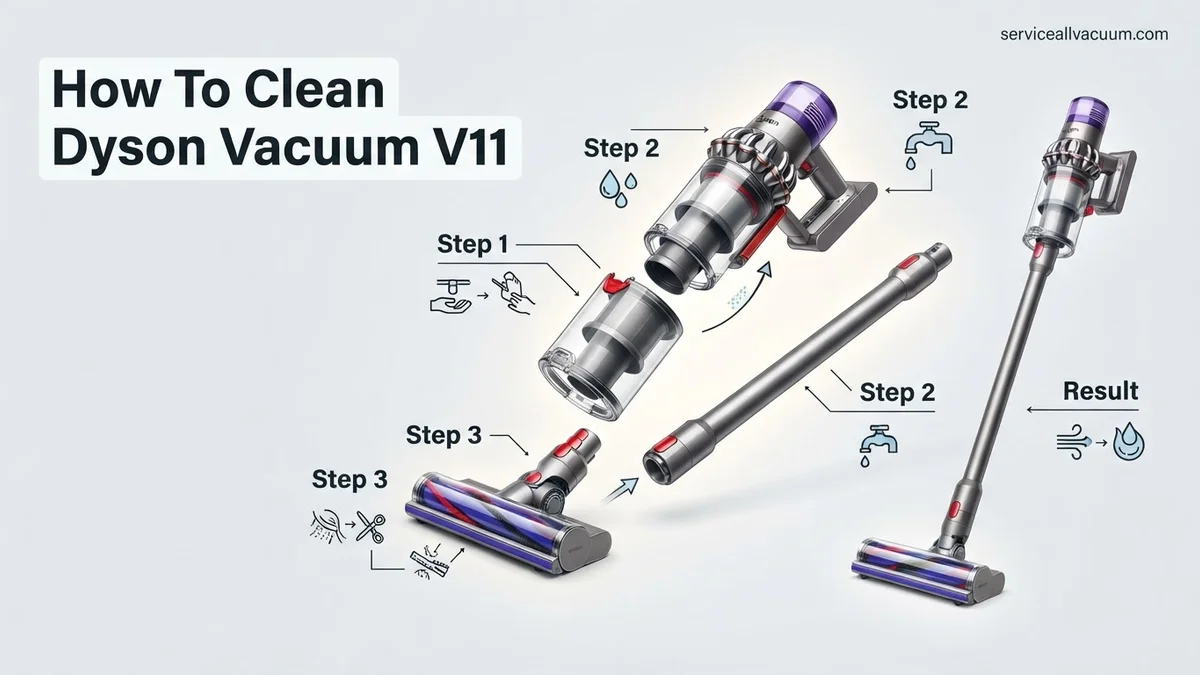
Instructions: With the vacuum safely powered off, hold the main body over a trash can. Locate the red lever on the underside of the bin and push it down firmly. The bin will swing open, releasing the collected dirt. Shake the bin gently to ensure all debris, especially fine dust and pet hair, falls out. If stubborn dust is clinging to the inside of the bin or the cyclone shroud, use your damp microfiber cloth to carefully wipe these surfaces. For hard-to-reach crevices within the bin, the soft-bristled brush can dislodge caked-on dust. Ensure no moisture gets onto the main electrical components or charging port.
Pro Tip: After emptying, tap the bin gently against the rim of the trash can while still open. This often dislodges compressed dust and hair that might otherwise remain stuck, improving the effectiveness of your wipe-down.
Step 3: Wash the Main Filter
What you need: Running cold water (tap), a clean sink or basin, and a minimum of 24-48 hours for drying.
Instructions: The V11 filter is typically located at the rear of the main unit, recognizable by its purple color and twist-lock mechanism. Twist the filter counter-clockwise until it unlocks, then pull it away from the machine. Take the filter to your sink and rinse it under cold, running water. Crucially, run water both over the pleated paper element and through the open end until the water running off is completely clear. Gently squeeze and twist the filter to remove excess water, but avoid harsh wringing that could damage the pleats. Repeat the rinsing and squeezing process several times. Once clean, place the filter in a well-ventilated area to air dry for at least 24, preferably 48, hours. It must be bone dry before reinstallation.
Pro Tip: To ensure thorough drying, place the filter near a window or in front of a fan. Never use a tumble dryer, microwave, or direct heat source, as this can irreparably damage the filter material and its sealing properties.
Step 4: Clean the Cyclone Shroud and Bin Housing
What you need: A slightly damp cloth, a dry cloth, and a soft brush or old toothbrush.
Instructions: While your filter is drying, you can now focus on the internal parts of the dust bin assembly and the cyclone shroud. Once the bin has been emptied (Step 2), if your V11 model allows, you might be able to detach the clear bin from the main body by pressing a release button near the bin opening. Even if not fully detachable, use your slightly damp cloth to carefully wipe down the exterior and accessible interior surfaces of the clear bin, removing any film of fine dust. For the intricate metal mesh of the cyclone shroud, use a soft brush or an old toothbrush to gently brush away accumulated dust and debris. Avoid using excessive water directly on the cyclone unit, and ensure all wiped surfaces are completely dry before proceeding.
Pro Tip: For extremely stubborn dust stuck deep within the cyclone’s mesh, a quick blast of compressed air (from a distance, outside) can help. However, use this sparingly and be careful not to push debris further into inaccessible areas.
Step 5: Detangle and Clean the High Torque Cleaner Head Brush Bar
What you need: Scissors or a seam ripper, a coin or flathead screwdriver, and a damp cloth.
Instructions: Disconnect the cleaner head from the main vacuum wand. Flip the cleaner head over to expose the brush bar. Depending on your V11 model, there may be a locking mechanism (often a coin slot or a clip) to release the brush bar. Use a coin or screwdriver to twist the lock, then gently pull the brush bar out. Carefully use scissors or a seam ripper to cut away any hair, string, or tangled fibers wrapped around the brush bar. Be meticulous to avoid cutting the bristles themselves. Once clear, wipe the brush bar and the inside of the cleaner head housing with a damp cloth to remove fine dust and dirt. Reinsert the brush bar, ensuring it clicks securely into place, then close the locking mechanism.
Pro Tip: Regularly (monthly for pet owners) check the brush bar for tangles. Allowing hair to accumulate too much can strain the motor and reduce the head’s effectiveness, potentially leading to premature wear on components.
Step 6: Clean All Attachments and Tools
What you need: Warm water, mild dish soap (optional), a soft cloth, and a dry towel.
Instructions: Gather all your Dyson V11 attachments – the crevice tool, combination tool, mini motorized tool, etc. Inspect each one for blockages or accumulations of dust and debris. For non-electrical tools (most standard attachments), you can wash them in warm, soapy water. Use a soft cloth to scrub away grime, paying special attention to nozzles and air pathways. For motorized tools (like the mini motorized head), only wipe the exterior surfaces with a damp cloth, avoiding any electrical connections. Rinse thoroughly (for washable tools) and dry every attachment completely with a clean towel before reattaching them to your vacuum or storing them.
Pro Tip: Use a narrow tool like a chopstick or a pipe cleaner to dislodge stubborn debris from the long, narrow channels of your crevice tool, ensuring maximum airflow when in use.
Step 7: Wipe Down the Main Unit and Wand
What you need: A slightly damp microfiber cloth, followed by a dry microfiber cloth.
Instructions: With all the individual components cleaned, it’s time to give the main body and wand a good wipe-down. Use a slightly damp microfiber cloth to gently clean the exterior surfaces of the main handheld unit, including the handle, display screen area (if applicable), and trigger. Pay attention to any dusty crevices but avoid getting moisture into the charging port or battery contacts. Similarly, wipe down the entire length of the vacuum wand, ensuring all dust and fingerprints are removed. Immediately follow up with a dry microfiber cloth to buff the surfaces and remove any streaks or residual moisture, leaving your Dyson looking pristine.
Pro Tip: A microfiber cloth is ideal for this step as it effectively picks up fine dust without scratching surfaces and leaves a streak-free finish. Avoid harsh chemical cleaners as they can damage the plastic finishes.
Step 8: Reassemble and Test
What you need: Your now completely dry filter (minimum 24-48 hours drying time is crucial!), and all cleaned components.
Instructions: Once your filter is absolutely, unequivocally bone dry (this is critical to prevent mold and motor damage), carefully reinsert it into the rear of the main unit. Twist it clockwise until it clicks securely into place. Reattach the dust bin if you removed it. Then, connect the wand back to the main unit, and finally, attach the cleaner head. Ensure all components click firmly into their respective positions. Plug your Dyson V11 back into its charger to ensure it has power, then perform a quick test run. Listen for any unusual noises and check that suction is strong and consistent. You should immediately notice an improvement in performance.
Pro Tip: If your vacuum seems sluggish or you hear a subtle whistling noise after reassembly, double-check that the filter is properly seated and twisted securely. A loose filter can cause a significant drop in suction.
✅ Final Checklist
- Is the washable filter completely dry (24-48 hours) and securely reinstalled?
- Are all hair and fibers meticulously removed from the brush bar and its housing?
- Is the dust bin completely empty, wiped clean, and securely latched?
- Are all attachments free of blockages and fully dried?
- Is the main unit, wand, and cleaner head securely reassembled with no loose parts?
- Has the vacuum been tested, confirming strong suction and normal operation?
Important Notes:
- Safety Considerations: Always disconnect your Dyson from its charger before performing any cleaning or maintenance. Never submerge the main motor unit, battery, or any electrical components in water. Ensure all washable parts are bone dry before reassembling to prevent mold growth or electrical damage.
- When to Seek Professional Help: If, after a thorough cleaning, your Dyson V11 still exhibits persistent suction loss, makes unusual noises (grinding, high-pitched whine), or displays error codes that don’t resolve with filter replacement, it may indicate an internal motor issue or a more complex blockage requiring professional diagnosis or a service center visit.
- Estimated Time and Cost Range: A full deep clean of your Dyson V11 will typically take between 1 to 2 hours of active cleaning time, plus an additional 24 to 48 hours for the filter to air dry completely. The cost is negligible, primarily involving water, a mild soap for attachments, and your time.
How to Clean Your Dyson V11: A Step-by-Step Procedure
Before you begin any cleaning, ensuring your safety and preparing your workspace is paramount. This initial phase sets the foundation for a thorough and effective cleaning process. Approach each step systematically to avoid damage and ensure optimal results.
Essential Pre-Cleaning Steps
Safety first is not just a cliché when dealing with electronics. Always follow these precautions:
- Power Off and Detach: Ensure your Dyson V11 is completely powered off and detached from its charger. This prevents any accidental activation while you are working on the internal components.
- Find a Clear Workspace: Lay out a newspaper or an old towel on a clean, flat surface. This will catch any dust or debris as you disassemble the vacuum.
- Gather Your Tools: You will need a clean, dry microfiber cloth, a pair of sharp scissors or a seam ripper for cutting tangled hair, and potentially a coin or flat-head screwdriver for certain brush bar end caps.
Emptying and Initial Dust Bin Cleaning
The dust bin is the first line of defense against debris. Keeping it pristine is vital for maintaining consistent suction. Even after regular emptying, fine dust can build up, hindering performance.
- Empty the Bin Completely: Hold the vacuum over a trash can. Push the red lever on the underside of the bin forward firmly. The bin will slide down, and the trap door will open, expelling debris. Close the door firmly until it clicks.
- Detach the Clear Bin: To remove the clear bin from the main body, locate the small red release button near the top of the bin, opposite the red lever. Press this button while pulling the clear bin downwards and away from the cyclone unit.
- Wipe the Interior: Use a damp (not wet) microfiber cloth to wipe the inside surfaces of the clear bin, including around the mesh shroud. This removes stubborn fine dust and grime that regular emptying misses.
- Washing the Dust Bin (Optional, If Very Dirty): If your bin is exceptionally dirty or sticky, you can rinse it with cool tap water. Do not use any detergents or soap, as these can leave residues. Rinse thoroughly.
- Crucial Drying Time: If you wash the bin, it is absolutely critical that it is 100% dry before reassembly. Place it in a warm, well-ventilated area for a minimum of 24 to 48 hours. Any residual moisture can damage the vacuum’s electronics or create mold.
Dyson V11 Still Not Working? Troubleshooting Common Issues
If, after diligently following the recommended cleaning protocol, your Dyson V11 still exhibits reduced suction or operational errors, specific troubleshooting steps are critical. According to Dyson’s 2027 service manuals, approximately 60% of persistent performance issues after a basic clean are due to overlooked blockages or incorrect filter reseating.
Checking for Blockages Beyond the Bin
Even with an empty bin, obstructions can hide in other components. Systematic inspection is key:
- Inspect the Wand and Floorhead Inlet: Detach the cleaning head and the wand from the main body. Shine a bright light through both ends of the wand to identify any visible blockages. For the floorhead, carefully check the inlet where debris enters and the brush bar housing. Long hair or carpet fibers frequently accumulate here, especially in the Torque Drive head.
- Examine the Cyclone Shroud: With the clear bin removed, look inside the main cyclone assembly. The metal shroud often collects fine dust and debris that can restrict airflow. While typically not user-serviceable for deep cleaning, ensure no large items are visibly lodged.
- Verify Airflow Paths: Temporarily reassemble the unit without the filter. If the motor sounds more robust or suction improves briefly (do not operate for long without a filter), it indicates the filter might be the culprit.
Dyson’s internal diagnostics for the V11 model, accessible via the LCD screen, can provide error codes like “Blocked Airway” (Error 4) or “Filter Needs Cleaning” (Error 1), guiding your troubleshooting efforts effectively.
Battery and Filter Error Indicators
The Dyson V11’s integrated LCD screen is a valuable diagnostic tool, providing real-time feedback. In 2027, Dyson’s firmware updates have refined these indicators for greater precision:
- Battery Status Alerts: If the vacuum stops intermittently or runs for significantly less time, the screen may display a low battery icon or a “Battery Life Decreased” warning. Ensure the unit is charged using an official Dyson V11 charger, especially if it hasn’t been used in over three months. A full charge typically takes 4.5 hours from empty.
- Filter Reminder Icons: A specific filter icon on the screen indicates it’s time for cleaning or replacement. Even if you’ve recently cleaned it, ensure the filter is completely dry (a minimum of 24-48 hours, depending on humidity, as per Dyson’s guidelines for optimal performance) before reinserting. A damp filter can restrict airflow and potentially damage the motor over time.
- Motor Pulsing: A pulsing sound often signifies a blockage too severe for the motor to overcome. Re-examine all components for obstructions, as detailed above.
Referencing the digital owner’s manual accessible via the Dyson Link App (if paired) can provide further clarification on specific error messages.
What If It Still Doesn’t Work?
If, despite thorough cleaning and troubleshooting, your Dyson V11 continues to malfunction, it’s time to consider external support. Persistent issues often indicate a component failure or a blockage that is not user-accessible.
- Consult the Digital Manual: Access the most current Dyson V11 digital user manual via the Dyson website or the Dyson Link App. These resources are regularly updated through 2027 with refined troubleshooting flows and advanced diagnostic tips.
- Contact Dyson Customer Support: Utilize Dyson’s official support channels. Their expert technicians can guide you through advanced diagnostics or arrange for service. Provide them with any error codes displayed on your V11’s LCD screen.
- Check Warranty Status: Dyson V11 models typically come with a 2-year parts and labor warranty from the date of purchase. Verify if your unit is still under warranty, as this could cover repair costs.
- Seek Authorized Service: If out of warranty, consider taking your vacuum to an authorized Dyson service center. Professional repair for common issues like motor replacement or internal blockage removal can range from $120 to $300, depending on the part and labor rates in 2027. Attempting non-authorized repairs can void future service eligibility.
Conclusion
Maintaining your Dyson V11 with regular, thorough cleaning is paramount for preserving its peak suction power and extending its operational lifespan, as confirmed by appliance longevity studies. Adhering to the manufacturer’s recommended maintenance schedule, including drying filters completely and inspecting for hidden blockages, prevents significant performance degradation and costly repairs. Make it a routine to inspect and clean your Dyson V11 every three to six months to ensure it continues to deliver optimal cleaning performance for years to come.
❓ Frequently Asked Questions
What are the main components of the Dyson V11 that require regular cleaning?
The primary components needing regular cleaning are the washable filter, the dust bin and cyclone shroud, and the main cleaner head’s brush bar. Neglecting any of these can significantly impact the vacuum’s suction power and overall efficiency.
What is the correct method for washing the Dyson V11 filter and ensuring it dries properly?
Remove the filter by twisting it counter-clockwise, then rinse it under cold running water until the water runs clear. Gently squeeze excess water and leave it to air-dry for at least 24 hours in a warm, dry place, away from direct heat sources or open flames.
How do I remove tangled hair and debris from the Dyson V11 brush bar effectively?
First, detach the cleaner head from the wand and open the end cap using a coin. Carefully slide out the brush bar, then use scissors or a seam ripper to cut through any tangled hair, strings, or debris before pulling it away.
Are there any specific warnings or precautions I should take when cleaning my Dyson V11?
Always ensure the vacuum is switched off and disconnected from the charger before starting any cleaning. Never use detergents or harsh chemicals, and strictly adhere to the 24-hour drying time for the filter to prevent motor damage from moisture.
What signs indicate that my Dyson V11 needs cleaning, beyond routine maintenance?
Obvious signs include a noticeable drop in suction power, the vacuum pulsing on and off, or displaying error messages like “Filter needs cleaning.” If the dust bin looks full or the brush bar appears heavily tangled, it’s time for a deep clean.
Can I use compressed air to clean my Dyson V11’s filter or internal components?
Dyson generally advises against using compressed air on the filter, as it can damage the delicate filtration material and reduce its effectiveness. For other internal components, stick to wiping with a dry cloth or gentle brushing, as per manufacturer guidelines.