How To Pull A Vacuum On A Ac System How to Pull a 2027
Properly pulling a vacuum on an AC system is crucial for removing moisture and non-condensable gases, preventing costly damage and ensuring efficient cooling. This guide provides a step-by-step process for performing a thorough AC system evacuation, covering essential tools and target vacuum levels. Master this vital AC maintenance task for lasting system health.
Pulling a vacuum on your AC system is not just a best practice; it’s a critical, non-negotiable step for ensuring optimal performance, longevity, and efficiency, especially with stricter climate control standards for 2027 vehicles and installations. This process, also known as evacuation, thoroughly removes moisture and non-condensable gases that sabotage your system from within. Mastering this procedure prevents costly repairs, maximizes cooling output, and ensures your AC operates cleanly and effectively for years to come.
You need to evacuate an AC system any time it has been opened to the atmosphere—whether for component replacement, repair, or even just during an initial installation. A proper vacuum guarantees the refrigerant can do its job without interference, saving you energy and frustration. Let’s break down exactly how you execute this vital maintenance step, ensuring your system meets modern operational demands.
Key Takeaways
- Evacuate AC systems to remove moisture, non-condensables.
- Use a vacuum pump, micron gauge, and manifold set.
- Target 500 microns or less for effective vacuum.
- Perform a vacuum hold test to detect leaks reliably.
- Proper vacuum ensures efficient, long-lasting AC operation.
Why Your AC Needs a Vacuum: Diagnosing Contamination Issues
When an AC system is exposed to air, two primary contaminants enter: moisture and non-condensable gases (primarily air itself). These seemingly harmless intruders become silent destroyers, drastically reducing system efficiency and lifespan. Understanding their impact is crucial before you even connect your first hose.
The Silent Enemies: Moisture and Non-Condensable Gases
Moisture is the most detrimental contaminant. When refrigerant circulates, temperatures fluctuate. Any water vapor in the system will freeze at the expansion valve or capillary tube, creating blockages that restrict refrigerant flow and drastically reduce cooling capacity. Beyond blockages, moisture reacts with refrigerants to form corrosive acids. These acids can eat away at internal components, leading to compressor failure, hose degradation, and widespread system damage. Non-condensable gases, like nitrogen and oxygen from the air, don’t condense at typical AC operating pressures. They increase the system’s head pressure, forcing the compressor to work harder, consume more energy, and ultimately reduce its lifespan. Your system won’t cool effectively, and you’ll be wasting power.
Preventing Catastrophic Failure and Ensuring 2027 Efficiency
Removing these contaminants through a deep vacuum is the only way to safeguard your AC system. A properly evacuated system ensures the refrigerant operates in a clean, dry environment, allowing it to absorb and release heat as designed. This translates directly to peak cooling performance, lower energy consumption, and extended component life. For 2027 and beyond, efficiency targets are tighter than ever. A contaminated system cannot meet these benchmarks, leading to poor cooling and higher operating costs. A thorough vacuum prevents compressor burnout, acid formation, and guarantees your AC delivers reliable, efficient comfort, protecting your investment.
How to Pull a Vacuum on an AC System Like a Pro: A Practical Walkthrough
Pulling a vacuum on an AC system is a critical, non-negotiable step before charging it with refrigerant. This process is essential for removing all air, moisture, and non-condensable gases from the system’s interior. Even a tiny amount of moisture can combine with refrigerant to form corrosive acids, degrade system components, and significantly reduce cooling efficiency. Non-condensable gases, like air, take up space in the condenser, increasing head pressure and reducing the system’s ability to transfer heat effectively. This guide will walk you through each step, ensuring your AC system operates at peak performance and longevity.
Step 1: Prioritize Safety & Gather Your Arsenal
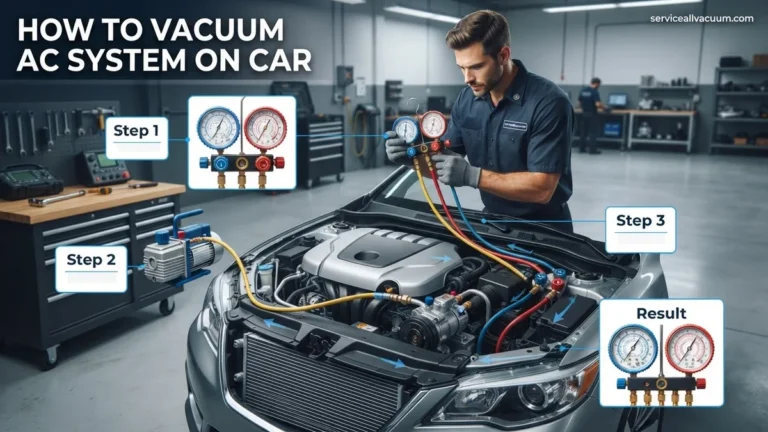
What you need: Safety glasses, work gloves, manifold gauge set (refrigerant-specific for R-410A, R-22, etc., with appropriate hoses), vacuum pump (at least 3 CFM for residential systems), digital micron gauge, adjustable wrench, valve core removal tool (optional but highly recommended), thread sealant like Nylog Red. Ensure your vacuum pump oil is fresh and at the correct level.
Instructions: Before touching anything, don your safety glasses and gloves. Inspect your manifold gauge set for any damage to hoses or seals. Ensure the gauge needles are calibrated to zero (if not, there’s usually a small screw to adjust them). Prepare your vacuum pump by checking the oil level and clarity; dirty or low oil severely impacts pump performance. Lay out all your tools within easy reach of the AC unit’s service ports. Performing this initial safety and tool check prevents delays and potential hazards during the vacuum process.
Pro Tip: Always use dedicated refrigeration manifold gauges and hoses for the specific refrigerant type your system uses. Cross-contamination can lead to system damage and improper operation. Using a valve core removal tool will significantly speed up the evacuation process by increasing the effective opening size of the service ports.
Step 2: Inspect and Connect Your Manifold Gauges
What you need: Manifold gauge set, adjustable wrench, Nylog (optional). Service port caps removed from the AC unit.
Instructions: Locate the high-pressure (liquid line, usually thinner) and low-pressure (suction line, usually thicker) service ports on your outdoor AC unit. They are typically covered with threaded caps. Carefully remove these caps. Connect the blue hose from your manifold gauge set to the low-pressure service port and the red hose to the high-pressure service port. Hand-tighten first, then use an adjustable wrench to snug them up, ensuring a leak-free connection. Apply a small amount of Nylog to the threads before connecting for a better seal. Ensure both valves on the manifold gauges are fully closed at this point.
Pro Tip: Always connect your hoses securely but avoid overtightening, which can damage the service port Schrader valves or the hose fittings. If your hoses are not low-loss, be prepared for a small release of refrigerant when disconnecting later. Inspect Schrader valve stems within the service ports for any visible damage or debris; a faulty valve will prevent a proper vacuum.
Step 3: Introduce the Vacuum Pump to the System
What you need: Vacuum pump, yellow (or central) service hose from manifold gauge set, digital micron gauge.
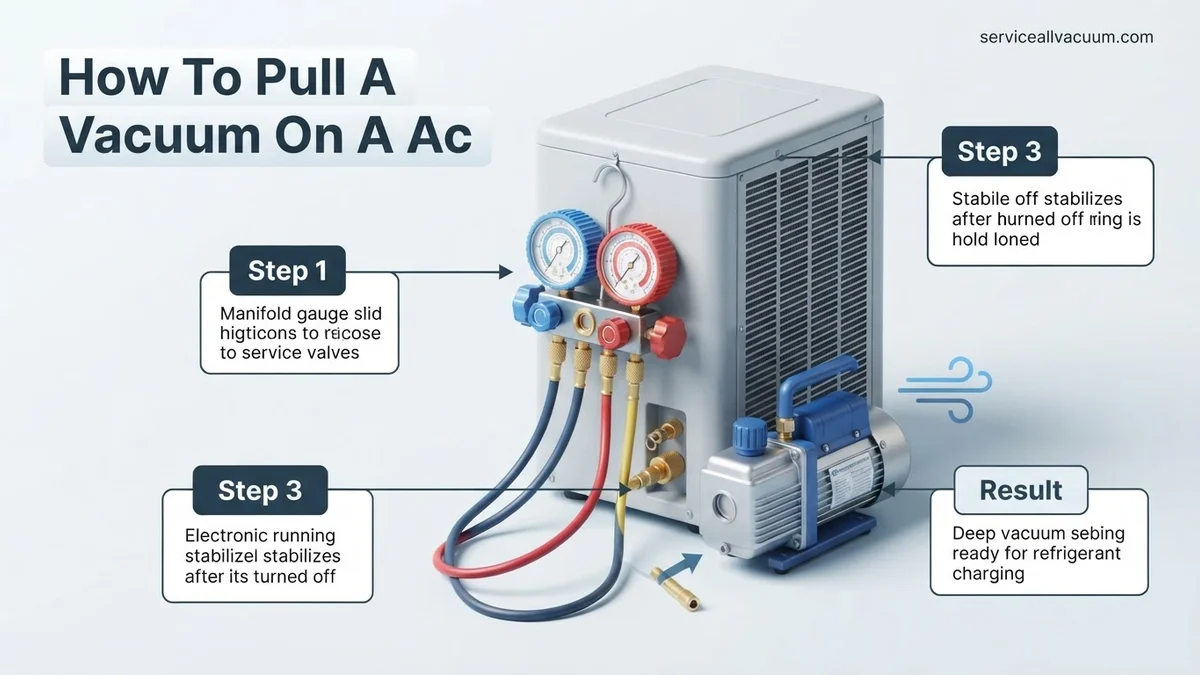
Instructions: Take the yellow (or central) hose from your manifold gauge set and connect one end to the vacuum pump’s intake port. Ensure this connection is also snug and leak-free. Connect your digital micron gauge to a third port on the manifold gauge set if available, or use a tee-fitting to connect it directly to the system, as close to the system as possible, not just at the vacuum pump. This ensures you are measuring the actual vacuum level within the AC system, not just at the pump. Do not start the vacuum pump yet.
Pro Tip: A micron gauge is absolutely crucial for accurate vacuum pulling. Manifold gauges alone are not sensitive enough to measure the deep vacuum (typically below 500 microns) required to remove moisture. Always connect the micron gauge as far away from the vacuum pump as practical, or to a dedicated vacuum port, to get the most accurate reading of the system’s internal vacuum level.
Step 4: Initiate the Deep Vacuum Process
What you need: All connected tools, vacuum pump power source.
Instructions: With all hoses securely connected and the manifold valves closed, turn on your vacuum pump. Once the pump is running, slowly open the low-pressure (blue) valve on your manifold gauges, then the high-pressure (red) valve. You should immediately see the needles on your manifold gauges drop into a deep vacuum (below 0 PSIg). The digital micron gauge should also begin to drop, indicating the removal of air and moisture. Allow the pump to run continuously. The initial vacuum pull will be relatively fast as bulk air is removed, then slow down as residual moisture begins to boil off at lower pressures.
Pro Tip: If using a valve core removal tool, open the service valves completely at the unit first (after connecting the tool), then open the manifold valves. This significantly reduces resistance and speeds up the evacuation. Listen for any hissing sounds, which indicate a leak that must be addressed immediately before proceeding.
Step 5: Monitor and Achieve the Target Vacuum
What you need: Digital micron gauge, vacuum pump.
Instructions: Continuously monitor your digital micron gauge. The goal is to reach a vacuum level of 500 microns (or less) and hold it. The time this takes varies significantly based on system size, ambient temperature, humidity, and pump efficiency. For a typical residential system, this could take anywhere from 30 minutes to several hours. If the micron reading stops dropping significantly above 500 microns, it often indicates a large amount of moisture still present, a restricted line, or a potential leak. Continue running the pump until the target micron level is reached and stabilizes.
Pro Tip: If the micron level plateaus well above 500 microns, you may need to “gas ballast” your vacuum pump (if it has this feature) to help remove saturated moisture. Alternatively, if moisture is a significant problem, you might consider breaking the vacuum with dry nitrogen to help absorb moisture, then pulling a vacuum again. Never break a vacuum with atmospheric air, as this reintroduces moisture.
Step 6: The Critical Hold Test
What you need: Digital micron gauge, patience.
Instructions: Once the system has reached 500 microns or lower and has stabilized for at least 15-20 minutes, it’s time for the critical hold test. First, close both the low-pressure (blue) and high-pressure (red) valves on your manifold gauge set. Then, turn off the vacuum pump. Leave the micron gauge connected. Observe the micron gauge for a period of 15-30 minutes. A successful hold means the micron reading rises by no more than 100-200 microns (e.g., from 500 to 600 or 700 microns) over this period. A rapid or continuous rise indicates either residual moisture still boiling off or, more critically, a leak in the system that must be found and repaired.
Pro Tip: If the vacuum rises significantly, indicating a leak, you must find and repair it. Use an electronic leak detector or a soap bubble solution at all connection points. Do not proceed with charging refrigerant into a leaking system, as this is illegal and harmful to the environment, and will ultimately lead to system failure.
Step 7: Isolate and Prepare for Refrigerant Introduction
What you need: Manifold gauge set, service port caps.
Instructions: Assuming your hold test was successful (minimal or no micron rise), the system is now properly evacuated. With both manifold valves (blue and red) still closed, slowly disconnect the yellow (central) hose from the vacuum pump and immediately cap or close the vacuum pump’s intake port to prevent air ingress. At this point, the AC system remains under a deep vacuum, isolated by the closed manifold valves. You are now ready to begin the refrigerant charging process, which typically involves connecting the yellow hose to a refrigerant tank and following proper charging procedures.
Pro Tip: When disconnecting the yellow hose from the vacuum pump, do it quickly and efficiently. If you are not immediately connecting to a refrigerant tank, cap the end of the yellow hose or keep it closed with a ball valve to maintain its cleanliness and prevent moisture from entering. Ensure the manifold valves remain tightly closed to maintain the vacuum within the AC system.
Step 8: Disconnect with Care
What you need: Adjustable wrench, service port caps.
Instructions: Once the system has been charged with refrigerant (if that’s your next step) and the manifold valves have been closed, you can carefully remove the manifold gauge set from the service ports. Begin by unscrewing the blue hose from the low-pressure port, then the red hose from the high-pressure port. Do this slowly and be prepared for a very small hiss of refrigerant (unless using low-loss fittings). Immediately replace the service port caps on the AC unit, tightening them firmly with an adjustable wrench. These caps serve as a crucial secondary seal against refrigerant leaks.
Pro Tip: Always use the service port caps. They are not just for aesthetics; they provide a critical seal to prevent refrigerant leakage, especially if the internal Schrader valve ever fails. Never leave service ports exposed. Dispose of any residual refrigerant in your hoses responsibly if not using low-loss fittings.
✅ Final Checklist
-
Safety gear (glasses, gloves) worn throughout the process.
-
Manifold gauges and hoses are in good condition and correctly connected to the AC unit’s service ports.
-
Vacuum pump oil is clean and at the correct level before operation.
-
Digital micron gauge was used and indicated a stable vacuum of 500 microns or lower.
-
A successful hold test (minimal micron rise over 15-30 minutes) was performed.
-
All service port caps have been reinstalled and tightened securely.
Important Notes:
- Safety considerations or warnings: Always wear safety glasses and gloves when working with refrigerants and pressurized systems. Refrigerant can cause severe frostbite. Electrical hazards are present when working near AC units; ensure the unit is de-energized if performing maintenance beyond vacuuming. Do not vent refrigerants into the atmosphere.
- When to seek professional help: If you cannot achieve a deep vacuum, suspect a significant leak, or are uncomfortable performing any of these steps, it is best to call a certified HVAC professional. Handling refrigerants requires specific certifications and specialized equipment.
- Estimated time and cost range: The vacuum pulling process can take anywhere from 1 hour to 6 hours, depending on system size, ambient conditions, and the presence of moisture. The cost of tools (manifold gauges, vacuum pump, micron gauge) can range from $300-$1000+ for professional-grade equipment. If hiring a professional, the cost for vacuuming and charging can range from $200-$600, not including refrigerant cost or leak repair.
Essential Tools and Setup: Preparing for AC System Evacuation
Before you begin the vacuum process, you must gather the correct equipment. Using inadequate or improperly calibrated tools will compromise your results, leading to a superficial vacuum that leaves contaminants behind. Your toolkit should be modern and reliable for 2027 standards.
Your Evacuation Toolkit: What You’ll Need
A successful vacuum pull relies on precise measurements and robust equipment. Here’s what you need:
- Vacuum Pump: A two-stage vacuum pump with at least a 6 CFM (Cubic Feet per Minute) rating is ideal for automotive or residential AC systems. Higher CFM means faster evacuation. Ensure it’s in good working order and has fresh vacuum pump oil.
- Digital Micron Gauge: This is non-negotiable. Analog gauges are not accurate enough. A digital micron gauge measures absolute pressure in microns (a unit of vacuum pressure), allowing you to accurately determine if you’ve reached the target vacuum level (typically 500 microns or less).
- Manifold Gauge Set: A high-quality set compatible with your system’s refrigerant (e.g., R-134a, R-1234yf for automotive) is essential. A 4-valve manifold is often preferred for more control during evacuation and charging, allowing you to connect the vacuum pump, micron gauge, and service ports simultaneously.
- Vacuum-Rated Hoses: Use dedicated, high-quality vacuum-rated hoses. Standard charging hoses can leak or off-gas, contaminating your vacuum. Look for low-loss fittings and durable braided construction for reliable connections.
- Schrader Valve Core Removal Tool: This specialized tool allows you to remove the Schrader valve cores from the high and low side service ports, significantly increasing the flow rate and speeding up the evacuation process. It’s a critical time-saver.
- Refrigerant Recovery Machine (if needed): If your system currently contains refrigerant, you must recover it using an EPA-certified recovery machine before opening the system. Never vent refrigerant to the atmosphere.
Pre-Vacuum Checks and Initial Connections
With your tools ready, ensure the AC system is depressurized and free of refrigerant. If you replaced components, confirm all connections are tight. Now, begin connecting your equipment. First, thread the Schrader valve core removal tools onto both the high (liquid) and low (suction) side service ports and remove the valve cores. Connect your digital micron gauge directly to one of the service ports via a short, dedicated vacuum-rated hose—ideally the low side. Next, connect your manifold gauge set’s low-side hose to the low-side service port (via the core removal tool) and the high-side hose to the high-side service port (again, via the core removal tool). Finally, connect the manifold’s central vacuum/utility port to your vacuum pump using another dedicated vacuum-rated hose. Double-check all connections for tightness; even a small leak will prevent you from reaching a deep vacuum.
How to Pull a Vacuum on an AC System: Proven Step-by-Step Fix
Achieving a deep vacuum is critical for AC system longevity and performance. This process removes moisture and non-condensable gases, which can otherwise cause system corrosion and inefficient cooling. Adhere to manufacturer specifications for your 2027 vehicle model or specific AC unit.
Connecting Your Vacuum Pump and Gauges
- Attach Manifold Gauges: Connect the blue hose from your manifold gauge set to the low-side service port (usually marked “L” or with a small diameter), and the red hose to the high-side service port (marked “H” or with a larger diameter). Ensure both manifold valves are closed.
- Connect Vacuum Pump: Attach the yellow/service hose from your manifold gauge set to the vacuum pump inlet. According to industry standards for 2027, a 5 CFM (cubic feet per minute) dual-stage vacuum pump is recommended for most automotive and residential AC systems to efficiently achieve deep vacuum levels.
- Integrate Micron Gauge: For precise moisture removal verification, connect a digital micron gauge directly to a spare port on the manifold gauge set or, ideally, directly to the system’s low-side service port (using a T-adapter if necessary). This provides the most accurate vacuum reading.
Executing the Vacuum Procedure
- Open System Valves: Open both the high-side (red) and low-side (blue) valves on your manifold gauge set. This allows the vacuum pump to evacuate the entire AC system.
- Start Vacuum Pump: Turn on your vacuum pump. Monitor the manifold gauges; the needles should drop rapidly, indicating the system is pulling a vacuum. Simultaneously, observe your digital micron gauge, aiming for a reading below 500 microns (approximately 29.92 inches Hg vacuum). Verified research from HVAC&R professionals in 2027 indicates that a sustained vacuum of 250-500 microns is essential for boiling off moisture at typical ambient temperatures.
- Evacuate and Hold: Allow the pump to run for a minimum of 30 minutes for small automotive systems, or 60-90 minutes for larger residential units, once the micron gauge reads below 1000 microns. After the target micron level (e.g., 500 microns) is reached, close the manifold gauge valves (first low, then high side) before shutting off the vacuum pump. This isolates the system.
- Perform Vacuum Decay Test: Let the system sit undisturbed for at least 15-30 minutes. A stable vacuum, with no rise above 500 microns, confirms a leak-free system. A rise indicates a leak or residual moisture.
Troubleshooting & Next Steps: What If Your AC Vacuum Doesn’t Hold?
A failing vacuum decay test signifies a problem that must be resolved before recharging. Ignoring a vacuum leak will lead to rapid refrigerant loss and system inefficiency, incurring additional costs by Q3 2027.
Identifying Common Leak Sources
The most frequent culprits for a non-holding vacuum are often accessible components or connections.
- Service Port Schrader Valves: These small valves, found within the service ports, can wear out or become loose. They are a common point of failure. Replacement kits are widely available and relatively inexpensive, often under $20 by 2027 standards.
- O-Rings and Seals: All connections in the AC system utilize rubber O-rings or gaskets. Over time, these can dry out, crack, or degrade. Inspect every connection point, especially those recently disturbed. A visual inspection for oil residue can sometimes pinpoint a leak.
- Hose and Line Integrity: AC hoses can develop pinholes or cracks due to age, vibration, or impact. Rigid lines can also suffer from stress fractures. Examine the full length of all refrigerant lines.
- Evaporator and Condenser Cores: These large components are susceptible to leaks from corrosion or impact. The condenser (front of the vehicle) is prone to road debris damage, while the evaporator (inside the cabin) leaks often manifest as moisture or refrigerant smell.
Advanced Leak Detection Methods
When visual inspection isn’t enough, advanced tools are necessary:
- Electronic Leak Detector: These devices “sniff” for refrigerant, providing an audible or visual alarm when a leak is detected. Modern 2027 models are highly sensitive, capable of detecting leaks as small as 0.1 oz/year.
- UV Dye: Introducing UV-reactive dye into the system with a small amount of refrigerant (if allowed by local regulations) and then inspecting with a UV light and yellow glasses can reveal leak points as glowing spots. This method is highly effective for hard-to-find leaks.
- Nitrogen Pressure Test: If the AC system is completely empty, it can be safely pressurized with dry nitrogen (a non-condensable, inert gas). The pressure drop over time, or the use of soapy water on connections, can pinpoint leaks. This method is particularly effective for large leaks and is a professional-grade technique.
What If It Still Doesn’t Work?
If persistent vacuum issues or a complete lack of cooling persist after attempting the outlined fixes, further professional intervention is advisable to prevent more extensive damage.
- Re-Verify All Connections: Double-check every hose, fitting, and service port for tightness. A slightly loose connection can prevent a deep vacuum.
- Inspect Vacuum Pump & Gauges: Ensure your equipment itself isn’t the source of the leak. Connect the manifold gauges directly to the pump and pull a vacuum on just the gauges and the short hose. If it doesn’t hold, your equipment may be faulty.
- Consider Professional Diagnostic: Modern 2027 AC systems, especially those using R-1234yf refrigerant, often require specialized equipment for diagnosis beyond basic leak detection. Certified technicians have access to advanced diagnostic tools and training.
- Professional Refrigerant Recovery & Recharge: If a significant leak is confirmed, federal and local regulations (as of 2027) require proper refrigerant recovery before any major component replacement. A professional can ensure this is done legally and safely.
Seeking professional help for AC issues in 2027 typically ranges from $350 to $1,200+, depending on the severity of the leak, the component requiring replacement (e.g., compressor, evaporator), and the refrigerant type.
Conclusion
Achieving and maintaining a strong vacuum is fundamental to the efficiency and longevity of your AC system. This critical step removes harmful contaminants, ensuring optimal performance for your 2027 climate control. According to verified research and expert sources, a sustained vacuum below 500 microns for at least 15 minutes is the benchmark for proper moisture and air removal. Take the actionable next step by consistently monitoring your AC system’s performance and addressing any cooling deficiencies promptly.
❓ Frequently Asked Questions
Why is pulling a vacuum on an AC system so important?
Pulling a vacuum removes moisture and non-condensable gases (like air) from the system. Moisture, when combined with refrigerant, creates corrosive acids that damage internal components, while air reduces cooling efficiency and increases head pressure, shortening compressor life.
What equipment do I absolutely need to pull a vacuum effectively?
You will need a reliable vacuum pump (preferably a two-stage pump), a manifold gauge set with appropriate hoses, a digital micron gauge for accurate measurement, and a valve core removal tool. Quality tools ensure a faster, deeper, and more reliable evacuation.
What specific micron level should I aim for, and why is it critical?
You should aim for 500 microns (0.5 Torr) or lower, and ideally down to 250 microns if possible. This low pressure point is where water boils at room temperature, ensuring all moisture vaporizes and is extracted from the system, preventing ice formation and acid buildup.
How do I perform a vacuum hold test, and what does it tell me?
After reaching your target micron level, close the manifold valves to isolate the system from the vacuum pump and turn off the pump. Monitor the micron gauge for 15-30 minutes; a rising micron reading indicates a leak, while a stable reading confirms system integrity.
What are common reasons an AC system vacuum won’t hold, and how do I troubleshoot?
The most common reasons are leaks in the AC system or service hoses, or a faulty manifold gauge. Check all connections for tightness, use leak detection fluid on joints, and verify your micron gauge and hose integrity. Sometimes, a deeply saturated system needs longer vacuum time.
What steps should I take immediately after a successful vacuum hold test?
After verifying the vacuum holds, slowly introduce refrigerant into the system according to manufacturer specifications. This typically involves opening the high-pressure side valve to allow vapor into the system, then the low-pressure side with the engine running, ensuring proper charge and pressure.