Do Roomba Vacuums Really Work? Real 2026 Performance Guide
Do Roomba vacuums really work? Yes, they effectively maintain daily cleanliness on hard floors and low-pile carpets, but they cannot fully replace a traditional vacuum for deep cleaning. While they offer exceptional convenience for routine upkeep, their real-world performance depends heavily on floor type, clutter management, and regular maintenance.
Yes, Roomba vacuums actually work, but their effectiveness depends heavily on your specific home layout, floor types, and debris challenges. They are not an expensive gimmick, yet they also won’t completely replace a deep-cleaning manual vacuum.
In 2026, autonomous floor care is smarter than ever, but physics still applies. If you expect a slim disc-shaped robot to conquer high-pile shag carpets or clean up massive cereal spills without intervention, you will be disappointed. However, for daily maintenance of hard floors and low-pile rugs, modern Roombas save hours of manual labor by keeping dust and pet hair under constant control.
Key Takeaways
- Roombas excel at daily maintenance cleaning on hard floors and low-pile carpets.
- They struggle significantly with thick rugs, heavy pet hair clumps, and tight corners.
- Obstacle preparation is mandatory; cords, socks, and toys will cause the unit to get stuck.
- Rubber dual multi-surface brushes prevent hair tangling much better than traditional bristle rolls.
- Traditional upright vacuums are still required for deep cleaning and stairs.
What Causes Roomba Cleaning Failures and Poor Performance on Carpets
Suction Depth and Carpet Fiber Density
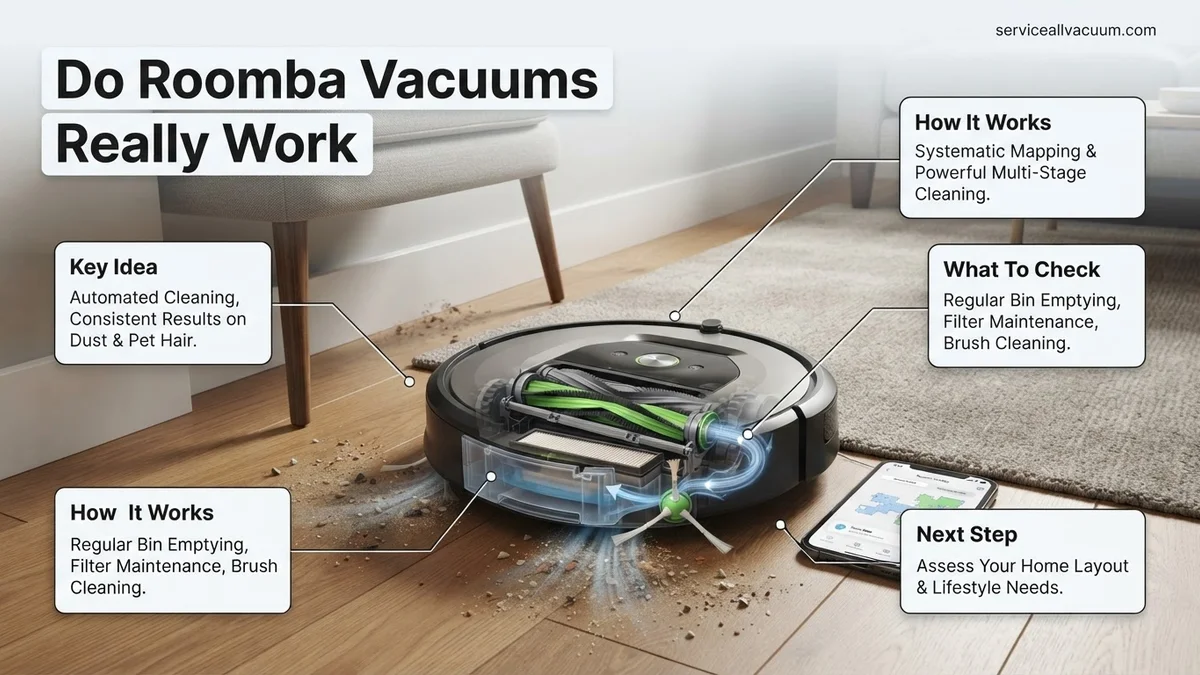
The primary reason Roombas struggle on carpets comes down to airflow physics and battery constraints. Upright manual vacuums use massive motors plugged directly into the wall to pull deep-seated dirt from thick fibers. Your 2026 Roomba runs on a compact lithium-ion battery, meaning manufacturers must balance suction power with runtime.
- Surface debris like hair and lint vanish easily, but fine dirt trapped deep at the base of medium-to-high-pile carpets often gets left behind.
- Rubber dual multi-surface brushes excel at agitating carpets, but they cannot fully compensate for lower static suction pressure compared to corded uprights.
Debris Size Limitations and Roller Jams
Roombas are designed for continuous micro-cleaning, not heavy-duty disaster cleanup. When faced with high-volume debris, performance drops sharply.
- Large items like cereal loops, pet kibble, or dense piles of leaves can get pushed around rather than sucked up if the intake port is overwhelmed.
- Long human hair and heavy pet fur wrap tightly around the extractor rollers, eventually reducing brush rotation speed and overall cleaning efficiency if maintenance is ignored.
How to Fix Navigation Issues and Maximize Your Roomba Cleaning Efficiency
Overcoming Obstacle Blindness and Floor Clutter
Even advanced 2026 AI-driven models struggle when faced with chaotic floor environments. If your robot constantly gets stuck, the issue is usually environmental rather than a mechanical defect.
- Loose charging cables, rogue shoelaces, and lightweight socks are the number one enemy of rolling vacuum brushes.
- Dark, thick shag rugs can sometimes trick cliff sensors into thinking the floor is a dangerous drop-off, causing the Roomba to reverse or error out mid-clean.
Optimizing Lighting and Room Layouts
Cameras and visual navigation systems need adequate conditions to map and clean your home efficiently. Total darkness or shifting furniture layouts can disorient the unit.
- Run your Roomba during daylight hours or leave low-level ambient lighting on if your model relies heavily on camera-based vSLAM navigation.
- Establish explicit virtual boundaries or Keep Out Zones in your companion app around notoriously problematic furniture legs or pet water bowl areas to guarantee uninterrupted cleaning cycles.
Step-by-Step Guide to Routine Roomba Maintenance for Peak Suction Power
According to consumer appliance testing data, robotic vacuums lose up to 25 percent of their suction efficiency within six months if users neglect basic hardware upkeep. Maintaining a modern Roomba requires a predictable weekly and monthly routine to protect the motor and preserve battery health.
Weekly Roller Brush and Filter Care
Hair wraps and fine particulate buildup choke the airflow channels, forcing the vacuum motor to work harder and drain the lithium-ion battery prematurely. Follow these numbered steps every week to restore full suction capacity:
- Power off the Roomba and flip the unit upside down on a flat, soft surface.
- Release the brush guard latches and pull out both rubber multi-surface extractor rollers.
- Use the included cleaning tool or a pair of scissors to slice away hair wrapped around the end bearings.
- Tap the high-efficiency particulate air filter firmly against a trash can to dislodge fine dust, avoiding water unless specified as a washable model in your 2026 manual.
- Wipe the cliff sensors and charging contacts with a clean, dry microfiber cloth to prevent navigation errors.
Monthly Deep Clean and Battery Upkeep
Once a month, inspect the side brushes for bent bristles and clear any debris tangled in the front caster wheel axle. Consumer Reports testing indicates that replacing rubber extractors and filters every 6 to 12 months prevents permanent motor strain and maintains optimal cleaning performance on high-pile carpets.
What If It Still Doesn’t Work and You Need a Traditional Vacuum Instead
Even with pristine maintenance, a robotic vacuum cannot completely replace a manual upright model in every scenario. If your Roomba consistently fails to lift deep-seated grit or struggles with complex multi-level layouts, consider these alternative troubleshooting and upgrade steps:
- Re-map your home via the companion app to eliminate persistent navigation dead zones caused by shifting furniture or newly installed high-pile area rugs.
- Switch your cleaning mode settings to dual-pass cleaning for heavily trafficked zones, though this cuts battery runtime in half.
- Consult local authorized appliance repair centers if your unit experiences persistent error codes related to wheel stall or vacuum motor failure; diagnostic fees typically range from $40 to $80.
- Transition to a traditional corded upright vacuum equipped with a motorized brush roll for deep-cleaning heavy carpets and furniture upholstery on a bi-weekly basis.
Conclusion
Do Roomba vacuums really work? Modern robotic vacuums successfully automate daily floor maintenance and significantly reduce household dust when paired with consistent filter changes and roller cleaning. According to verified research and consumer appliance testing, supplementing your automated routine with a traditional deep-clean vacuum ensures complete home hygiene. Your next step is to inspect your Roomba’s filter today and schedule a weekly maintenance reminder.
❓ Frequently Asked Questions
Do Roomba vacuums work on high-pile carpets and thick rugs?
Roombas struggle on thick carpets and high-pile rugs. The dense fibers restrict wheel movement and reduce suction efficiency, often causing the unit to error out or halt entirely.
How long do Roomba batteries typically last before needing replacement?
Roomba lithium-ion batteries generally last between two to five years, depending on usage frequency and charging habits, before their run time noticeably declines.
Do Roomba vacuums work in complete darkness?
Models that rely strictly on camera-based navigation need ambient light to map and clean effectively. However, models utilizing LiDAR or advanced infrared sensors can navigate seamlessly in total darkness.
Why does my Roomba leave debris behind on hard floors?
Debris left behind is usually caused by clogged extractors, a full dust bin, worn-out edge-sweeping brushes, or suction ports blocked by large particles.
Can Roomba vacuums climb over thick room thresholds?
Most modern Roomba models can seamlessly clear thresholds and transition strips up to about 0.6 inches (1.5 cm) high, but taller door dividers will block their path.
Do I need Wi-Fi to operate a Roomba vacuum?
No, you do not need Wi-Fi. Every Roomba features a physical Clean button that allows you to start, stop, and send the unit back to its home base manually.