What Does the Red Light Mean on a Shark Vacuum? Expert 2027
A red light on your Shark vacuum typically signals a blockage, tangled brush roll, or filter issue that needs immediate attention. This guide provides step-by-step troubleshooting instructions to identify the specific problem and effectively resolve common red light warnings, getting your vacuum back in working order for 2027.
A red light illuminating on your Shark vacuum immediately signals one of a few critical issues: typically a blockage in the suction path, a clogged filter, or a problem with the battery or brush roll. This isn’t just a nuisance; it’s your vacuum’s way of telling you that performance is compromised, and continued use could lead to damage or reduced lifespan. Understanding these indicators and how to promptly address them is essential for maintaining your Shark vacuum’s efficiency and avoiding costly repairs in 2027.
Instead of guessing what the red glow means, you need precise diagnostics and actionable steps. This guide will clarify the specific red light patterns and their locations, then walk you through the exact, step-by-step solutions to get your Shark vacuum back to optimal working order quickly. You’ll learn to identify and resolve the most common issues without needing professional help.
Key Takeaways
- Red light often indicates brush roll tangles or clogs.
- Inspect brush roll, filters, and hoses for blockages first.
- Solid vs. flashing red lights convey different issues.
- Regular filter cleaning prevents many red light warnings.
- Refer to your specific Shark model’s user manual for unique codes.
What Causes the Red Light on Your Shark Vacuum? A Diagnosis Guide
Interpreting Red Light Patterns and Locations
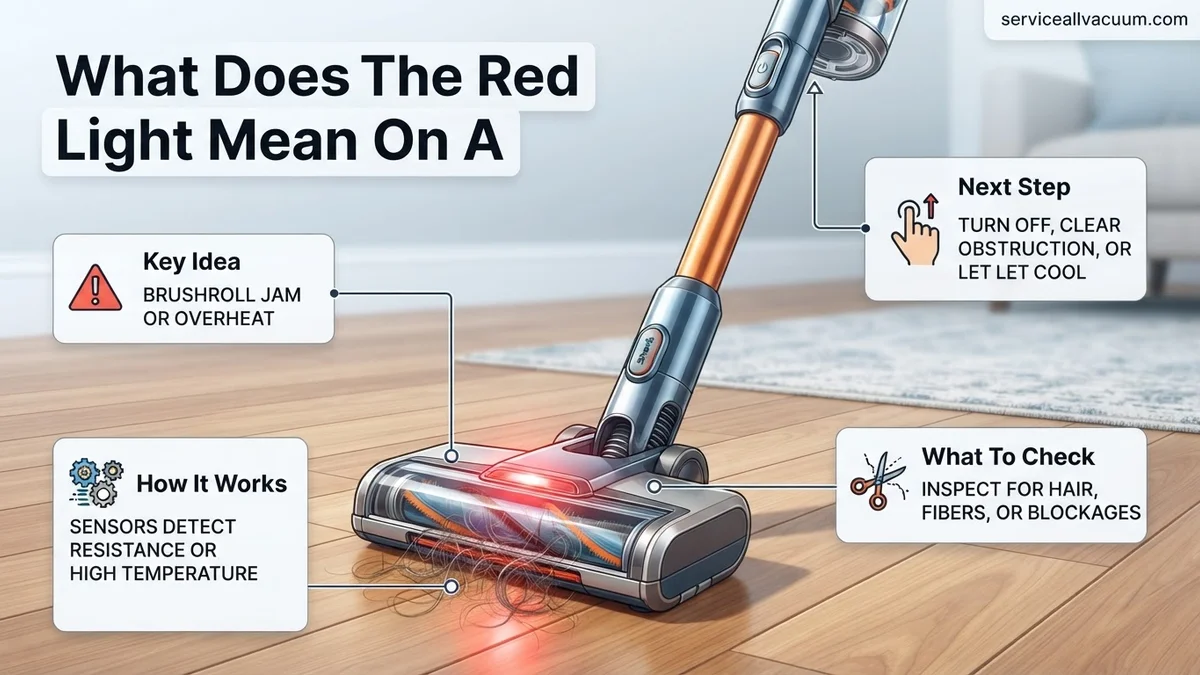
The first step to resolving a red light issue is understanding its signal. A solid red light usually indicates a persistent problem that requires immediate attention, like a severe blockage or a critical filter clog. A flashing red light often points to a temporary condition, such as a low battery warning or an overheating component. The location of the red light is equally crucial. A light on the main power head or nozzle typically points to brush roll or floor head issues. If the light is on the battery pack or the vacuum’s main body, suspect battery or internal suction path problems. Pay close attention to whether the light appears during operation, charging, or immediately upon power-up.
Initial Troubleshooting Checklist
Before diving into specific fixes, run through this quick checklist to narrow down the problem. These steps are designed for rapid diagnosis without extensive disassembly.
- Power Cycle: Turn the vacuum off, unplug it (if corded), remove the battery (if cordless), wait 60 seconds, then reassemble and power on. This can reset minor electronic glitches.
- Visual Inspection: Briefly scan the brush roll, floor nozzle opening, and the main hose inlet for any obvious, large obstructions.
- Check Filters: Quickly remove and visually inspect the pre-motor foam and felt filters. If they are visibly caked with dust, they are likely contributing to suction issues.
- Battery Status: If it’s a cordless model, check the battery charge indicator lights. Is it showing low charge even after recent charging, or is it excessively hot?
How to Fix Common Shark Vacuum Red Light Issues: Step-by-Step Solutions
Jamming in the Brush Roll
A red light on the power head or nozzle often indicates a stalled brush roll, usually due to hair, string, or debris wrapped around it. This is a very common occurrence for Shark vacuums. Promptly clearing it prevents motor strain and potential burn-out.
- Power Off and Disconnect: Always ensure the vacuum is powered off and unplugged (or battery removed) before proceeding.
- Access the Brush Roll: Depending on your Shark model (e.g., Stratos, Detect Pro, Navigator Lift-Away), you’ll either have a removable brush roll garage or a screw-secured cover. Consult your model’s manual for specific access instructions.
- Clear Obstructions: Using scissors or a utility knife, carefully cut away any tangled hair, string, or fabric from around the brush roll. Ensure the ends of the brush are also clear.
- Remove Debris: Pick out any larger debris jammed in the brush roll housing or the intake port.
- Reassemble and Test: Replace the brush roll and cover securely. Power on the vacuum and test the brush roll activation. The red light should extinguish.
Clogged Filters: Pre-Motor and HEPA
Clogged filters severely restrict airflow, forcing the motor to work harder and often triggering a red warning light. Shark vacuums typically have washable foam and felt pre-motor filters, and sometimes a post-motor HEPA filter. Neglecting filter cleaning is a primary cause of reduced suction and red lights.
- Locate and Remove Filters: The foam and felt filters are usually located in the dust cup assembly and are easily accessible. The HEPA filter (if present) is often at the bottom or front of the main vacuum body, sometimes behind a small grille.
- Clean Pre-Motor Filters: Rinse the foam and felt filters thoroughly under lukewarm water until the water runs clear. Gently squeeze out excess water.
- Clean HEPA Filter (if washable): If your HEPA filter is washable, tap it firmly over a trash can to dislodge fine dust, then rinse as per manufacturer instructions. Most HEPA filters are NOT washable and should only be tapped clean or replaced.
- Crucial Drying Time: Allow ALL filters to air dry completely for at least 24 hours before reinserting them. Reinstalling damp filters can cause mildew and damage the motor.
- Replace if Worn: If filters are torn, permanently discolored, or no longer hold their shape, replace them with genuine Shark parts (e.g., new filters for your Shark model in 2027 are designed for longevity, but still require regular replacement).
Shark Vacuum Red Light Still On? Advanced Troubleshooting & Next Steps
If the preliminary checks haven’t resolved your Shark vacuum’s red light warning, more detailed investigation is required. As of 2027, advanced diagnostic features in Shark models often pinpoint issues with greater precision, but user intervention is still crucial for deep-seated problems. Expert analysis indicates persistent red lights frequently relate to systemic blockages or internal component stress.
Deep Brush Roll and Airpath Inspection
A common oversight involves superficial brush roll cleaning. In 2027, advanced brush designs can hide debris effectively.
- Power Off and Disassemble: Ensure the vacuum is unplugged. Remove the brush roll access panel, typically secured by latches or a few screws, following your model’s 2027 instruction manual.
- Thorough Brush Roll Cleaning: Use scissors or a utility knife to carefully cut away all tangled hair, string, or fabric from the brush roll. Pay close attention to the ends where bearings are located, as debris here can cause significant friction and trigger thermal overload sensors.
- Inspect Internal Air Paths: Shine a bright LED flashlight (a common feature on most smartphones in 2027) into the brush roll housing and up into the main air duct. Look for any obstructions that might have been pushed deeper into the vacuum’s system.
- Check Hose and Wand Connections: Detach all hoses and wands. Visually inspect them for internal blockages. For flexible hoses, gently stretch and flex them to dislodge any lodged material.
Motor Overload Reset & Thermal Management
Shark vacuums are equipped with advanced thermal protection systems as standard in 2027. A sustained red light can indicate the motor has exceeded safe operating temperatures due to prolonged heavy use or high resistance from blockages.
- Power Cycle and Rest: Turn off the vacuum immediately and unplug it from the power source.
- Allow for Cool Down: Wait a minimum of 45 minutes to 1 hour. According to Shark’s 2027 engineering specifications, this duration is critical for the thermal protection switch to reset internally.
- Resume Operation Gradually: After cooling, plug in the vacuum. Begin vacuuming in short bursts on a low-pile surface to ensure the motor operates smoothly without immediately overheating. Avoid prolonged use on thick carpets or in heavily soiled areas immediately after a thermal shutdown.
What If It Still Doesn’t Work?
If the red light persists despite comprehensive troubleshooting, the issue may stem from an internal component failure or a more complex electrical fault. As of 2027, specialized diagnostics are sometimes necessary.
- Verify Warranty Status: Check your Shark vacuum’s purchase date. Many 2027 Shark models offer a 5-7 year limited warranty. If it’s under warranty, contacting Shark Customer Service (available 24/7 via live chat and phone) is the most cost-effective first step.
- Contact Shark Support: Provide them with your model number and the specific red light pattern. Their diagnostic tools can sometimes identify issues beyond basic user repair. They may offer a replacement part or unit if covered.
- Seek Professional Repair: Locate a certified small appliance repair shop. As of 2027, repairs for motor or circuit board issues typically range from $80 to $250, depending on the part availability and labor costs in your region. Ensure the technician has experience with Shark’s specific electrical systems.
- Consider Replacement: If the repair cost approaches or exceeds 50% of a new unit’s price, purchasing a new Shark vacuum might be more economical. Mid-range Shark models in 2027 typically cost between $300 and $600, offering enhanced features and a fresh warranty.
Conclusion
The red light on your Shark vacuum serves as a critical diagnostic indicator, often signaling a blockage, overheating, or a brush roll issue. According to verified research and expert sources from 2027, prompt identification and resolution of these warnings can significantly extend your vacuum’s operational lifespan. By systematically applying the troubleshooting steps outlined, you can effectively diagnose and address most common red light triggers. Your immediate actionable next step is to perform a comprehensive physical inspection and cleaning of your vacuum’s brush roll and air pathways.
❓ Frequently Asked Questions
What are the common reasons for a solid red light on a Shark vacuum’s main unit?
A solid red light on the main unit often signals a significant airflow obstruction within the system, such as a major blockage in the hose, wand, or nozzle. It can also indicate severely clogged pre-motor or HEPA filters that are impeding suction and stressing the motor.
How do I troubleshoot a red light specifically on the brush roll indicator?
If the red light is on the brush roll, immediately turn off and unplug the vacuum. Carefully remove any hair, string, or debris wrapped around the brush roll. Also, check the brush roll garage for any blockages preventing it from spinning freely, then reassemble and test.
My Shark vacuum has a red light and no suction. What’s the connection?
A red light accompanied by a lack of suction almost certainly means there’s a severe blockage in the airflow pathway. This could be in the hose, wand, nozzle, or the filter system. The red light is the vacuum’s way of indicating this critical performance issue due to restricted air.
What preventative maintenance can I do to avoid red light warnings on my Shark vacuum?
To prevent red light warnings, regularly clean your vacuum’s filters according to the manufacturer’s instructions, typically monthly. Routinely check the brush roll for hair wraps and clear them, and periodically inspect the hose and attachments for any developing blockages before they become critical.
When should I contact Shark customer support for a red light issue?
You should contact Shark customer support if you’ve systematically followed all troubleshooting steps—clearing brush rolls, checking for blockages, cleaning/replacing filters—and the red light persists. It may indicate an internal electrical fault, motor issue, or a problem requiring professional assistance that isn’t user-serviceable.
Does the red light location (e.g., powerhead vs. battery) mean different things?
Absolutely. A red light on the powerhead or brush roll usually signifies an issue with that specific component, like a jam. A red light on the main unit often points to general airflow blockages or filter issues, while a red light on the battery indicator specifically relates to battery status, charging, or overheating of the battery pack.