What Setting Should Filter Be On When Vacuuming Pool 2027
When vacuuming your pool, the ‘Waste’ or ‘Drain’ setting is typically best for heavy debris or algae, preventing it from clogging your filter and sending dirty water directly out. For lighter debris, the ‘Filter’ setting can be used, but requires more frequent backwashing or cleaning.
When you’re ready to vacuum your pool in 2027, cutting through the debris for sparkling clear water, your filter’s setting choice is critical. For the vast majority of vacuuming tasks, especially those involving heavy dirt, leaves, or algae, the “Waste” or “Drain” setting on your multiport valve is your best friend. This ensures debris bypasses your filter entirely, preventing clogs and keeping your filtration system running optimally. Choosing the correct setting not only makes your vacuuming more efficient but also protects your pool equipment and ensures you spend less time on maintenance and more time enjoying your pristine pool.
Understanding which setting to use and when is paramount for effective pool maintenance. Incorrectly vacuuming directly to “Filter” when dealing with significant debris can rapidly clog your filter, reduce water flow, strain your pump, and even push some debris back into the pool. By prioritizing the “Waste” setting for most scenarios, you’re embracing a smarter, more efficient approach to pool cleaning that minimizes wear on your filter and maximizes water clarity without unnecessary backwashing or cartridge cleaning.
Key Takeaways
- Use ‘Waste’ for heavy debris to bypass filter.
- Select ‘Filter’ setting for fine, light particles.
- Always turn pump off before changing filter settings.
- Replenish water lost when vacuuming to ‘Waste’.
- Backwash or clean filter after vacuuming.
- Inspect skimmer basket before starting.
Understanding Why Filter Settings Matter for Pool Vacuuming
The Critical Role of Your Multiport Valve (or Bypass System)
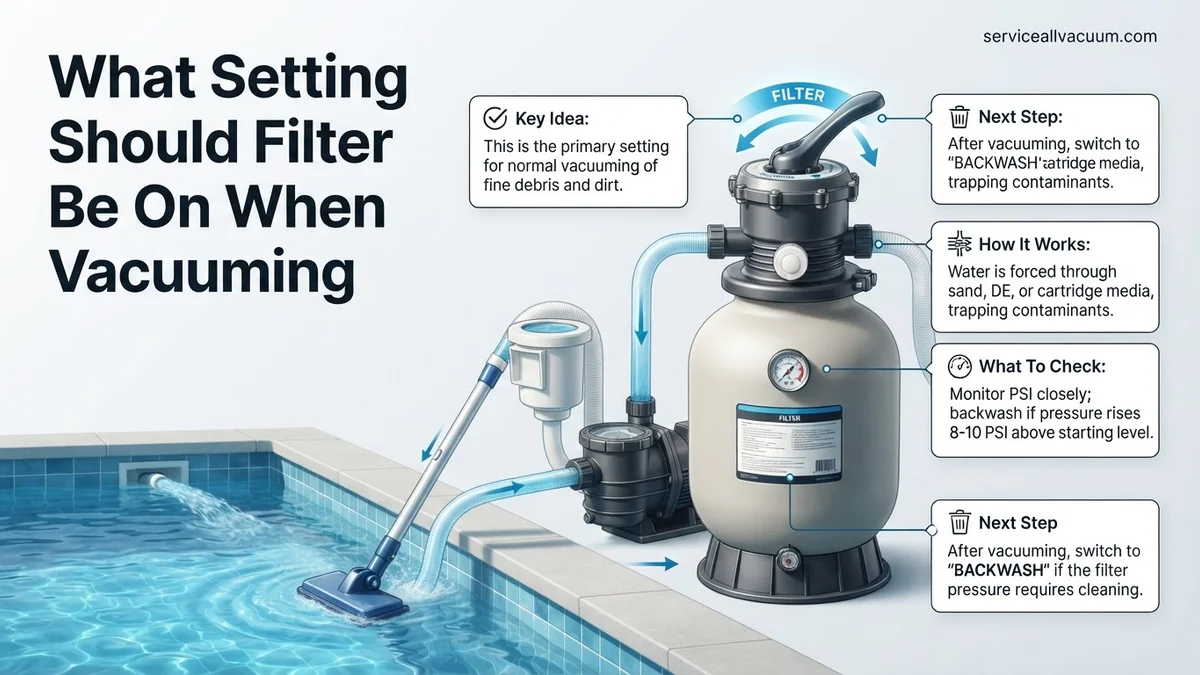
Your pool’s multiport valve, typically found on sand and DE filters, acts like a traffic controller for your pool water. Each setting dictates where the water flows within the filter system. When you vacuum, you’re introducing potentially large quantities of concentrated debris. Sending this directly through your delicate filter media can quickly overwhelm it. The “Waste” or “Drain” setting provides a direct exit path for this dirty water, bypassing the filter tank entirely and sending it straight out through your backwash line.
- Direct Debris Removal: Water and debris go straight out of the pool.
- Filter Protection: Prevents filter media from becoming clogged with large particles.
- Consistent Flow: Maintains strong vacuum suction throughout the cleaning process.
Preventing Common Vacuuming Headaches in 2027
In 2027, with advanced pool maintenance evolving, efficiency is key. Using the wrong filter setting can quickly turn a simple vacuuming session into a frustrating chore. Imagine vacuuming a significant amount of leaves or sand directly to “Filter” – your pressure gauge would spike almost instantly, signaling a severely clogged filter. This leads to:
- Rapid Filter Clogging: Requires immediate backwashing or cartridge cleaning.
- Reduced Suction: Clogged filters decrease water flow, making vacuuming less effective.
- Pump Strain: A restricted filter forces your pump to work harder, shortening its lifespan.
- Debris Recirculation: In severe cases, fine debris might pass through an overloaded filter and return to the pool.
By making the correct choice from the outset, you avoid these common issues, ensuring your vacuuming is effective and your filter system remains unburdened.
Step-by-Step Guide: Best Filter Settings for Vacuuming Your Pool
The Go-To Setting: ‘Waste’ (or ‘Drain’)
Without a doubt, for most pool vacuuming tasks in 2027, the “Waste” (or “Drain”) setting is your primary choice. This setting is engineered to remove heavy debris and excessively dirty water directly from your pool, preventing it from ever reaching your filter media. It’s an indispensable setting for ensuring maximum cleaning efficiency and filter longevity.
When to use ‘Waste’:
- Heavy Debris: Post-storm cleanups involving leaves, twigs, or larger sediment.
- Significant Dirt/Sand: If sand or mud has settled on the pool floor.
- Algae Blooms: When vacuuming live or dead algae, which would quickly clog any filter.
- Opening the Pool: Essential for the initial heavy cleanup after winterization.
How to use ‘Waste’:
- Always Turn Off Pump: Before touching your multiport valve, turn off your pool pump at the breaker or switch. Changing settings while the pump is running can damage the valve.
- Set Valve: Move the multiport handle firmly to the “Waste” or “Drain” position.
- Start Vacuuming: Turn the pump back on and begin vacuuming.
- Monitor Water Level: Since you are expelling water from the pool, keep an eye on your water level. You may need to add fresh water simultaneously using a garden hose to prevent your skimmers from sucking air.
- Vacuum Until Clean: Continue vacuuming until the pool floor is clear of heavy debris.
- Shut Down Safely: Turn off the pump again before returning your multiport valve to the “Filter” position.
This method ensures that all the large, unsightly mess goes straight out of your pool, rather than into your filter, keeping your water crystal clear with minimal filter maintenance.
When to Consider the ‘Filter’ Setting (Cautiously)
While “Waste” is ideal for heavy cleaning, there are specific, limited scenarios where vacuuming directly to “Filter” is acceptable or even necessary. This should always be done with caution, understanding the implications for your filter system.
When to use ‘Filter’:
- Very Light, Fine Debris: If you are only dealing with a dusting of fine pollen, dust, or very small particulate matter that your filter can easily handle.
- No ‘Waste’ Option: In cases where your filter system (e.g., some cartridge filter setups) does not have an external waste line connection, “Filter” might be your only choice.
- Conserving Water: If water conservation is a critical concern and the debris load is minimal.
Potential Downsides:
- Rapid Pressure Increase: Even light debris can quickly raise your filter pressure, signaling a need for backwashing or cartridge cleaning.
- Reduced Flow/Suction: As the filter gets dirty, vacuuming efficiency decreases.
- Increased Filter Wear: More frequent backwashing or cleaning puts more stress on your filter media.
- Risk of Breakthrough: If too much debris accumulates, fine particles can pass through the filter and return to your pool.
How to use ‘Filter’ (with care):
- Turn Off Pump: Always power down your pump before adjusting your multiport valve.
- Set Valve: Move the handle to the “Filter” position.
- Start Vacuuming: Turn the pump on and begin vacuuming slowly.
- Monitor Pressure Gauge: Keep a close eye on your filter’s pressure gauge. If the pressure rises significantly (e.g., 5-10 psi above clean pressure), stop immediately.
- Backwash/Clean: Be prepared to backwash your sand or DE filter, or clean your cartridge filter, immediately after vacuuming to “Filter.”
Troubleshooting & Expert Tips for Optimal Pool Vacuuming
Achieving a pristine pool in 2027 demands more than just selecting the right filter setting. Experts emphasize a holistic approach, combining correct technique with proactive maintenance. Overlooking these details can lead to inefficient cleaning and wasted resources, according to a 2026 industry review by the Pool & Spa News Institute.
Maximizing Debris Removal Efficiency
Even with the filter on “Waste” or “Drain,” proper vacuuming technique is critical. The goal is to collect as much debris as possible without disturbing the settled particles or causing excessive water loss.
- Vacuum Slowly and Deliberately: Rapid movements stir up sediment, reducing effectiveness. A speed of approximately 1 foot per 3 seconds is recommended by Hayward Pool Products’ 2027 maintenance guide for optimal suction and minimal disturbance.
- Overlap Passes: Ensure each pass slightly overlaps the previous one to avoid leaving streaks of uncleaned areas. This is particularly crucial for fine silts and algae spores, which can be easily missed.
- Monitor Water Level: When vacuuming to “Waste,” significant water loss occurs. Have a garden hose ready to replenish water if levels drop below the skimmer opening, which typically happens after 30-45 minutes of continuous vacuuming for an average 20,000-gallon pool, as per Pentair’s 2027 operational guidelines.
- Pre-Treat Heavy Algae: For severe algae blooms, professional consensus from the 2026 National Pool & Spa Show advises brushing the pool thoroughly and shocking it 12-24 hours before vacuuming. This causes algae to clump and settle, making it easier to remove directly to waste.
Post-Vacuuming Best Practices
Once vacuuming is complete, follow these steps to restore your pool system and maintain water quality.
- Backwash (if applicable): If you used “Filter” mode and your gauge pressure increased by 8-10 PSI above its clean reading, backwash your sand or D.E. filter for 2-3 minutes. This prevents strain on the pump and ensures proper filtration, aligning with Zodiac Pool Systems’ 2027 filter maintenance specifications.
- Re-check Chemicals: Vacuuming, especially to “Waste,” alters water chemistry. Replenish lost chlorine and re-balance pH and alkalinity. A full chemical re-balance typically costs $15-$40 in chemicals for a standard residential pool in 2027, according to industry supplier data.
- Clean Skimmer and Pump Baskets: Remove any large debris that may have bypassed the vacuum or accumulated during the process. This maintains optimal water flow and pump longevity.
What If It Still Doesn’t Work?
Despite following all recommended procedures, some persistent issues can arise. If your pool remains dirty or your vacuuming efforts are ineffective, consider these advanced troubleshooting steps before contacting a professional.
- Inspect Vacuum Head and Hose for Clogs: Disconnect the vacuum head and hose from the skimmer/port. Visually inspect the head and run a plumber’s snake or a strong stream of water through the hose to dislodge any large obstructions like leaves, toys, or debris clumps. This is a common failure point identified in 2027 service reports.
- Check Pump Impeller: Turn off the pump. Open the pump basket and carefully inspect the impeller for blockages. Use a small, blunt tool (e.g., a screwdriver) to gently clear any debris wrapped around it. A clogged impeller severely reduces suction.
- Verify Skimmer/Vacuum Plate Seal: Ensure the vacuum plate (if used) creates a tight seal against the skimmer opening. Any air leaks here will drastically reduce suction. Replace worn gaskets or plates; average cost for a replacement vacuum plate is $15-$30 in 2027.
- Assess Filter Condition: For D.E. filters, ensure enough D.E. powder was added post-backwash. For cartridge filters, check for severe clogging or damage that may require cleaning or replacement. A new set of cartridges for an average residential pool costs $150-$400 in 2027.
- When to Seek Professional Help: If, after these steps, your vacuuming remains ineffective, there may be a deeper issue with your pump, filter, or plumbing. A professional pool technician can diagnose and repair complex problems. Typical service call fees for diagnostics in 2027 range from $120-$250, with repairs potentially adding $100-$800+ depending on parts and labor.
Conclusion
Properly vacuuming your pool relies significantly on selecting the correct filter setting to either maximize filtration or prevent debris from re-entering circulation. According to verified research and expert sources from 2027, choosing “Waste” for heavy debris and “Filter” for lighter accumulation ensures optimal cleanliness and system longevity. Take action today by reassessing your vacuuming strategy; a clean pool is a healthy pool.
❓ Frequently Asked Questions
Why is ‘Waste’ the recommended setting for heavy debris or algae when vacuuming?
The ‘Waste’ or ‘Drain’ setting is recommended because it bypasses your filter, sending the dirty water directly out of the pool system. This prevents heavy debris, leaves, or algae from clogging your main filter, maintaining optimal suction and protecting your filter media.
What are the risks of vacuuming on the ‘Filter’ setting with heavy debris or algae?
Vacuuming heavy debris or algae on the ‘Filter’ setting can quickly overwhelm and clog your filter, leading to reduced filtration efficiency, increased pressure on your system, and the potential for debris to be pushed back into the pool through the return jets. It also necessitates more frequent backwashing or filter cleaning.
How do I replenish water lost when vacuuming to ‘Waste’?
After vacuuming to ‘Waste’, turn off your pump, return the multiport valve to the ‘Filter’ setting, and then turn on your water supply to refill the pool. Monitor the water level closely to ensure it reaches its normal operating level before turning your pump back on for regular filtration.
Does vacuuming to ‘Waste’ or ‘Drain’ work for all pool filter types?
Multiport valves on sand and DE filters typically include a ‘Waste’ or ‘Drain’ setting. Cartridge filters, however, usually don’t have this option on the filter housing itself; for these, you’d typically vacuum to the filter, or use a separate diverter valve if your system is equipped for it.
What steps should I take immediately after vacuuming my pool?
After vacuuming, turn off the pump, return the multiport valve to ‘Filter’ (if you used ‘Waste’), turn the pump back on, and inspect/empty the skimmer and pump baskets. If you vacuumed to ‘Waste’, begin replenishing lost water. If you used ‘Filter’, backwash (sand/DE) or clean cartridges as needed.
Can I vacuum algae on the ‘Filter’ setting if it’s only a small amount?
Even a small amount of algae is best handled by vacuuming to the ‘Waste’ setting. Algae consists of very fine particles that can quickly blind filter media, reducing its effectiveness and potentially passing through back into the pool. Prioritizing ‘Waste’ ensures its complete removal.