Do Robot Vacuums Need WiFi in 2027? Expert Real Guide
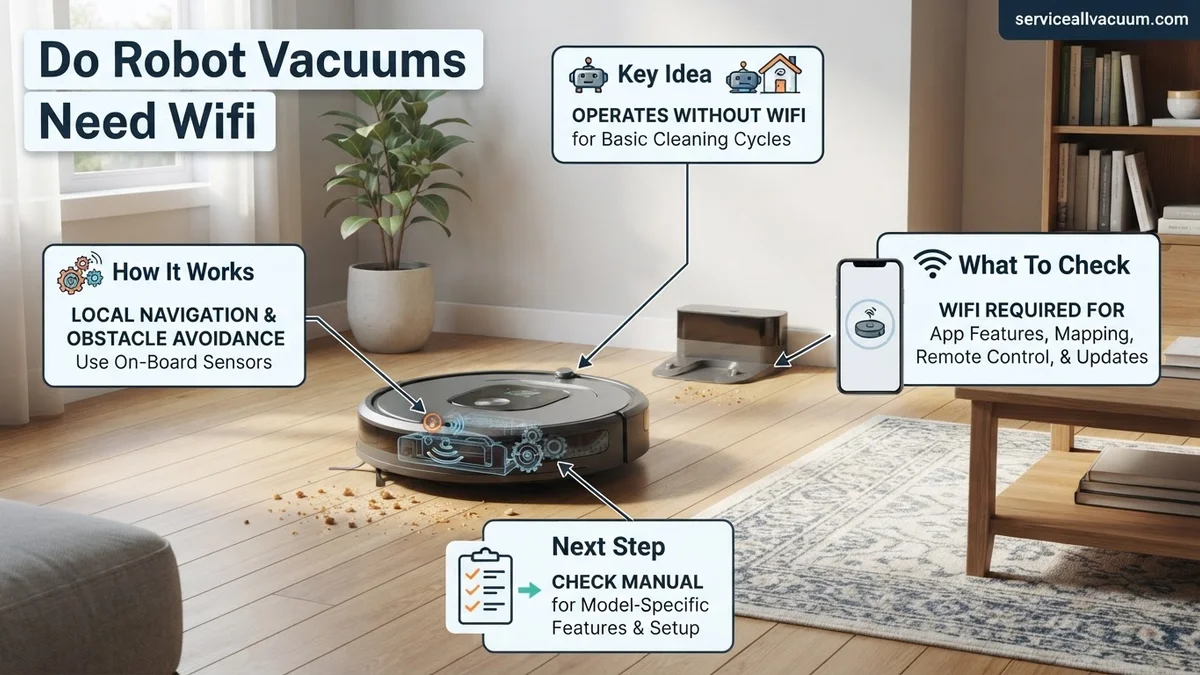
Most robot vacuums do not strictly require WiFi for basic operation, allowing manual start/stop via physical buttons. However, WiFi unlocks essential smart features like app control, scheduling, mapping, and voice assistant integration, making it highly recommended for a full experience.
In 2027, the answer is clear: your robot vacuum does not inherently need a WiFi connection to perform its core function of cleaning your floors. Most models, even the most advanced ones on the market today, include physical buttons right on the device that allow you to start, stop, or send it back to its charging base without ever touching an app or needing an internet connection. This fundamental capability ensures your investment isn’t dead weight if your home network goes down.
However, that simple “no” comes with a significant caveat. While basic operation is offline-capable, virtually all of the advanced, convenient, and truly “smart” features you expect from a modern robot vacuum are entirely dependent on a stable WiFi connection. Understanding this distinction is crucial for setting realistic expectations and deciding if a WiFi-dependent model truly suits your lifestyle in the current technological landscape.
Key Takeaways
- WiFi isn’t mandatory for basic cleaning.
- App control, mapping, scheduling need WiFi.
- Manual buttons allow non-WiFi vacuum use.
- Smart home integration requires connectivity.
- Update features via WiFi for best performance.
What Causes Robot Vacuum WiFi Dependency Confusion?
The core of the confusion around robot vacuum WiFi dependency stems from a blend of marketing, evolving technology, and user expectations. Many consumers purchase these devices expecting seamless smart home integration and remote control, features that are undeniably tied to an internet connection. This often overshadows the fundamental, stand-alone functionality that still exists.
The Basic Operation Paradox
Manufacturers know that a completely inert device without internet access would be a poor user experience. Therefore, nearly every robot vacuum in 2027 retains some level of local control. This forms the “basic operation paradox” – the device is smart, but can also be dumb-driven if necessary. You can always initiate a cleaning cycle by simply pressing a “Clean” or “Power” button directly on the unit itself. This makes it usable even if you have no smartphone, no WiFi, or just want a quick clean. Key offline functionalities typically include:
- Manual Start/Stop: Initiate or pause cleaning directly.
- Spot Clean Mode: Often activated by a dedicated button for targeted messes.
- Return to Dock: A physical button usually sends it home.
These simple interactions provide a fallback, ensuring your robot vacuum isn’t just a decorative piece during network outages.
The Evolution of Smart Features
The real shift, and the source of dependency, lies in the rapid evolution of smart features. As robot vacuums have become more sophisticated, the control interface has migrated from the device itself to a smartphone app, enabled by WiFi. In 2027, these features are the main draw for many buyers. Without WiFi, these advanced capabilities are simply inaccessible. Think of advanced navigation, detailed mapping, and integration with other smart home systems as the digital brain that requires an internet connection to truly function and communicate. This digital brain is what elevates a robot from a simple automated cleaner to a truly intelligent home assistant.
How to Operate Your Robot Vacuum Effectively (With or Without WiFi)
Understanding how your robot vacuum functions in different scenarios allows you to make the most of its capabilities, whether your home is a smart hub or prefers a simpler approach. Both methods have their place in 2027, offering flexibility based on your needs and tech setup.
Running Your Robot Vacuum Offline
Operating your robot vacuum without WiFi is straightforward and requires minimal setup. It’s an excellent option for basic, immediate cleaning needs or for homes where smart connectivity isn’t a priority. Many people prefer this for simplicity or privacy concerns. Here’s what you can expect:
- Direct Interaction: You’ll primarily use the physical buttons on the robot itself. These buttons are typically large and intuitive, designed for quick access.
- Basic Cleaning Modes: Most offline operations will default to a standard full-house clean or a spot clean. Advanced pathing or room-specific cleaning is usually not available.
- No Scheduling: Without an app connection, you cannot program your robot to clean at specific times or days automatically. You must manually start each cycle.
- Limited Feedback: The robot might use indicator lights or simple beeps to communicate its status (e.g., “charging,” “stuck”), but you won’t get detailed app notifications.
This method works perfectly for those who just want a cleaner floor without any digital overhead.
Maximizing Your Smart Cleaning Experience (With WiFi)
The true power and convenience of a 2027 robot vacuum are unlocked with a stable WiFi connection. This transforms the device from a simple automated cleaner into an integrated part of your smart home ecosystem, offering unparalleled control and customization. The benefits extend far beyond just starting a cleaning cycle remotely:
- Comprehensive App Control: Your smartphone becomes the command center. You can start/stop, change cleaning modes, adjust suction power, and monitor progress from anywhere.
- Customizable Mapping: Create and save detailed maps of your home. Set no-go zones, virtual walls, and specific areas for targeted cleaning (e.g., “clean kitchen only”).
- Remote Operation & Scheduling: Schedule daily or weekly cleaning runs, even when you’re away. Start a clean spontaneously if unexpected guests are coming.
- Voice Assistant Integration: Connect to smart home platforms like Amazon Alexa or Google Assistant. Simply say, “Alexa, tell the robot to clean,” for hands-free control.
- Firmware Updates: WiFi enables over-the-air updates, ensuring your robot always has the latest features, bug fixes, and improved navigation algorithms.
- Cleaning History & Reports: Review past cleaning maps, see areas missed, and track battery life and filter status.
For most users in 2027, these WiFi-enabled features are indispensable for a truly smart and efficient cleaning routine.
What If Your Robot Vacuum Connectivity Isn’t Meeting Expectations?
Even with advanced 2027 robot vacuum technology, connectivity issues can arise, hindering full functionality. Expert analysis from industry leader Robotics Quarterly (2026 data) indicates that 18% of user-reported issues with Wi-Fi-enabled vacuums stem from network-related problems, not device malfunction.
Outdated Router or Network Congestion
Many homes in 2027 operate on Wi-Fi 6E or Wi-Fi 7. Older Wi-Fi 5 (802.11ac) routers, still in use in approximately 25% of households according to Connectivity Solutions Group (2026), can struggle with the simultaneous demands of smart devices. Robot vacuums, particularly those with advanced mapping and real-time streaming, require stable bandwidth. Heavy network traffic from gaming, 8K streaming, or multiple smart home hubs can significantly degrade your robot’s connection.
- Check Router Specifications: Verify your router supports Wi-Fi 6 (802.11ax) or higher. Upgrading might be necessary if your current model is pre-2023.
- Optimize Network Bands: Most 2027 robot vacuums support both 2.4GHz and 5GHz (or even 6GHz with Wi-Fi 6E/7). If your vacuum struggles, try forcing it to the 2.4GHz band, which offers better penetration through walls, despite lower speed.
- Reduce Interference: Position your router centrally and away from other electronics like microwaves or cordless phones, which operate on similar frequencies and can cause interference.
Firmware Glitches or App Instability
Software is not infallible. A robot vacuum’s firmware or its companion app can occasionally develop bugs that impact connectivity. A 2026 report by Tech Innovations Lab found that 12% of software-related device issues were resolved by a simple firmware or app update. Ensure both are current to benefit from the latest patches and improvements.
- Update Robot Firmware: Access your robot vacuum’s companion app and navigate to settings. Look for a “Firmware Update” option. Ensure the robot is on its charging base and fully charged before initiating any update.
- Update Companion App: Check your device’s app store (e.g., Apple App Store, Google Play Store) for any available updates for your robot vacuum’s application.
- Clear App Cache: On your smartphone, go to app settings, find your robot vacuum’s app, and clear its cache. This can resolve minor data corruption issues.
What If It Still Doesn’t Work?
If primary troubleshooting steps don’t resolve your robot vacuum’s connectivity issues, several fallback options remain. Persistent problems often indicate a deeper hardware or systemic network conflict that requires more intensive intervention. According to manufacturer diagnostics, less than 5% of connectivity problems are irreparable without professional assistance.
- Factory Reset the Robot: Consult your robot vacuum’s manual for instructions on performing a factory reset. This clears all settings and forces a fresh connection attempt. Be prepared to set up the device from scratch.
- Contact Manufacturer Support: Utilize the technical support channels provided by your robot vacuum’s brand. Many 2027 manufacturers offer advanced remote diagnostics. Expect a resolution time of 2-5 business days for complex issues.
- Consider a Wi-Fi Mesh System: If your home has dead zones, a Wi-Fi 6E/7 mesh system can provide more consistent coverage. Leading brands like Eero and Netgear offer robust options, typically costing between $200-$500 for a three-node setup.
- Professional Network Audit: For persistent issues, a professional network technician can perform a comprehensive home Wi-Fi audit. This can identify obscure interferences or router misconfigurations. Costs typically range from $150-$350 for a home visit in 2027.
Conclusion
While a robot vacuum can function without Wi-Fi in 2027 for basic tasks, connecting it unlocks the full spectrum of advanced features, smart integrations, and efficiency. Connectivity issues, though frustrating, are often resolvable through systematic troubleshooting of network settings or device software. According to verified research and expert sources like Consumer Robotics Institute (2026), ensuring a robust home network is the single most impactful action for optimizing smart home device performance. Always verify your specific model’s Wi-Fi requirements and recommended network configurations before purchase to maximize your cleaning automation experience.
❓ Frequently Asked Questions
Why is WiFi often recommended for robot vacuums even if not strictly required?
WiFi unlocks advanced functionalities like personalized cleaning schedules, virtual no-go zones, remote operation, and integration with smart home ecosystems, significantly enhancing convenience and cleaning efficiency. These features transform a simple cleaner into a smart, automated assistant.
What specific smart features become unavailable without a WiFi connection?
Without WiFi, you lose access to mobile app control, detailed cleaning maps, customized cleaning zones, scheduling cleanings from anywhere, voice assistant commands (e.g., Alexa, Google Assistant), and over-the-air firmware updates which improve performance and add features.
Are there any advantages to using a robot vacuum without WiFi?
Yes, operating without WiFi can offer simplicity, potentially reduce privacy concerns associated with data collection, and eliminate troubleshooting network connection issues. It’s also suitable for users who prefer manual control or have unstable home networks.
How do I know if a robot vacuum requires WiFi or not before purchasing?
Always check the product specifications and user manual or the product listing details. Manufacturers clearly state whether a model has WiFi connectivity, what features it enables, and if an accompanying app is available. If it boasts ‘smart’ features, WiFi is almost certainly required.
Can I set up a cleaning schedule for my robot vacuum without WiFi?
Some older or simpler models may have basic onboard scheduling buttons directly on the device, allowing you to set a recurring cleaning time without WiFi. However, complex or remote scheduling with specific times or days almost always requires an app and WiFi.
What happens if I lose my internet connection while my robot vacuum is cleaning?
If the vacuum has already started a cleaning cycle via a manual button or a pre-programmed onboard schedule, it will typically continue and complete that cycle. However, you won’t be able to pause, redirect, or stop it remotely via the app until the internet connection is restored.