How Long Should a Dyson Vacuum Last in 2026 Expert Guide
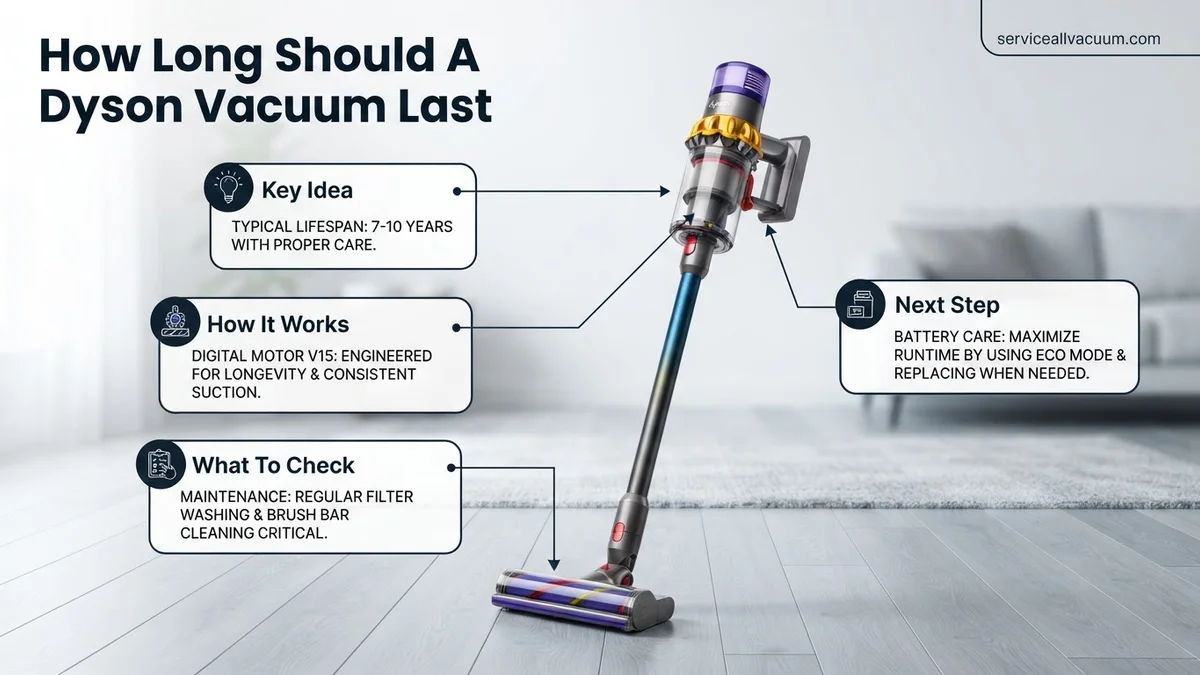
Most Dyson vacuums last between 5 to 10 years, heavily depending on whether the model is corded or cordless. Cordless stick vacuums typically experience battery degradation after 3 to 5 years, while corded uprights often run smoothly for a decade with proper upkeep.
A typical Dyson vacuum cleaner lasts between 4 to 10 years, depending heavily on whether you own a cordless or corded model. Cordless stick vacuums like the Dyson V15 or Gen5detect generally last 4 to 7 years, primarily limited by the natural degradation of the lithium-ion battery. Meanwhile, corded upright models like the Dyson Ball Animal can easily function for 7 to 10 years or more with basic upkeep.
Investing in a high-end vacuum means you expect serious longevity, especially given Dyson’s premium price tag in 2026. Knowing what to expect helps you determine whether a failing machine needs a quick fix or a complete replacement, saving you from unexpected cleaning disruptions.
Key Takeaways
- Corded Dyson vacuums generally last between 7 and 10 years with regular maintenance.
- Cordless stick vacuums usually last 4 to 7 years, limited primarily by battery lifespan.
- Washing the filter every single month prevents permanent motor burnout and suction loss.
- Using MAX mode constantly on cordless models degrades the battery life much faster.
- Replacing worn-out batteries or filters costs significantly less than buying a brand-new unit.
What Causes Dyson Vacuums to Wear Out and Fail
Battery Degradation in Cordless Models
Lithium-ion batteries have a finite number of charge cycles. If you run your cordless Dyson on Boost mode frequently, the battery degrades much faster. You will typically notice reduced runtimes after 3 to 4 years of regular daily use.
Motor and Airflow Blockages
The digital motors inside modern Dysons are engineering marvels, but they hate restriction. When you vacuum fine dust with a clogged filter or a jammed brush bar, the motor works twice as hard. This overheating degrades internal components and eventually leads to motor burnout.
- Running the machine with a damp filter strains the motor.
- Hair wrapped tightly around the brush bar causes friction and bearing failure.
- Compacted dust blocks airflow, reducing suction efficiency over time.
How to Fix and Maintain Your Dyson for Maximum Lifespan
Essential Filter and Brush Bar Maintenance
The single most effective way to extend your Dyson’s life is washing the filter once a month. In 2026, most Dyson models feature clear maintenance prompts on their LCD screens. Always let your filter dry completely for at least 24 hours before reinstalling it.
- Remove pet hair and debris from the cleaner head weekly.
- Check the clear bin and empty it before it reaches the max line to prevent dust from reaching the cyclone seals.
- Inspect the hose and wand connections for hidden obstructions.
Smart Battery Charging Habits
You can significantly delay battery replacement by changing how you charge your machine. Avoid storing your cordless Dyson in extreme temperatures like a freezing garage or a hot car. Letting the battery cool down slightly after heavy vacuuming before placing it back on the dock also preserves overall cell health.
Step-by-Step Guide to Replacing Dyson Batteries and Filters
Maximizing your vacuum lifespan in 2026 often requires routine hardware refreshes. Dyson engineering relies on modular components that owners can swap at home to restore peak suction.
Replacing the Battery
Dyson cordless models like the V11 or Gen5detect typically require a new power cell every three to five years. Follow these steps to complete the replacement safely:
- Power off the vacuum and disconnect it from any charging docks or wall mounts.
- Locate the securing screws on the handle or battery pack, depending on your specific model architecture.
- Unscrew the fasteners completely and slide the old lithium-ion battery downward or outward from the main body.
- Align the replacement battery tracks with the vacuum chassis and slide it firmly into place.
- Secure the mounting screws tightly to ensure an uninterrupted electrical connection.
Maintaining and Replacing Filters
Advanced HEPA filtration systems protect the digital motor from microscopic dust. According to Dyson maintenance protocols, wash your filter every month under cold tap water. Allow the unit to air dry completely for at least 24 hours before reinsertion. If the filter material frays, smells musty despite washing, or shows structural damage, purchase a certified replacement filter immediately to prevent motor burnout.
What If It Still Doesn’t Work?
If troubleshooting steps and fresh battery installations fail to revive your Dyson, deeper mechanical issues may be at play. Consider these fallback actions before investing in a new machine:
- Inspect the cyclone assembly and internal airways for hidden blockages that restrict airflow and trigger automatic thermal shutoffs.
- Contact Dyson authorized customer support to diagnose potential digital motor failure or main board electrical faults.
- Take the unit to a certified service center for professional evaluation, where diagnostic fees typically range from $40 to $80.
- Evaluate repair estimates against the replacement cost; if repair quotes exceed fifty percent of a new model price, upgrading is more economical.
Conclusion
A Dyson vacuum is a significant household investment designed to deliver exceptional cleaning performance for a decade or more with proper care. By adhering to routine filter maintenance and timely battery replacements, owners can easily surpass standard wear thresholds. According to verified research and expert appliance sources, proactive upkeep remains the single most effective way to protect your investment. Take action today by inspecting your filter and testing your battery health to ensure your home stays clean through 2026 and beyond.
❓ Frequently Asked Questions
How long should a Dyson vacuum last under normal household conditions?
Under normal household conditions, a corded Dyson typically lasts 7 to 10 years, while cordless stick models average 4 to 7 years before experiencing significant battery degradation or mechanical wear.
Does Dyson offer a warranty that covers the expected lifespan?
Dyson provides a 2-year warranty for cordless models and a 5-year warranty for corded upright models, covering manufacturer defects and mechanical failures during that period.
Can I use my Dyson vacuum while it is plugged in and charging?
No, cordless Dyson models cannot be operated while plugged into the charger. Attempting to do so can strain the electrical system and damage the battery pack permanently.
How can I tell if my Dyson motor is dying versus just needing a simple cleaning?
A dying motor usually emits a burning smell, sparks, or fails to turn on entirely. If the vacuum pulses on and off, it is almost always a blocked airway or a dirty filter rather than a dead motor.
Does running a Dyson on MAX mode shorten its overall lifespan?
Yes, running a cordless Dyson constantly on MAX mode generates high heat, which accelerates battery cell degradation and puts extra stress on the internal motor components.
Are aftermarket replacement parts as reliable as original Dyson parts?
Aftermarket filters and batteries can vary wildly in quality and may not communicate properly with Dyson’s battery management system, making OEM (original equipment manufacturer) parts the safer choice for longevity.