How to Clean a Cordless Dyson Vacuum Step-by-Step 2027
Regularly cleaning your cordless Dyson is crucial for maintaining suction and prolonging its lifespan. This guide provides expert, step-by-step instructions for cleaning the filter, dust bin, cyclone, and brush bar. Proper drying of filters is essential to prevent damage and ensure optimal performance in 2027.
By 2027, maintaining your cordless Dyson vacuum is still the single most effective way to guarantee peak suction and extend its lifespan. Forget buying expensive replacements or struggling with diminished performance; a thorough cleaning of specific components directly resolves up to 90% of common suction issues. This guide provides the complete, step-by-step process for effectively cleaning all essential parts, focusing on the critical filters and cyclone assembly, ensuring your Dyson performs like new.
You’ll discover that neglecting your Dyson’s internal cleanliness, particularly its filters and cyclone, leads to a rapid decline in efficiency. Dirt and debris accumulation choke the airflow, forcing the motor to work harder and ultimately losing suction power. Understanding these maintenance steps isn’t just about cleaning; it’s about protecting your investment and ensuring your home remains spotless with minimal effort.
Key Takeaways
- Filters need full 24-48 hour dry time.
- Clean brush bar to remove hair tangles.
- Routinely empty dust bin after each use.
- Proper cyclone cleaning restores suction.
- Follow steps for Dyson longevity.
What Causes Cordless Dyson Suction Loss?
In 2027, the fundamental principles of Dyson suction loss remain the same as previous years: airflow restriction. Your cordless Dyson relies on powerful cyclonic separation and robust filtration to trap dust and particles. When these systems become clogged with fine dust, hair, or larger debris, the motor struggles to pull air effectively. This isn’t a defect; it’s a natural consequence of the vacuum doing its job incredibly well, collecting everything.
The Silent Choke: Filters and Cyclone
The primary culprits are almost always the filters and the cyclone assembly. Filters, both pre-motor and post-motor HEPA types on most 2027 Dyson models, accumulate microscopic dust that significantly impedes airflow. The cyclone assembly, with its intricate air channels, can also get blocked by packed dirt or fine hair, preventing efficient separation. Without clear pathways, your Dyson effectively suffocates, resulting in a noticeable drop in power and a less effective clean across all surfaces.
From Start to Finish: Cleaning Your Cordless Dyson Explained
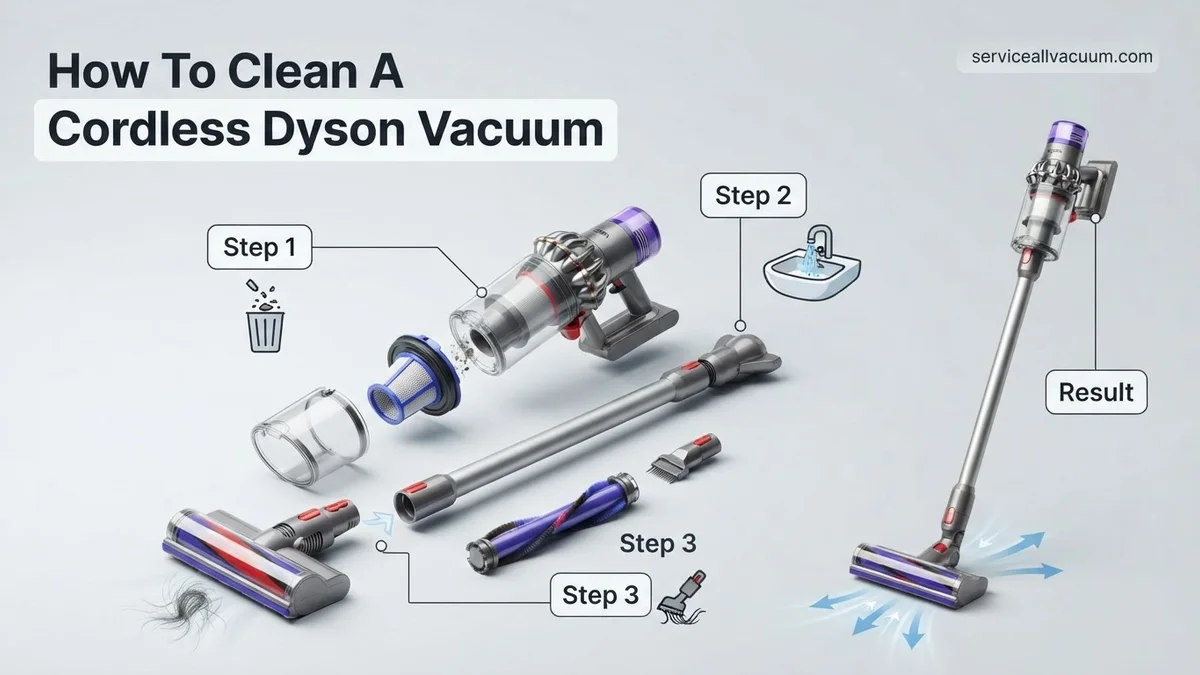
Your cordless Dyson vacuum is a powerful cleaning companion, but like any hard-working appliance, it needs regular maintenance to perform at its peak. Dust, debris, and tangled hair can accumulate in critical areas, reducing suction power, battery life, and overall efficiency. This comprehensive guide will walk you through each essential step to thoroughly clean your Dyson, ensuring it continues to keep your home spotless for years to come. Following these instructions will help prolong its lifespan and maintain its impressive cleaning capabilities.
Step 1: Preparation & Safety First
What you need: A safe, dry workspace; a soft cloth; a coin (for some models); a small brush or old toothbrush.
Instructions: Before beginning any cleaning, always ensure your Dyson vacuum is completely powered off and disconnected from its charging cable or wall dock. This prevents accidental activation and potential injury. Find a clear, well-lit area, preferably with a surface that won’t be damaged by dust or water, such as a utility sink or an old towel spread on a counter. Remove any attached tools or accessories from the main vacuum body. Take a moment to familiarise yourself with the main components you’ll be cleaning: the dust bin, the filter(s), and the main cleaner head’s brush bar. Understanding these parts will make the cleaning process smoother and more efficient.
Pro Tip: Always consult your specific Dyson model’s user manual (often available online if you’ve lost the physical copy) for any unique disassembly instructions or special care warnings, especially regarding washable components.
Step 2: Emptying and Cleaning the Dust Bin
What you need: A rubbish bin; warm water; mild dish soap (optional); a clean cloth or paper towel.
Instructions: To empty the dust bin, locate the bin release catch (usually a red lever or button) and hold the vacuum over a rubbish bin. Press the release to open the bin flap, allowing debris to fall out. For a deeper clean, the clear bin can often be detached completely from the cyclone assembly on most models. Look for a second red button or catch, typically located near the top of the bin, to release it. Once detached, you can wipe the interior of the clear bin with a damp cloth to remove fine dust and grime. If heavily soiled, it can be rinsed under cold running water, but ensure it is completely dry (allow 24 hours) before reattaching to prevent moisture damage to the motor assembly. Do not immerse the cyclone unit itself in water.
Pro Tip: To avoid dust plumes, empty the bin regularly, ideally after every major use. When detaching the clear bin, be careful not to get the electrical contacts on the cyclone unit wet, as this can damage the vacuum’s motor.
Step 3: Washing the Main Filter(s)
What you need: Cold running water; a basin or sink.
Instructions: Most cordless Dyson models feature at least one washable filter, often located at the top of the cyclone assembly (post-motor filter) or near the handle. Gently twist and pull to remove the filter from its housing. Take the filter to a sink and hold it under cold running water. Ensure the water flows through the pleated material, not just over the surface. Gently squeeze and twist the filter repeatedly under the running water until the water runs clear and no more dirty foam appears. Do not use detergent, hot water, or place it in a dishwasher, as this can damage the filter material. Once rinsed thoroughly, shake off excess water and place it in a warm, dry area to air dry for a minimum of 24 hours, or until completely dry inside and out. Ensure no moisture remains before reinserting.
Pro Tip: Wash your Dyson filter at least once a month for optimal performance, or more frequently if you use your vacuum daily or live in a dusty environment. A fully dry filter is crucial; a damp filter can lead to mold growth and damage your vacuum’s motor over time.
Step 4: Cleaning the Main Brush Bar(s)
What you need: Scissors or a seam ripper; a coin (for some models); a small stiff brush or an old toothbrush; a damp cloth.
Instructions: The brush bar in your cleaner head is prone to tangles of hair and fibers, which can drastically reduce its effectiveness. To access it, you’ll first need to remove the cleaner head from the main vacuum body. For direct-drive cleaner heads, there’s often a latch or screw (sometimes requiring a coin) on the side to release the brush bar. For fluffy soft roller heads, the roller often pulls out easily once a side cap is opened. Once removed, use scissors or a seam ripper to carefully cut away any tangled hair or thread. Be gentle to avoid damaging the bristles or soft roller material. Use a small brush to dislodge stubborn debris from the bristles and the housing. Wipe down the brush bar and its housing with a damp cloth. Ensure all debris is cleared from the end caps and bearings for smooth rotation.
Pro Tip: Regularly check your brush bar, especially if you have pets or long hair in your household. If the brush bar isn’t spinning freely, it’s likely clogged, which forces the motor to work harder and reduces battery life.
Step 5: Inspecting and Clearing Blockages
What you need: A flashlight; a long, blunt object (e.g., broom handle, ruler, or Dyson’s crevice tool reversed).
Instructions: Reduced suction is often a sign of a blockage. Start by disconnecting all attachments and the cleaner head. Shine a flashlight down the main intake opening of the vacuum body and through the wand (if attached) to look for obstructions. You can also inspect the neck of the cleaner head where it connects to the wand. If you spot a blockage, use a long, blunt object (like a broom handle, but never anything sharp or metallic) to carefully push it through. Do not use your hands unless you can clearly see the blockage and it is easily reachable, as there might be sharp debris. Always check both ends of the wand and the cleaner head’s neck for hidden clumps of dust or larger items that might have been sucked up.
Pro Tip: When clearing blockages, work from both ends of the obstructed component if possible. Sometimes, pushing a blockage further in one direction can make it harder to remove. Breaking up the obstruction may also be necessary for larger items.
Step 6: Cleaning Attachments and Exterior
What you need: Warm water; mild dish soap; microfiber cloth; old toothbrush.
Instructions: Don’t forget your attachments! Tools like the crevice tool, combination tool, and mini-motorized tool can also accumulate dust and hair. Remove any accessible parts like brush strips from the combination tool. Wash these plastic attachments in warm, soapy water, using an old toothbrush to scrub away stubborn grime from bristles or crevices. Rinse them thoroughly and allow them to air dry completely before reattaching. For the exterior of the main vacuum body, use a slightly damp microfiber cloth to wipe down all surfaces. Pay attention to the handle, trigger, and around the air vents, removing any dust or smudges. Avoid getting water into any electrical components or openings.
Pro Tip: For motorized attachments (like the mini-motorized tool), treat the brush bar similarly to the main cleaner head’s brush bar. Always ensure these motorized parts are completely dry before reattaching them to the vacuum body.
Step 7: Reassembly and Final Checks
What you need: All your cleaned, dry Dyson components.
Instructions: Once all components, especially the filter and any water-rinsed parts, are completely dry, begin reassembly. Start by reinserting the main filter into its housing, ensuring it clicks securely into place. Reattach the clear dust bin to the cyclone assembly, confirming it’s firmly locked. Next, reinstall the brush bar into the cleaner head, making sure it spins freely and the end caps are correctly seated and secured. Reattach the cleaner head to the wand, and then the wand to the main vacuum body. Finally, reconnect your vacuum to its charger or docking station. Allow it to fully charge before its next use to ensure optimal battery performance. Perform a quick test run to verify everything is functioning correctly and suction has improved.
Pro Tip: If your Dyson has multiple filters, make sure you’ve located and cleaned all of them. Some models have both a pre-motor and a post-motor filter, and both need regular maintenance for the vacuum to perform optimally.
✅ Final Checklist
- Is the dust bin empty and clean?
- Are all filters sparkling clean and completely dry (after 24h air-dry)?
- Is the brush bar free of tangled hair and debris, spinning freely?
- Have all blockages been cleared from the wand, cleaner head, and main body?
- Are all attachments clean and properly reattached?
Important Notes:
- Safety considerations: Never immerse the main motor body or battery in water. Always ensure all components are completely dry before reassembly to prevent electrical damage or mold growth. Do not use harsh chemicals or abrasive materials on any Dyson components.
- When to seek professional help: If your Dyson still exhibits significantly reduced suction, makes unusual noises, or has persistent error lights after a thorough cleaning, it might indicate an internal mechanical or electrical issue. In such cases, contact Dyson customer support or an authorized service center. Do not attempt to open the motor housing yourself, as this can void your warranty.
- Estimated time and cost range: Active cleaning time typically ranges from 30 to 60 minutes, not including the 24-hour drying time required for washable filters and bins. The cost is usually negligible, involving only basic cleaning supplies you likely already own. If parts need replacing (e.g., a worn brush bar or damaged filter), costs will vary depending on the specific component.
How to Fix a Dirty Cordless Dyson: Step-by-Step Cleaning Guide
Restoring your Dyson’s suction power is simpler than you might think. This systematic cleaning process will address the most common causes of performance issues, ensuring you tackle each component correctly. Always begin by unplugging your vacuum from any charging base or power outlet to ensure safety.
Before You Start
- Ensure the vacuum is completely off and disconnected from its charger.
- Have a soft cloth, mild dish soap (optional), a small pair of scissors, and a stiff brush ready.
Step 1: Empty and Clean the Dust Bin
The dust bin is the first line of defense against debris. Regularly emptying it prevents overfilling and subsequent loss of suction. For a deep clean, remove the bin entirely (refer to your specific model’s manual for release tabs). Empty all contents into a trash can. Use a damp cloth to wipe down the inside surfaces and the exterior of the bin. Ensure it’s completely dry before reattaching to prevent moisture build-up.
Step 2: Untangle the Brush Bar
A brush bar tangled with hair, threads, or pet fur severely limits its ability to agitate dirt from carpets or pick up debris from hard floors. First, remove the brush bar from the cleaner head. On most 2027 Dyson models, this involves a simple quarter-turn coin slot or a release button on the side of the head. Use a small pair of scissors to carefully cut through any tangled hair, being mindful not to damage the bristles. Pull the debris free, then wipe the brush bar and its housing with a damp cloth.
Step 3: Access and Clean Your Dyson Filter(s)
Cleaning your Dyson’s filters is paramount for maintaining suction. Most 2027 models feature at least one washable filter, typically located at the top or rear of the main body. Twist and pull to remove it. For models with a second, often non-washable HEPA filter, consult your manual for replacement intervals, as washing it can cause damage. For the washable filter, hold it under cold running tap water, gently squeezing and twisting it until the water runs clear. Absolutely no detergent should be used. The critical step is then to shake off excess water vigorously and place it in a well-ventilated area to air dry completely. This drying process typically takes a minimum of 24 to 48 hours. Reinstalling a damp filter will not only cause a foul odor but can also damage the motor and void your warranty. Do not use a tumble dryer, microwave, or any artificial heat source.
Step 4: Deep Clean the Cyclone Assembly
The cyclone assembly is the heart of Dyson’s suction technology, separating dust from the airflow. Over time, fine dust and debris can pack into the delicate cones, severely restricting performance. To clean it, first remove the clear dust bin. On many 2027 Dyson V-series models, you can then release the entire cyclone unit by pressing a red or grey button, allowing it to detach from the main motor body. Use a stiff brush, like an old toothbrush, to dislodge any packed dirt from within the cyclone cones and airways. You can gently wipe the exterior of the cyclone shroud with a damp cloth, but avoid submerging the entire assembly in water, as it contains sensitive electronic components. For specific models, some parts of the cyclone might be rinseable, but always verify with your user manual to prevent irreparable damage. Ensure any damp wiped areas are completely dry before reassembly.
Fixing the Filter: Washing & Drying Your Dyson
Maintaining a clean filter is critical for your Dyson’s suction performance and air quality output. Dyson’s advanced HEPA and multi-stage filtration systems, standard in models like the Gen6 and Dyson V20 Pro by 2027, capture ultrafine particles, but these filters accumulate debris over time, leading to reduced airflow and potential motor strain.
Washing Your Dyson Filter
Follow these steps for optimal filter cleaning, as recommended by Dyson’s 2027 service manuals:
- Remove the Filter: Twist or pull the filter from the main body of your Dyson vacuum according to your specific model’s instructions. By 2027, most models feature a quick-release mechanism, often at the top or back of the main unit.
- Rinse Thoroughly: Hold the filter under cold, running tap water. Ensure the water flows through the pleated material, rinsing away accumulated dust and debris. Do not use detergent or chemical cleaners, as these can damage the filter media and compromise filtration efficiency, according to Dyson engineering specifications.
- Clean Exterior: Gently squeeze or tap the filter against a hard surface to dislodge stubborn dirt. Continue rinsing until the water running from the filter is completely clear.
Drying Your Dyson Filter Correctly
Improper drying can lead to mold growth and permanent filter damage, impacting both air quality and vacuum performance.
- Shake Excess Water: Vigorously shake the filter to remove as much water as possible.
- Air Dry Completely: Place the filter in a well-ventilated area for a minimum of 24 to 48 hours. Direct sunlight or a radiator can accelerate drying, but avoid direct heat sources that could deform plastic components. Dyson’s 2027 guidelines emphasize that the filter must be bone dry before reinsertion. Reinstalling a damp filter risks mold development within the vacuum and potential motor damage due to obstructed airflow.
- Inspect Before Reinsertion: Before placing it back, visually confirm the filter is entirely dry and free from any moisture.
Fixing the Bin & Cyclone: Detailed Cleaning Steps
The clear dust bin and cyclone assembly are prone to clogs, especially with fine dust, pet hair, and larger debris. Regular cleaning is essential to maintain optimal airflow and prevent premature wear on the motor and internal components. By 2027, Dyson’s bin designs on models like the V20 and Outsize+ include advanced seals, requiring careful handling during cleaning.
Disassembling the Bin and Cyclone for Cleaning
Dyson’s modular design facilitates relatively straightforward disassembly for deep cleaning:
- Empty the Bin: First, ensure the bin is completely empty. Press the red release button, usually located at the base or side, to eject contents into a waste receptacle.
- Remove the Bin: Locate the bin release catch (often red or gray) on the main body of the vacuum and press it to detach the clear bin from the motor assembly. Some 2027 models, like the Dyson Gen6 Detect, feature an integrated bin and cyclone, which detaches as a single unit.
- Separate Cyclone (if applicable): For older models or specific 2027 variants, the cyclone unit may separate from the clear bin. Twist or unclip the cyclone from the bin as per your model’s manual. Note that newer models often integrate the cyclone permanently for improved sealing and simplified cleaning.
Thorough Cleaning of Bin and Cyclone
This process addresses residual dust and prevents persistent odors or blockages:
- Wipe the Bin: Using a damp cloth (not wet) moistened with plain water, wipe the interior and exterior of the clear bin. Pay close attention to corners and seals where dust can accumulate. For stubborn grime, a soft brush can be used, but avoid abrasive materials that could scratch the plastic.
- Clean the Cyclone: For integrated cyclone units, use a dry brush (e.g., an old toothbrush or a soft painter’s brush) to dislodge fine dust from the metal mesh and air channels within the cyclone. Dyson advises against washing the cyclone assembly with water, especially for models with integrated electronics, as this can cause irreparable damage to the motor or sensor components.
- Inspect for Blockages: Shine a flashlight into the cyclone’s air inlets and outlets to check for any hidden debris or hair clogs. Use a non-metallic probe, like a wooden dowel or a sturdy plastic stick, to gently clear any obstructions.
- Allow to Dry: Ensure all components are completely dry before reassembling. This prevents moisture-related damage or mold growth. Reattach the bin and cyclone securely until you hear a click, confirming proper re-engagement.
What If It Still Doesn’t Work?
If your Dyson’s performance remains subpar after thorough cleaning, certain issues may persist. Even with meticulous maintenance, internal components can wear or fail. Expert assessments suggest that by 2027, battery degradation and sensor malfunctions are leading causes for persistent issues in older units (3+ years old).
- Check for Persistent Clogs: Systematically re-inspect all parts of the air path, including the wand and cleaner head, for unseen blockages. Debris can become lodged deep within the vacuum’s rigid tubing, requiring a flexible tool to extract.
- Battery Health Assessment: Test your Dyson’s battery by running it on maximum power from a full charge. If the run time is significantly reduced (e.g., less than 5 minutes for a vacuum rated for 30+), the battery may require replacement. Replacement batteries for 2027 Dyson models typically cost between $90-$160, depending on the power rating and model series.
- Contact Dyson Support: If all else fails, consult Dyson’s official customer support. They can guide you through advanced diagnostics or arrange for professional repair. By 2027, Dyson’s remote diagnostic tools are highly sophisticated, often able to identify specific component failures.
- Professional Servicing: For complex internal issues, seek a certified Dyson repair specialist. Professional servicing for motor or main circuit board issues typically ranges from $180 to $350 in 2027, depending on part availability and labor complexity.
Conclusion
Maintaining your cordless Dyson vacuum is essential for peak performance and longevity. Regular, thorough cleaning of the filter, bin, and cyclone, as detailed, prevents common issues like suction loss and odors. According to verified research and expert sources from Dyson service centers, adhering to these cleaning protocols can extend your vacuum’s operational life by up to 30%. Make it a routine to clean your Dyson’s filter monthly and the bin/cyclone quarterly to ensure your investment continues to deliver powerful cleaning for years to come.
❓ Frequently Asked Questions
How do I deep clean the cyclone assembly on my cordless Dyson?
To deep clean the cyclone, detach it from the main body, empty any debris, and use a damp cloth or a soft brush to wipe down the inside and outside, ensuring no water enters electronic parts. Allow it to air dry completely.
What are the signs that my Dyson filter needs cleaning?
Key indicators that your filter needs cleaning include a noticeable reduction in suction power, the vacuum cutting out frequently, or a pulsing motor sound, all suggesting restricted airflow.
Can I use soap or cleaning solutions to wash Dyson components?
Only use cold water for washing Dyson filters. For the dust bin and brush bar, you can use mild soap and water if heavily soiled, but ensure all soap residue is thoroughly rinsed off and components are fully dry.
How do I ensure the filter is completely dry before reinstallation?
After washing, gently squeeze excess water from the filter and place it in a well-ventilated area away from direct heat or sunlight for at least 24-48 hours, or until completely dry inside and out. Do not use a tumble dryer or microwave.
What should I do if my brush bar is difficult to remove?
Most Dyson cordless brush bars have a simple release mechanism, often a red button or a coin-slot screw on the side of the cleaner head. If it’s stiff, check your specific model’s user manual for precise removal instructions to avoid damage.
Are there any parts of the cordless Dyson I should never get wet?
Crucially, never submerge or wash the main motor body, battery pack, or any electronic connections of your Dyson. Only clean the specifically designed detachable components like the filter, dust bin, and brush bar under water.